转载:https://www.cnblogs.com/supiaopiao/p/7527216.html
1.首先准备好自己微信和支付宝收款的二维码图片,注意,图片需要修改为bmp结尾的格式,如,weixin.bmp ,alipay.bmp。
2.进入自己的博客园,然后进入 管理--->文件,在这里上传自己第1步中准备好的二维码图片。

上传 tctip-1.0.3.js 文件

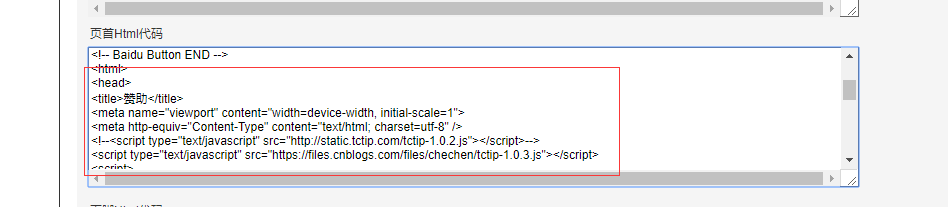
3.复制下面的代码
<html>
<head>
<title>赞助</title>
<meta name="viewport" content="width=device-width, initial-scale=1">
<meta http-equiv="Content-Type" content="text/html; charset=utf-8" />
<!--<script type="text/javascript" src="http://static.tctip.com/tctip-1.0.2.js"></script>-->
<script type="text/javascript" src="https://files.cnblogs.com/files/chechen/tctip-1.0.3.js"></script>
<script>
  new tctip({
    top: '20%',
    button: {
      id: 9,
      type: 'zanzhu'
    },
    list: [
      {
        type: 'alipay',
        qrImg: 'https://files.cnblogs.com/files/自己的博客地址名/alipay.bmp'
      }, {
        type: 'wechat',
        qrImg: 'https://files.cnblogs.com/files/自己的博客地址名/wechat.bmp'
      }
    ]
  }).init()
</script>
</head>
<body>
</body>
</html
注:script 中src的地址是上传到你自己博客园中 tctip-1.0.3.js文件的下载地址
4.最后一步,进入管理--设置,往下拉找到【首页Html代码】,把上面的代码粘贴到里面,保存之后就大功告成了。