ajax实例,检测用户与注册
检测用户名是否被占用:
在用户填写完用户名之后,ajax会异步向服务器发送请求,判断用户名是否存在
首先写好静态页面:
index.html
<!DOCTYPE html>
<html lang="en">
<head>
    <meta charset="UTF-8">
    <title>index</title>
    <style>
        *{
            margin:0;
            padding:0;
        }
        body{
            background-color: #333;
        }
        a{
            text-decoration: none;
        }
        .box{
            width:300px;
            height:270px;
            margin:80px auto;
            background-color: #abcdef;
            border-radius: 5px;
            padding:15px 30px;
        }
        .box .title{
            height:15px;
            margin-bottom:20px;
        }
        .box .title span{
            font-size:16px;
            color:#333;
            margin-right:15px;
        }
        .box .title span.current{
            color:red;
        }
        .box div{
            width:280px;
            height:30px;
            margin-bottom:25px;
            padding:8px 10px;
            background-color: #fff;
            border-radius: 5px;
            color:#666;
            position: relative;
        }
        .box div span{
            display: inline-block;
            padding-top:4px;
            padding-right:6px;
        }
        .box div input{
            border:none;
            outline:none;
            font-size:16px;
            color:#666;
            margin-top:5px;
        }
        .box div i{
            width:16px;
            height:16px;
            position: absolute;
            top:14px;
            right:12px;
        }
        .box div i.ok{
            background:url(icon.png) no-repeat 0 -67px;
        }
        .box div i.no{
            background:url(icon.png) no-repeat -17px -67px;
        }
        .box div .info{
            color:red;
            margin-top:16px;
            padding-left:2px;
        }
        .button{
            margin-top:7px;
        }
        .button a{
            display: block;
            text-align: center;
            height:45px;
            line-height:45px;
            background-color: #f20d0d;
            border-radius:20px;
            color:#fff;
            font-size:16px;
        }
    </style>
</head>
<body>
    <div class="box">
        <p class="title">
            <span>登 录</span>
            <span class="current">注 册</span>
        </p>
        <div>
            <span>+86</span>
            <input type="text" name="user" id="user" placeholder="请输入注册手机号" autocomplete="off">
            <i class="ok"></i>
            <p class="info">该手机号已注册</p>
        </div>
        <div>
            <input type="password" name="pwd" id="pwd" placeholder="请设置密码" autocomplete="off">
            <i class="no"></i>
            <p class="info"></p>
        </div>
        <p class="button">
            <a href="javascript:void(0)" id="btn" class="btn">注册</a>
        </p>
    </div>
    <script src="ajax.js"></script>
</body>
</html>
效果图
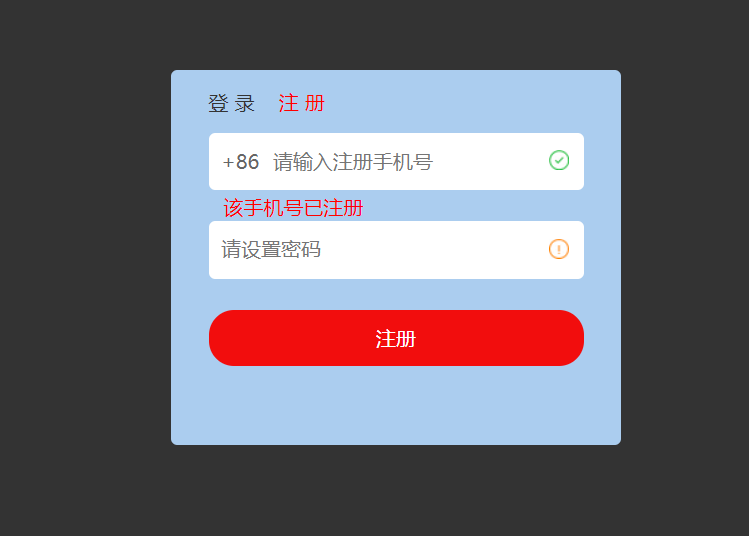
然后是仿照jquery的$.ajax(),使用js封装了一个ajax方法(只是为了熟悉运行原理,实际项目可以直接用jquery封装好的)
ajax.js
//仿写jquery的ajax方法
var $={
    ajax:function(options){
        var xhr=null;//XMLHttpRequest对象
        var url=options.url,//必填
            type=options.type || "get",
            async=typeof(options.async)==="undefined"?true:options.async,
            data=options.data || null,
            params="",//传递的参数
            callback=options.success,//成功的回调
            error=options.error;//失败的回调

        //post传参的转换,将对象字面量形式转为字符串形式
        // data:{user:"13200000000",pwd:"123456"}
        // xhr.send("user=13200000000&pwd=123456")
        if(data){
            for(var i in data){
                params+=i+"="+data[i]+"&";
            }
            params=params.replace(/&$/,"");//正则替换,以&结尾的将&转为空
        }

        //根据type值修改传参
        if(type==="get"){
            url+="?"+params;
        }
        console.log(url);

        //IE7+,其他浏览器
        if(typeof XMLHttpRequest!="undefined"){
            xhr=new XMLHttpRequest();//返回xhr对象的实例
        }else if(typeof ActiveXObject!="undefined"){
            //IE7及以下
            //所有可能出现的ActiveXObject版本
            var arr=["Microsoft.XMLHTTP","MSXML2.XMLHTTP.6.0","MSXML2.XMLHTTP.5.0","MSXML2.XMLHTTP.4.0","MSXML2.XMLHTTP.3.0","MSXML2.XMLHTTP.2.0"];
            //循环
            for(var i=0,len=arr.length;i<len;i++){
                try{
                    xhr=new ActiveXObject(arr[i]);//任意一个版本支持,即可退出循环
                    break;
                }catch(e){

                }
            }
        }else{
            //都不支持
            throw new Error("您的浏览器不支持XHR对象!");
        }

        //响应状态变化的函数
        xhr.onreadystatechange=function(){
            if(xhr.readyState===4){
                if((xhr.status>=200&&xhr.status<300) || xhr.status===304){
                    callback&&callback(JSON.parse(xhr.responseText));//如果存在回调则执行回调
                }else{
                    error&&error();
                }
            }
        }

        //创建HTTP请求
        xhr.open(type,url,async);
        //设置HTTP头
        xhr.setRequestHeader("Content-type","application/x-www-form-urlencoded");
        //发送请求
        xhr.send(params);
    },
  jsonp:function(){

  }

}
下面放出所有代码:
index.html
<!DOCTYPE html>
<html lang="en">
<head>
    <meta charset="UTF-8">
    <title>index</title>
    <style>
        *{
            margin:0;
            padding:0;
        }
        body{
            background-color: #333;
        }
        a{
            text-decoration: none;
        }
        .box{
            width:300px;
            height:270px;
            margin:80px auto;
            background-color: #abcdef;
            border-radius: 5px;
            padding:15px 30px;
        }
        .box .title{
            height:15px;
            margin-bottom:20px;
        }
        .box .title span{
            font-size:16px;
            color:#333;
            margin-right:15px;
            cursor:pointer;
        }
        .box .title span.current{
            color:red;
        }
        .box div{
            width:280px;
            height:30px;
            margin-bottom:25px;
            padding:8px 10px;
            background-color: #fff;
            border-radius: 5px;
            color:#666;
            position: relative;
        }
        .box div span{
            display: inline-block;
            padding-top:4px;
            padding-right:6px;
        }
        .box div input{
            border:none;
            outline:none;
            font-size:16px;
            color:#666;
            margin-top:5px;
        }
        .box div i{
            width:16px;
            height:16px;
            position: absolute;
            top:14px;
            right:12px;
        }
        .box div i.ok{
            background:url(icon.png) no-repeat 0 -67px;
        }
        .box div i.no{
            background:url(icon.png) no-repeat -17px -67px;
        }
        .box div .info{
            color:red;
            margin-top:16px;
            padding-left:2px;
        }
        .button{
            margin-top:7px;
        }
        .button a{
            display: none;
            text-align: center;
            height:45px;
            line-height:45px;
            background-color: #f20d0d;
            border-radius:20px;
            color:#fff;
            font-size:16px;
        }
        .button a.show{
            display: block;
        }
    </style>
</head>
<body>
    <div class="box">
        <p class="title" id="title">
            <span>登 录</span>
            <span class="current">注 册</span>
        </p>
        <div>
            <span>+86</span>
            <input type="text" name="user" id="user" placeholder="请输入注册手机号" autocomplete="off" data-check="reg">
            <i id="userIco"></i>
            <p class="info" id="userInfo"></p>
        </div>
        <div>
            <input type="password" name="pwd" id="pwd" placeholder="请设置密码" autocomplete="off">
            <i id="pwdIco"></i>
            <p class="info" id="pwdInfo"></p>
        </div>
        <p class="button">
            <a href="javascript:void(0)" id="btn" class="btn show">注册</a>
            <a href="javascript:void(0)" id="btn2" class="btn">登录</a>
        </p>
    </div>
    <script src="ajax.js"></script>
    <script>
        var user=document.getElementById("user"),
            userIco=document.getElementById("userIco"),
            userInfo=document.getElementById("userInfo"),
            pwd=document.getElementById("pwd"),
            pwdIco=document.getElementById("pwdIco"),
            pwdInfo=document.getElementById("pwdInfo"),
            btn=document.getElementById("btn"),
            btn2=document.getElementById("btn2"),
            title=document.getElementById("title").getElementsByTagName("span"),
            userPattern=/^[1]d{10}$/,//手机号格式的正则,
            pwdPattern=/^w{5,10}$/,
            isRepeat=false;//默认不重复

        //绑定检测手机号事件
        user.addEventListener("blur",checkUser,false);

        //绑定检测密码事件
        pwd.addEventListener("blur",checkPwd,false);

        //绑定注册事件
        btn.addEventListener("click",regFn,false);

        // 切换登录绑定
        title[0].addEventListener("click",showLogin,false);

        // 切换注册绑定
        title[1].addEventListener("click",showReg,false);

        //检测手机号方法
        function checkUser(){
            var userVal=user.value;
            if(!userPattern.test(userVal)){
                userInfo.innerHTML="手机号格式有误";
                userIco.className="no";
            }else{
                //格式正确时
                userInfo.innerHTML="";
                userIco.className="";

                //发起ajax请求
                $.ajax({
                    url:"http://localhost/reg/server/isUserRepeat.php",//get传参
                    type:"post",
                    async:true,
                    data:{username:userVal},
                    success:function(data){
                        console.log(data);
                        if(data.code===1){
                            userIco.className="ok";
                            isRepeat=false;
                        }else if(data.code===0){
                            userInfo.innerHTML=data.msg;
                            userIco.className="no";
                            isRepeat=true;//手机号重复
                        }else{
                            userInfo.innerHTML="检测失败,请重试";
                        }

                    }
                })
            }
        }

        //检测密码的方法
        function checkPwd(){
            var pwdVal=pwd.value;
            if(!pwdPattern.test(pwdVal)){
                pwdInfo.innerHTML="密码格式有误";
                pwdIco.className="no";
            }else{
                //格式正确时
                pwdInfo.innerHTML="";
                pwdIco.className="ok";
            }
        }

        //注册的方法
        function regFn(){
            var user_val=user.value,
                pwd_val=pwd.value;
            //再次检测用户名和密码是否合法
            if(userPattern.test(user_val) && pwdPattern.test(pwd_val) && !isRepeat){
                //发起ajax请求
                $.ajax({
                    url:"http://localhost/reg/server/register.php",
                    type:"post",
                    data:{username:user_val,userpwd:pwd_val},
                    success:function(data){
                        alert("注册成功~");
                        //切换登录页面
                        showLogin();
                        user.value="";
                        pwd.value="";
                    },
                    error:function(){
                        pwdInfo.innerHTML="注册失败,请重试!";
                    }
                })
            }else{
                //不合法
            }
        }

        // 切换登录
        function showLogin(){
            //切换到登录页面
            title[0].className="current";
            title[1].className="";
            btn2.className="btn show";
            btn.className="btn";
        }

        // 切换注册
        function showReg(){
            //切换到登录页面
            title[1].className="current";
            title[0].className="";
            btn2.className="btn";
            btn.className="btn show";
        }


    </script>
</body>
</html>
ajax.js上面已经贴过了
接下来是模拟服务器端的三个文件:
isUserRepeat.php
<?php
header('Content-Type:application/json');
$isUsername = array_key_exists('username',$_REQUEST);
$username = $isUsername ? $_REQUEST['username'] : '';

if(!$username){
    $msg = printMsg('参数有误',2);
    echo json_encode($msg);
    exit();
}

function printMsg($msg,$code){
    return array('msg'=>$msg,'code'=>$code);
}

// 记录存储用户的文件路径
$fileStr = __DIR__.'/user.json';

// 读取现存的用户名和密码

$fileStream = fopen($fileStr,'r');

$fileContent = fread($fileStream,filesize($fileStr));
$fileContent_array = $fileContent ? json_decode($fileContent,true) : array();
fclose($fileStream);
// 判断用户名是否有重复的

$isrepeat = false;

foreach($fileContent_array as $key=>$val){
    if($val['username'] === $username){
        $isrepeat = true;
        break;
    }
}

if($isrepeat){
    $msg = printMsg('用户名重复',0);
    echo json_encode($msg);
    exit();
}
$msg = printMsg('用户名可用',1);
echo json_encode($msg);
?>
register.php
<?php
header('Content-Type:application/json');
// 获取前端传递的注册信息 字段为   username   userpwd
$isUsername = array_key_exists('username',$_REQUEST);
$isUserpwd = array_key_exists('userpwd',$_REQUEST);
$username = $isUsername ? $_REQUEST['username'] : '';
$userpwd = $isUserpwd ? $_REQUEST['userpwd'] : '';
function printMsg($msg,$code){
    return array('msg'=>$msg,'code'=>$code);
}

if(!$username || !$userpwd){
    $msg = printMsg('参数有误',0);
    echo json_encode($msg);
    exit();
}

// 记录存储用户的文件路径
$fileStr = __DIR__.'/user.json';

// 读取现存的用户名和密码

$fileStream = fopen($fileStr,'r');

$fileContent = fread($fileStream,filesize($fileStr));
$fileContent_array = $fileContent ? json_decode($fileContent,true) : array();
fclose($fileStream);
// 判断用户名是否有重复的

$isrepeat = false;

foreach($fileContent_array as $key=>$val){
    if($val['username'] === $username){
        $isrepeat = true;
        break;
    }
}

if($isrepeat){
    $msg = printMsg('用户名重复',0);
    echo json_encode($msg);
    exit();
}

array_push($fileContent_array,array('username'=>$username,'userpwd'=>$userpwd));

// 将存储的用户名密码写入
$fileStream = fopen($fileStr,'w');
fwrite($fileStream,json_encode($fileContent_array));
fclose($fileStream);
echo json_encode(printMsg('注册成功',1));


?>
user.json
[{"username":"zhangsan","userpwd":"zhangsan"},{"username":"lisi","userpwd":"lisi"},{"username":"134","userpwd":"sdfsdf"},{"username":"135","userpwd":"dsff"},{"username":"136","userpwd":"dsff"},{"username":"13521554677","userpwd":"sdfsdf"},{"username":"13521557890","userpwd":"sdfsdf"},{"username":"13521557891","userpwd":"sdfsdf"},{"username":"13810701234","userpwd":"sdfsdf"},{"username":"13810709999","userpwd":"shitou051031"},{"username":"13810709998","userpwd":"sdfsdfdsf"},{"username":"13412345678","userpwd":"shitou"},{"username":"13211111111","userpwd":"111111"},{"username":"13212222222","userpwd":"111111"},{"username":"13244444444","userpwd":"444444"}]
效果图

跳转到登录页面
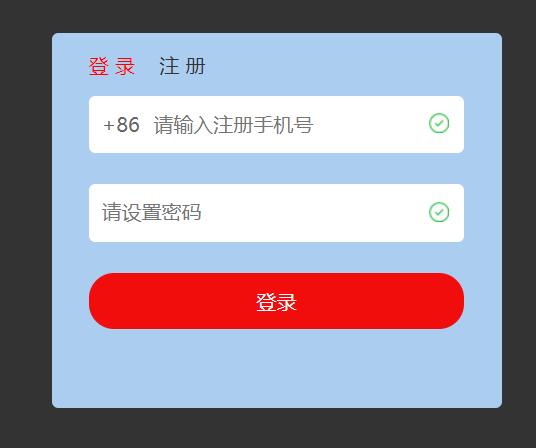
补充:登录页面时不需要检测用户名是否重复,可以在手机号的输入框中添加 data-check 属性,如果是reg,则为注册效果;如果是login,则为登录效果
待完成……
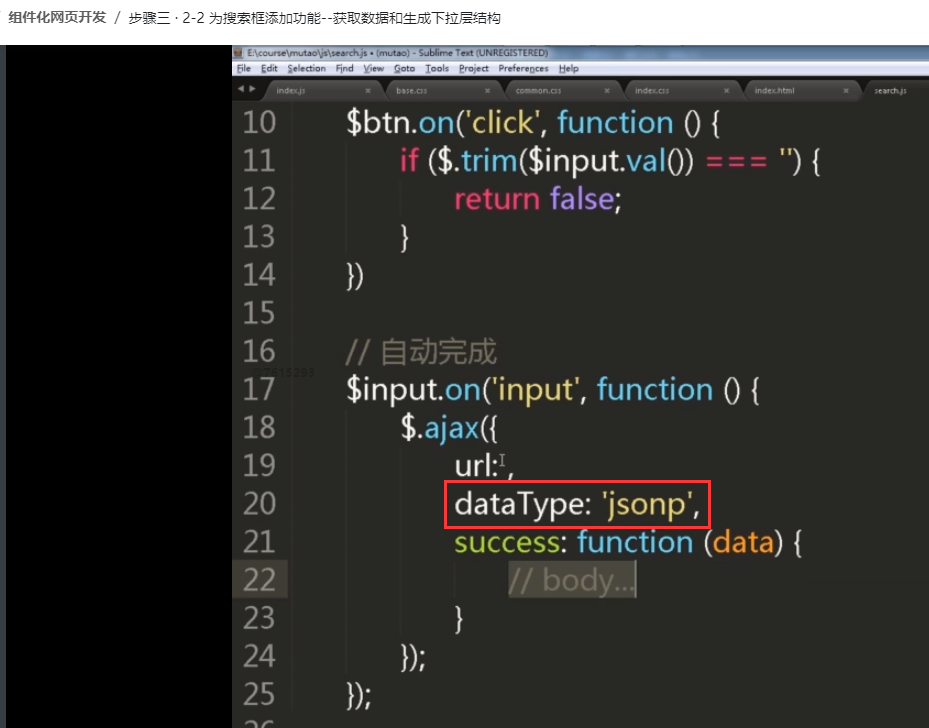
还有jquery的跨域实现,jsonp如何实现:
把dataType属性设置为jsonp就可以