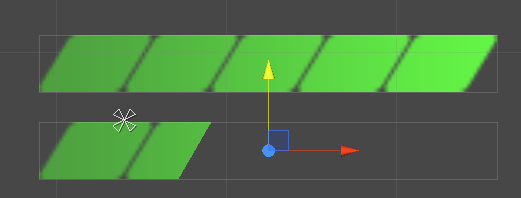
Shader "Sprites/SpriteShader"
{
Properties
{
[PerRendererData] _MainTex("Sprite Texture", 2D) = "white" {}
_Color("Tint", Color) = (1,1,1,1)
_FillAmount("进度",Range(0,1))=1
_Angle("斜率",Range(0,1))=1
[MaterialToggle] PixelSnap("Pixel snap", Float) = 0
}
SubShader
{
Tags
{
"Queue" = "Transparent"
"IgnoreProjector" = "True"
"RenderType" = "Transparent"
"PreviewType" = "Plane"
"CanUseSpriteAtlas" = "True"
}
Cull Off
Lighting Off
ZTest Always
ZWrite Off
Fog{ Mode Off }
Blend One OneMinusSrcAlpha
Pass
{
CGPROGRAM
#pragma vertex vert
#pragma fragment frag
#pragma multi_compile DUMMY PIXELSNAP_ON
#include "UnityCG.cginc"
struct appdata_t
{
float4 vertex : POSITION;
float4 color : COLOR;
float2 texcoord : TEXCOORD0;
};
struct v2f
{
float4 vertex : SV_POSITION;
fixed4 color : COLOR;
half2 texcoord : TEXCOORD0;
};
fixed4 _Color;
float _FillAmount;
float _Angle;
v2f vert(appdata_t IN)
{
v2f OUT;
OUT.vertex = mul(UNITY_MATRIX_MVP, IN.vertex);
OUT.texcoord = IN.texcoord;
OUT.color = IN.color * _Color;
#ifdef PIXELSNAP_ON
OUT.vertex = UnityPixelSnap(OUT.vertex);
#endif
return OUT;
}
sampler2D _MainTex;
fixed4 frag(v2f IN) : SV_Target
{
float2 uv = IN.texcoord;
fixed4 c = tex2D(_MainTex, uv) * IN.color;
c.rgb *= c.a;
float fill = _FillAmount+uv.y*_Angle;
clip(fill - uv.x);
return c;
}
ENDCG
}
}
}