在wpf的项目中引入System.Speech
Code .XAML
<Window x:Class="ReportWPF.Window5"
        xmlns="http://schemas.microsoft.com/winfx/2006/xaml/presentation"
        xmlns:x="http://schemas.microsoft.com/winfx/2006/xaml"
        Title="Window5" Height="300" Width="594">
    <Grid>
        <Label Content="  Example Of Speech Synthesis in WPF" Height="43" HorizontalAlignment="Left" Margin="73,15,0,0" Name="label1" VerticalAlignment="Top" Width="431" FontFamily="Cambria" FontWeight="Normal" FontSize="25">
            <Label.Foreground>
                <LinearGradientBrush EndPoint="0.5,1" StartPoint="0.5,0">
                    <GradientStop Color="Black" Offset="0" />
                    <GradientStop Color="#FF71FF00" Offset="1" />
                </LinearGradientBrush>
            </Label.Foreground>
        </Label>
        <Label Height="36" Content="Enter Text for Speech" HorizontalAlignment="Left" Margin="87,89,0,0" Name="label2" VerticalAlignment="Top" Width="191" FontFamily="Shruti" FontWeight="Bold" FontSize="18" />
        <TextBox Height="23" HorizontalAlignment="Left" Margin="300,97,0,0" Name="textBox1" VerticalAlignment="Top" Width="203" />
        <Button Content="Start Voice" Height="35" HorizontalAlignment="Left" Margin="246,160,0,0" Name="button1" VerticalAlignment="Top" Width="89" Foreground="#FFECDADA" FontFamily="Times New Roman" FontSize="18" Click="button1_Click">
            <Button.Background>
                <LinearGradientBrush EndPoint="0.5,1" StartPoint="0.5,0">
                    <GradientStop Color="Black" Offset="0" />
                    <GradientStop Color="#FF36FF00" Offset="1" />
                </LinearGradientBrush>
            </Button.Background>
        </Button>
    </Grid>

</Window>
Code .cs:
using System;
using System.Collections.Generic;
using System.Linq;
using System.Text;
using System.Windows;
using System.Windows.Controls;
using System.Windows.Data;
using System.Windows.Documents;
using System.Windows.Input;
using System.Windows.Media;
using System.Windows.Media.Imaging;
using System.Windows.Shapes;
using System.Speech.Synthesis;// Add speech namespace in application

namespace ReportWPF
{
    public partial class Window5 : Window
    {
        public Window5()
        {
            InitializeComponent();
        }

        private void button1_Click(object sender, RoutedEventArgs e)
        {
            SpeechSynthesizer synthesizer = new SpeechSynthesizer();//create insatnce of SpeechSynthesizer class
            PromptBuilder promptBuilder = new PromptBuilder();//create insatnce of PromptBuilder class
            promptBuilder.AppendText(textBox1.Text);//AppendText is a method of PromptBuilder class that is parameterized that take string value
            synthesizer.SpeakAsync(promptBuilder);//SpeakAsync is a method of SpeechSynthesizer class that is parameterized that take object of PromptBuilder class
        }
    }
}
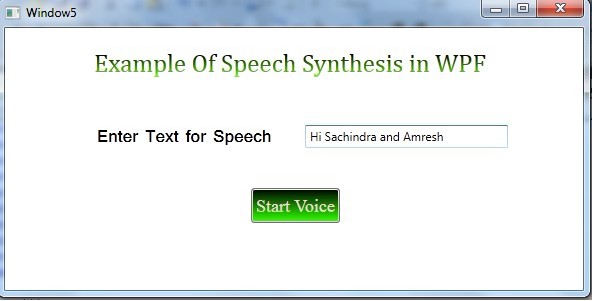
运行后,效果如下,在文本框中输入内容,点击按钮”Start Voice“后,带上耳机,你将能听到你的内容被声音读了出来