人生不如意之事十之八九,合并分支往往也不是一帆风顺。
准备新的feature1分支,继续我们的新分支开发:
$ git checkout -b feature1
Switched to a new branch 'feature1'
修改readme.txt最后一行,改为:
Creating a new branch is quick AND simple.
在feature1分支上提交:
$ git add readme.txt
$ git commit -m "AND simple"
[feature1 ab1c693] AND simple
1 file changed, 1 insertion(+), 1 deletion(-)
切换到master分支:
$ git checkout master
Switched to branch 'master'
Your branch is ahead of 'origin/master' by 1 commit.
(use "git push" to publish your local commits)
Git还会自动提示我们当前master分支比远程的master分支要超前1个提交。
在master分支上把readme.txt文件的最后一行改为:
Creating a new branch is quick & simple.
提交:
$ git add readme.txt
$ git commit -m "& simple"
[master ea364c9] & simple
1 file changed, 1 insertion(+), 1 deletion(-)
现在,master分支和feature1分支各自都分别有了新的提交,变成了这样:
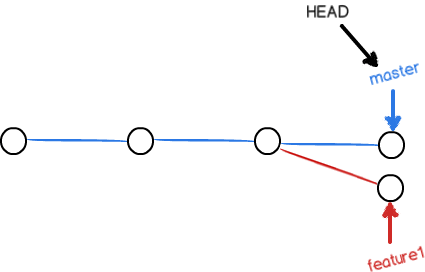
这种情况下,Git无法执行“快速合并”,只能试图把各自的修改合并起来,但这种合并就可能有冲突,我们试试看:
$ git merge feature1
Auto-merging readme.txt
CONFLICT (content): Merge conflict in readme.txt
Automatic merge failed; fix conflicts and then commit the result.
果然冲突了,Git告诉我们,readme.txt文件存在冲突,必须手动解决冲突后再提交,git status也可以告诉我们冲突的文件:
$ git status
On branch master
Your branch is ahead of 'origin/master' by 2 commits.
(use "git push" to publish your local commits)
You have unmerged paths.
(fix conflicts and run "git commit")
(use "git merge --abort" to abort the merge)
Unmerged paths:
(use "git add <file>..." to mark resolution)
both modified: readme.txt
no changes added to commit (use "git add" and/or "git commit -a")
我们也可以直接查看readme.txt的内容:
Git is a distributed version control system
Git is free sofwore distributed under the GPL
Git has a mutable index called stage.
Git tracks changes of files.
<<<<<<< HEAD
Creating a new branch is quick & simple.
=======
Creating a new branch is quick AND simple.
>>>>>>> feature1
Git用<<<<<<<,=========,>>>>>>>>>标记出不同分支的内容,我们修改如下后保存:
Creating a new branch is quick AND simple.
再提交:
$ git add readme.txt
$ git commit -m "confict fixed"
[master 20864c0] confict fixed
现在,master分支和feature1分支就变成了下图所示的:
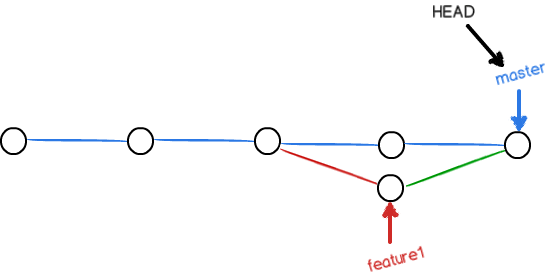
用带参数的git log也可以看到分支的合并情况:
$ git log --graph --pretty=oneline --abbrev-commit
* 20864c0 (HEAD -> master) confict fixed
|
| * ab1c693 (feature1) AND simple
* | ea364c9 & simple
|/
* 3d9a6be branch test
* d255aa7 (origin/master) LICENSE
* 4e28fb6 readme.txt
最后,删除 feature1分支:
$ git branch -d feature1
Deleted branch feature1 (was ab1c693).
工作完成了
摘抄自:
https://www.liaoxuefeng.com/wiki/0013739516305929606dd18361248578c67b8067c8c017b000/001375840202368c74be33fbd884e71b570f2cc3c0d1dcf000