拷贝了个虚拟机,有两个网卡,1个可以起来,另一个起不来。运行命令:
$>systemctl restart network
输出如下:Job for network.service failed because the control process exited with error code. See "systemctl status network.service" and "journalctl -xe" for details.
根据提示,继续运行
$>systemctl status network.service ,输出:
● network.service - LSB: Bring up/down networking
Loaded: loaded (/etc/rc.d/init.d/network; bad; vendor preset: disabled)
Active: failed (Result: exit-code) since Fri 2017-05-05 17:34:58 CST; 4min 48s ago
Docs: man:systemd-sysv-generator(8)
Process: 5470 ExecStop=/etc/rc.d/init.d/network stop (code=exited, status=0/SUCCESS)
Process: 5668 ExecStart=/etc/rc.d/init.d/network start (code=exited, status=1/FAILURE)
May 05 17:34:57 head systemd[1]: Starting LSB: Bring up/down networking...
May 05 17:34:58 head network[5668]: Bringing up loopback interface: [ OK ]
May 05 17:34:58 head network[5668]: Bringing up interface enp0s3: Connection successfully activated (D-Bus a...ion/4)
May 05 17:34:58 head network[5668]: [ OK ]
May 05 17:34:58 head network[5668]: Bringing up interface enp0s8: Error: Connection activation failed: No su...ction.
May 05 17:34:58 head network[5668]: [FAILED]
May 05 17:34:58 head systemd[1]: network.service: control process exited, code=exited status=1
May 05 17:34:58 head systemd[1]: Failed to start LSB: Bring up/down networking.
May 05 17:34:58 head systemd[1]: Unit network.service entered failed state.
May 05 17:34:58 head systemd[1]: network.service failed.
Hint: Some lines were ellipsized, use -l to show in full.
ifup也起不来
$> ifup enp0s8
Error: Connection activation failed: No suitable device found for this connection.
网上搜了一通,然并卵,发现虚拟机右上角只能显示一个网卡,另一个显示不出来
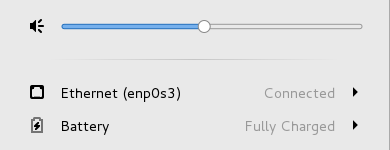
分明就是没连上这个网卡了,到vbox里查看发现
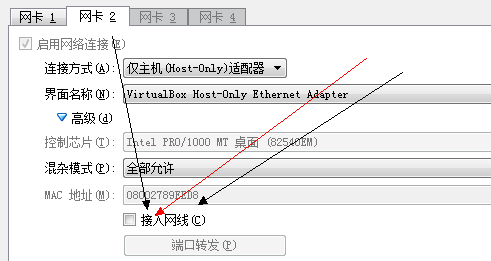
接入网线选项没勾上!
选上之后重启网卡,一切ok(无须重启机器)。