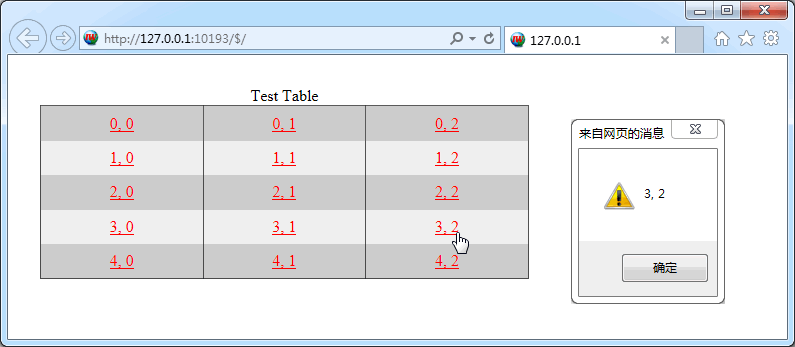
TIWGrid 最终通过 Html Table 呈现; 其每个 Cell 都是一个 TIWGridCell 对象, Cell 对象的 Control 属性非常好, 可以非常方便地嵌入其他控件.
TIWGrid 所在单元及继承链:
IWCompGrids.TIWGrid < TIWCustomGrid < TIWCustomControl < TIWBaseHTMLControl < TIWBaseControl < TIWVCLBaseControl < TControl < TComponent < TPersistent < TObject
主要成员:
property Cell[const ARow: Integer, const AColumn: Integer]: TIWGridCell //读取单元格对象
property RowCount: Integer    //行数
property ColumnCount: Integer //列数
property ShowInvisibleRows: Boolean  //是否隐藏空行
property HiddenColumns: TStringList  //隐藏指定列, 譬如: IWGrid1.HiddenColumns.CommaText := '0,2'; 是隐藏第 1、3 列
property ShowEmptyCells: Boolean     //是否显示空的单元格; 好像存在点问题
property BGColor: TIWColor           //
property BorderColors: TIWGridBorderColors //边框色分为: 主色、暗色、亮色(Color、Dark、Light)
property BorderSize: Integer               //线宽, 对应 Table 的 Border 属性
property BorderStyle: TIWGridBorderStyle   //它对应 Table 的 frame 属性(边框相关); 使用具体的属性值需要 uses IWCompGridCommon
property Caption: TCaption     //
property CellPadding: Integer  //单元格内边距
property CellSpacing: Integer  //单元格间距
property Font: TIWFont         //如果各单元格字体一直, 可以在这里一起指定
property FrameBuffer: Integer  //?
property Lines: TIWGridLines   //对应 Table 的 Rules 属性: tlAll、tlNone、tlRows、tlCols
property Summary: string       //对应 Table 的 summary 属性
property UseFrame: Boolean     //是否使用框架, 在需要时它会给出滚动条
property UseSize: Boolean      //是否使用设计时的大小; 好像只对宽度有用
property CurrentRow: Integer         //如果 ScrollToCurrentRow = True, 可通过 CurrentRow 让指定行立即可见
property ScrollToCurrentRow: Boolean //参见 CurrentRow
property CellRenderOptions: TIWCellRenderOptions //集合选项, 决定哪些 Cell 相关的设置会被使用: [crAlign, crBGcolor, crCellPadding, crStyle, crValign]

property OnCellClick: TIWOnCellClick   //如果 TIWGridCell.Clickable = True; 单元格中的文本就会变成链接, 以响应该事件
property OnRenderCell: TIWOnRenderCell //同 TStringGrid 中的 OnDrawCell, 可以在此事件中个性化单元格
property OnGetCellRenderOptions: TIWGetCellRenderOptionsEvent //可以从这里设置某些单元格的 CellRenderOptions 属性

procedure Clear //
function CellExists(const ARow: Integer; const AColumn: Integer): Boolean //判断参数指定的单元格是否有效(譬如超界了)
procedure DeleteColumn(const AColumn: Integer)  //删除列
procedure DeleteRow(const ARow: Integer)        //删除行
TIWGridCell:
{IWCompGrids.TIWGridCell < TCollectionItem < TPersistent < TObject}
property Grid: TIWCustomGrid
property DoRefreshControl: Boolean
property Clickable: Boolean  //
property Alignment: TAlignment  //
property VAlign: TIWVerticalAlignment //
property BGColor: TIWColor
property Control: TIWCustomControl  //嵌入其他控件
property DoSubmitValidation: Boolean
property Font: TIWFont
property Header: Boolean
property Height: string
property Hint: string
property ShowHint: Boolean
property Tag: TObject
property Text: string  //
property UnlinkedText: string
property Visible: Boolean
property Width: string
property Wrap: Boolean    //
property RawText: Boolean //
property Css: string
property Collection: TCollection
property ID: Integer
property Index: Integer
property DisplayName: string
测试:
procedure TIWForm1.IWAppFormCreate(Sender: TObject);
var
  i,j: Integer;
begin
  IWGrid1.RowCount := 5;
  IWGrid1.ColumnCount := 3;

  IWGrid1.Caption := 'Test Table';

  IWGrid1.BGColor := $d0d0d0;
  IWGrid1.CellPadding := 8;
  IWGrid1.Font.Size := 12;
  IWGrid1.Lines := tlCols;

  for i := 0 to IWGrid1.RowCount - 1 do
    for j := 0 to IWGrid1.ColumnCount - 1 do
    begin
      IWGrid1.Cell[i,j].Text := Format('%d, %d', [i, j]);
      IWGrid1.Cell[i,j].Alignment := taCenter;
//      IWGrid1.Cell[i,j].VAlign := vaMiddle;
      IWGrid1.Cell[i,j].Clickable := True;
      if Odd(i) then IWGrid1.Cell[i,j].BGColor := $f0f0f0;
    end;

  LinkColor := $0000FF;
  IWGrid1.UseSize := True;
end;

{OnCellClick}
procedure TIWForm1.IWGrid1CellClick(ASender: TObject; const ARow, AColumn: Integer);
begin
  WebApplication.ShowMessage(IWGrid1.Cell[ARow, AColumn].Text);
end;
效果图: