根据前端勾选的复选框 提交勾选的数据到后台处理
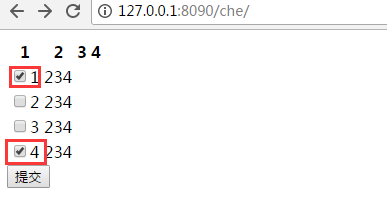

che.html
<!DOCTYPE html>
<html lang="en">
<head>
    <meta charset="UTF-8">
    <title></title>
</head>
<body>


<form action="" method="POST"> {% csrf_token %}

        <table>
        <thead>
        <th>1</th>
        <th>2</th>
        <th>3</th>
        <th>4</th>
        </thead>
{#    <form action="" method="POST"> {% csrf_token %}#}
    {% for i in a %}
         <tbody>
         <td><input type="checkbox" value="{{ i }}" name="check_box_list" >{{ i }}</td>
         <td>234</td>
        </tbody>

    {% endfor %}
    </table>
<input type="submit" value="提交"/>
</form>
{#<input type="checkbox" value="1" name="check_box_list"/>1#}
{##}
{#<input type="checkbox" value="2" name="check_box_list"/>2#}
{##}
{#<input type="checkbox" value="3" name="check_box_list"/>3#}
{##}
{#<input type="submit" value="提交"/>#}


</body>
</html>
views.py
def che(request):
    if request.method=="POST":
        check_box_list = request.POST.getlist('check_box_list')
        if check_box_list:
            print(check_box_list)
            return HttpResponse("ok")
        else:
            print("fail")
            return HttpResponse("fail")
    else:
        a = [1,2,3,4]
        return render(request,'che.html',{'a':a})
url.py
url(r'^che/', views.che ,name="che"),
具体应用 见计划任务管理平台源码