简要:本系列文章讲会对expo进行全面的介绍,本人从2017年6月份接触expo以来,对expo的研究断断续续,一路走来将近10个月,废话不多说,接下来你看到内容,讲全部来与官网
我猜去全部机翻+个人修改补充+demo测试的形式,对expo进行一次大补血!欢迎加入expo兴趣学习交流群:597732981
【之前我写过一些列关于expo和rn入门配置的东i西,大家可以点击这里查看:从零学习rn开发】
相关文章:
Expo大作战(一)--什么是expo,如何安装expo clinet和xde,xde如何使用
Expo大作战(二)--expo的生命周期,expo社区交流方式,expo学习必备资源,开发使用expo时关注的一些问题
Expo大作战(三)--针对已经开发过react native项目开发人员有针对性的介绍了expo,expo的局限性,开发时项目选型注意点等
Expo大作战(四)--快速用expo构建一个app,expo中的关键术语
Expo大作战(五)--expo中app.json 文件的配置信息
Expo大作战(六)--expo开发模式,expo中exp命令行工具,expo中如何查看日志log,expo中的调试方式
Expo大作战(七)--expo如何使用Genymotion模拟器
Expo大作战(八)--expo中的publish以及expo中的link,对link这块东西没有详细看,大家可以来和我交流
接下来就开始撸码
推送通知
推动通知是一个重要特性,因为“增长黑客”会说(Push Notifications are an important feature to, as “growth hackers” would say, ),保留并重新吸引用户,并通过他们的注意力货币化等等。从我的角度来看,只需知道相关事件何时发生在应用程序中便可方便使用,这样我就可以跳回来阅读更多内容。让我们看看expo如何与做到这一点。扰流警报:这几乎太简单了(Spoiler alert: it’s almost too easy)。
注意:iOS和Android模拟器无法接收推送通知。要测试它们,您需要使用真实设备。此外,在模拟器上调用Permissions.askAsync时,无论您是否选择允许,它都会立即以“未确定”状态作为状态解决。
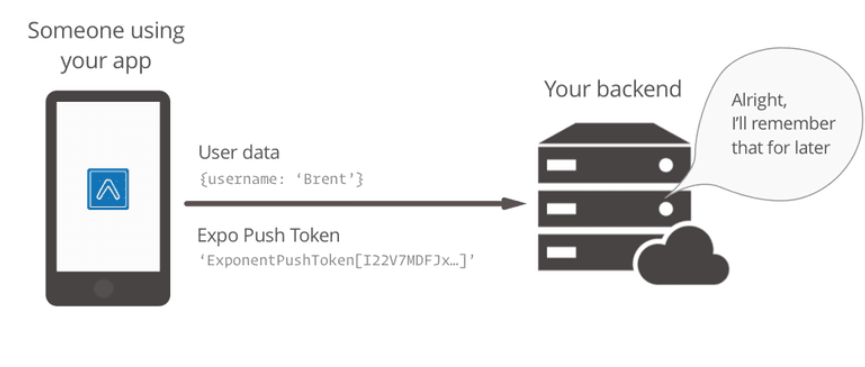
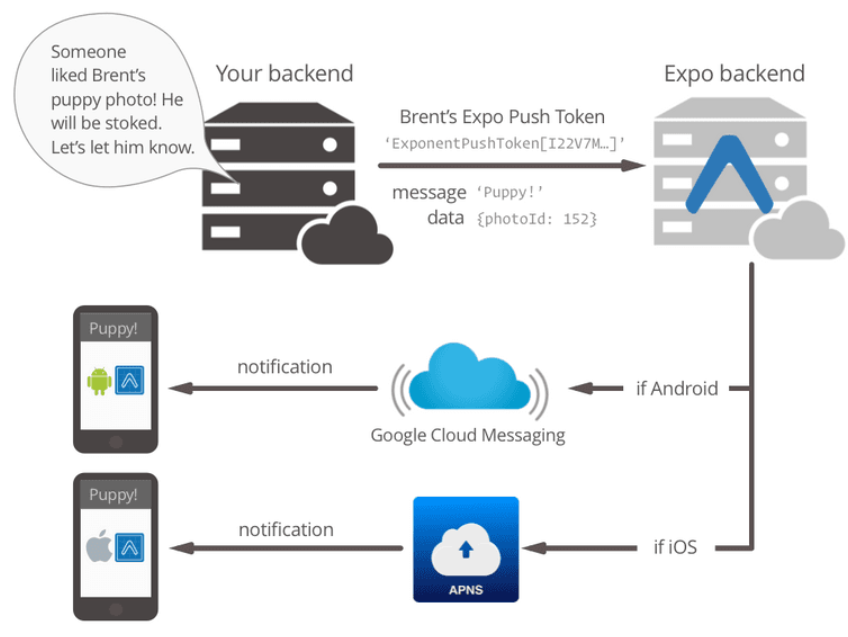
连接推送通知有三个主要步骤:发送用户的Expo Push Token到您的服务器,当您想发送通知时使用令牌调用Expo的Push API,并且响应接收 and/or 选择应用程序中的通知(例如跳转到通知所指的特定屏幕)。
1.将用户的Expo Push Token保存在服务器上为了向其他人发送推送通知,我们需要了解他们的设备。当然,我们自己知道我们用户的帐户信息,但Apple,Google和Expo不了解您的专有用户帐户系统中与“Brent”相对应的设备。Expo负责通过expo推送令牌识别Apple和Google的设备,这种令牌每次在设备上安装应用程序时都是唯一的。我们所需要做的就是将此令牌发送到您的服务器,以便您可以将其与用户帐户相关联,并在将来用于发送推送通知。
import { Permissions, Notifications } from 'expo';

const PUSH_ENDPOINT = 'https://your-server.com/users/push-token';//

async function registerForPushNotificationsAsync() {
  const { status: existingStatus } = await Permissions.getAsync(
    Permissions.NOTIFICATIONS
  );
  let finalStatus = existingStatus;

  // only ask if permissions have not already been determined, because
  // iOS won't necessarily prompt the user a second time.
 //仅询问权限是否尚未确定,因为
 // iOS不一定会再次提示用户。
  if (existingStatus !== 'granted') {
    // Android remote notification permissions are granted during the app
    // install, so this will only ask on iOS
    //在应用程序期间授予Android远程通知权限
    //安装,所以这只会在iOS上询问
    const { status } = await Permissions.askAsync(Permissions.NOTIFICATIONS);
    finalStatus = status;
  }

  // Stop here if the user did not grant permissions
  //如果用户没有授予权限,请在此停止
  if (finalStatus !== 'granted') {
    return;
  }

  // Get the token that uniquely identifies this device
  //获取唯一标识此设备的令牌
  let token = await Notifications.getExpoPushTokenAsync();

  // POST the token to your backend server from where you can retrieve it to send push notifications.
  //将令牌发布到您的后端服务器,您可以从中检索该令牌以发送推送通知。

  return fetch(PUSH_ENDPOINT, {
    method: 'POST',
    headers: {
      Accept: 'application/json',
      'Content-Type': 'application/json',
    },
    body: JSON.stringify({
      token: {
        value: token,
      },
      user: {
        username: 'Brent',
      },
    }),
  });
}
2.用用户令牌调用Expo的Push API
推送通知必须来自某个地方,并且某个地方是您的服务器,可能(如果您想要,您可以编写一个命令行工具来发送它们,它们都是一样的)。 当您准备发送推送通知时,请将expo推送令牌从用户记录中取出,并使用普通的旧HTTPS POST请求将其发送到Expo API。 我们已经采取了几种语言为您打包:
exponent-server-sdk-node for Node.js. Maintained by the Expo team.
exponent-server-sdk-python for Python. Maintained by community developers.
exponent-server-sdk-ruby for Ruby. Unmaintained.
ExpoNotificationsBundle for Symfony. Maintained by SolveCrew.
如果您想以其他语言实现它,请查看源代码。
Expo推送通知工具对于在开发过程中测试推送通知也很有用。它可让您轻松地将测试通知发送到您的设备。
3.处理接收和/或选择通知(Handle receiving and/or selecting the notification)
对于Android来说,这一步完全是可选的 - 如果您的通知纯粹是信息性的,而您在接收或选择时不想处理它们,那么您已经完成了。通知将出现在系统通知托盘中,正如您期望的那样,点击它们可以打开/关闭应用程序。
对于iOS来说,处理推送通知是明智的,因为否则用户将永远看不到它们。系统通知列表中不会显示在iOS上预先登录应用程序时发出的通知。通常的解决方案是只手动显示通知。例如,如果您在Messenger for iOS上收到消息,请将应用程序预先安排好,但没有打开此对话,您将看到通知从自定义通知用户界面的屏幕顶部向下滑动。
幸运的是,处理推送通知对于Expo来说很简单,您只需将侦听器添加到Notifications对象。import React from 'react'; import { Notifications, } from 'expo'; import { Text, View, } from 'react-native'; import registerForPushNotificationsAsync from 'registerForPushNotificationsAsync'; export default class AppContainer extends React.Component { state = { notification: {}, }; componentWillMount() { registerForPushNotificationsAsync(); // Handle notifications that are received or selected while the app // is open. If the app was closed and then opened by tapping the // notification (rather than just tapping the app icon to open it), // this function will fire on the next tick after the app starts // with the notification data.
// 处理在应用程序中接收或选择的通知
// 当他们在打开状态。 如果应用程序已关闭,然后通过点击打开应用程序
// 通知(而不是只是点击应用程序图标打开它),
// 这个函数会在应用程序启动后触发下一个勾子
// 与通知数据。
this._notificationSubscription = Notifications.addListener(this._handleNotification); } _handleNotification = (notification) => { this.setState({notification: notification}); }; render() { return ( <View style={{flex: 1, justifyContent: 'center', alignItems: 'center'}}> <Text>Origin: {this.state.notification.origin}</Text> <Text>Data: {JSON.stringify(this.state.notification.data)}</Text> </View> ); } }通知处理时间
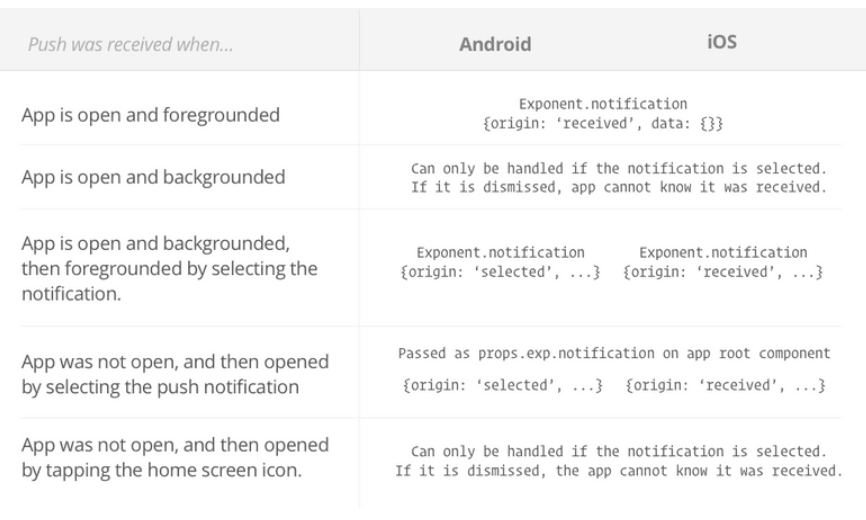
从上面的情况来看,根据收到通知时的状态,您的应用程序能够处理通知的时间并不完全清楚。 详细,请参阅下表:
HTTP / 2 API
虽然有几种语言的服务器端SDK可以帮助您发送推送通知,但您可能希望直接通过HTTP / 2 API发送请求。
- 发送通知
使用以下HTTP标头向https://exp.host/--/api/v2/push/send发送POST请求:(Send a POST request to
https://exp.host/--/api/v2/push/sendwith the following HTTP headers:)accept: application/json accept-encoding: gzip, deflate content-type: application/json
此API目前不需要任何身份验证。
这是一个使用cURL的“hello world”请求(用您自己的替换占位符推送令牌):curl -H "Content-Type: application/json" -X POST https://exp.host/--/api/v2/push/send -d '{ "to": "ExponentPushToken[xxxxxxxxxxxxxxxxxxxxxx]", "title":"hello", "body": "world" }'HTTP请求正文必须是JSON。 它可以是单个消息对象或最多100个消息的数组。 我们建议您在发送多个邮件时尽量使用数组,以便有效减少需要向Expo服务器发送的请求数量。 这是发送两条消息的示例请求主体:
[{
  "to": "ExponentPushToken[xxxxxxxxxxxxxxxxxxxxxx]",
  "sound": "default",
  "body": "Hello world!"
}, {
  "to": "ExponentPushToken[yyyyyyyyyyyyyyyyyyyyyy]",
  "badge": 1,
  "body": "You've got mail"
}]
//完整代码这样
curl -H "Content-Type: application/json" -X POST https://exp.host/--/api/v2/push/send -d '[
{ "to": "ExponentPushToken[xxxxxxxxxxxxxxxxxxxxxx]", "sound": "default", "body": "Hello world!" },
{ "to": "ExponentPushToken[yyyyyyyyyyyyyyyyyyyyyy]", "badge": 1, "body": "You've got mail" }]'一旦成功,HTTP响应将是一个JSON对象,其数据字段是一个推送收据数组,每个对应于请求中相应索引处的消息。 继续上面的例子,这是一个成功的响应主体的样子:
{
  "data": [
    {"status": "ok"},
    {"status": "ok"}
  ]
}
当传递消息时出错时,收据的状态将为“错误”,并且收据将包含有关错误的信息。 有关响应格式的更多信息记录如下。
注意:即使收据显示“OK”,也不能保证设备已收到信息; “OK”表示我们已成功将消息发送给Android或iOS推送通知服务。 例如,如果收件人设备处于关闭状态,则Android或iOS推送通知服务将尝试传递消息,但设备不一定会收到该消息。
如果您发送单个未包装在数组中的消息,则数据字段将为未包装在数组中的推送收据。
消息格式每条消息必须是具有给定字段的JSON对象:
type PushMessage = {
  /**
   * An Expo push token specifying the recipient of this message.
   * Expo推送令牌,指定此消息的收件人。
   */
  to: string,

  /**
   * A JSON object delivered to your app. It may be up to about 4KiB; the total
   * notification payload sent to Apple and Google must be at most 4KiB or else
   * you will get a "Message Too Big" error.
    *一个JSON对象传递给你的应用程序。 它可能高达约4KiB; 总数
    *发送给Apple和Google的通知有效负载必须最大为4KiB或其他
    *你会得到一个“消息太大”的错误。
   */
  data?: Object,

  /**
   * The title to display in the notification. Devices often display this in
   * bold above the notification body. Only the title might be displayed on
   * devices with smaller screens like Apple Watch.
    *通知中显示的标题。 设备经常在此显示
    *在通知主体上方加粗。 只有标题可能会显示在上面
    * Apple Watch等小屏幕设备。
   */
  title?: string,

  /**
   * The message to display in the notification
  *要在通知中显示的消息
   */
  body?: string,

  /**
   * A sound to play when the recipient receives this notification. Specify
   * "default" to play the device's default notification sound, or omit this
   * field to play no sound.
    *收件人收到此通知时播放的声音。指定
    *“默认”播放设备的默认通知声音,或省略此
    *现场不播放声音。
   */
  sound?: 'default' | null,

  /**
   * Time to Live: the number of seconds for which the message may be kept
   * around for redelivery if it hasn't been delivered yet. Defaults to 0.
   *
   * On Android, we make a best effort to deliver messages with zero TTL
   * immediately and do not throttle them
   *
   * This field takes precedence over `expiration` when both are specified.
  *生存时间:可以保留消息的秒数
    *如果还没有交付,请重新发送。 默认为0。
   *
    *在Android上,我们尽最大努力以零TTL传递消息
    *立即,不要扼杀他们
   *
    *这两个字段在指定时优先于`expiration`。
   */
  ttl?: number,

  /**
   * A timestamp since the UNIX epoch specifying when the message expires. This
   * has the same effect as the `ttl` field and is just an absolute timestamp
   * instead of a relative time.
    *自UNIX纪元指定消息到期时的时间戳。 这个
    *与`ttl`字段具有相同的效果,并且只是一个绝对时间戳
    *而不是相对时间。
   */
  expiration?: number,

  /**
   * The delivery priority of the message. Specify "default" or omit this field
   * to use the default priority on each platform, which is "normal" on Android
   * and "high" on iOS.
   *
   * On Android, normal-priority messages won't open network connections on
   * sleeping devices and their delivery may be delayed to conserve the battery.
   * High-priority messages are delivered immediately if possible and may wake
   * sleeping devices to open network connections, consuming energy.
   *
   * On iOS, normal-priority messages are sent at a time that takes into account
   * power considerations for the device, and may be grouped and delivered in
   * bursts. They are throttled and may not be delivered by Apple. High-priority
   * messages are sent immediately. Normal priority corresponds to APNs priority
   * level 5 and high priority to 10.
   *消息的传递优先级。 指定“默认”或省略此字段
    *在每个平台上使用默认优先级,在Android上为“正常”
    *和iOS上的“高”。
   *
    *在Android上,普通优先级消息不会打开网络连接
    *睡眠设备及其交付可能会延迟以节省电池。
    *如果可能,高优先级消息会立即传送并可能唤醒
    *睡觉设备打开网络连接,消耗能源。
   *
    *在iOS上,正常优先级消息会在考虑时发送
    *设备的功耗考虑因素,可能会被分组和交付
    *爆发。 它们受到限制,可能无法由Apple提供。高优先级
    *消息立即发送。 正常优先级对应于APN优先级
    * 5级,高优先级为10。
   */
  priority?: 'default' | 'normal' | 'high',

  // iOS-specific fields

  /**
   * Number to display in the badge on the app icon. Specify zero to clear the
   * badge.
    *号码显示在应用程序图标上的徽章中。 指定零来清除
    *徽章。
   */
  badge?: number,
}
响应格式
响应是一个带有两个可选字段,数据和错误的JSON对象。 如果整个请求出现错误,那么HTTP状态码将是4xx或5xx,并且错误将是一个错误对象数组(通常只有一个):
{
  "errors": [{
    "code": "INTERNAL_SERVER_ERROR",
    "message": "An unknown error occurred."
  }]
}
如果存在影响单个消息但不是整个请求的错误,则HTTP状态代码将为200,错误字段将为空,并且数据字段将包含描述错误的推送收据:
{
  "data": [{
    "status": "error",
    "message": ""ExponentPushToken[xxxxxxxxxxxxxxxxxxxxxx]" is not a registered push notification recipient",
    "details": {
      "error": "DeviceNotRegistered"
    }
  }]
}
如果所有消息都已成功传送到Android和iOS推送通知服务,则HTTP状态码也将为200。
重要说明:特别是,查找具有错误字段的详细信息对象。如果存在,它可能是以下值之一:DeviceNotRegistered,MessageTooBig,MessageRateExceeded和InvalidCredentials。你应该像这样处理这些错误:
DeviceNotRegistered:设备不能再接收推送通知,您应该停止向给定的expo推送令牌发送消息。
MessageTooBig:总通知有效负载太大。在Android和iOS上,总有效负载不得超过4096字节。
MessageRateExceeded:您发送消息的频率太高,无法给定设备。实施指数退避并慢慢重试发送消息。
InvalidCredentials:您的独立应用程序的推送通知凭证无效(例如:您可能已撤销它们)。运行exp build:ios -c为iOS重新生成新推送通知凭证。
如果我们无法将消息传递给Android或iOS推送通知服务,则收据的详细信息可能还包括特定于服务的信息。这主要用于调试和报告可能的错误给我们。
下一张继续介绍,这一篇主要介绍了:expo的消息推送机制, 欢迎大家关注我的微信公众号,这篇文章是否被大家认可,我的衡量标准就是公众号粉丝增长人数。欢迎大家转载,但必须保留本人博客链接!