如下遇到自己编写的服务无法启动
需要添加环境变量(标红的)
C:Python27Scripts;C:Python27;C:Python27chromedriver.exe;C:Python27Libsite-packageswin32;C:Python27Libsite-packagespywin32_system32;
1.需求
为什么要开发一个windows服务呢?之前做一个程序,必须要读取指定目录文件License, 因为其他程序也在读取这指定目录的License文件,且License不同时会修改License的内容,
修改了License后导致我们的程序无法运行,所以想做个windows 的服务时时检测这个License文件是否被修改,如果检测到被修改就覆盖该License。
2.依赖的第三方库
必须要借助第三方模块pywin32
下载地址: https://pypi.python.org/pypi/pywin32/214
3.实现过程
实例化win32serviceutil.ServiceFramework的时候,windows系统会自动调用SvcDoRun方法,
这个函数的执行不可以结束,因为结束就代表服务停止。所以当我们放自己的代码在SvcDoRun函数中执行的时候,必须确保该函数不退出,类似与这样的效果:
1 def SvcDoRun(self):
2        while True:
3             self._LicenseExist()
4             time.sleep(2)
当停止服务的时候,系统会调用SvcDoStop函数,该函数通过设置标志位等方式让SvcDoRun函数退出,就是正常的停止服务。
win32event.SetEvent(self.hWaitStop) 通过事件退出
服务操作命令:

 1 #1.安装服务
 2
 3 python PythonService.py install
 4
 5 #2.让服务自动启动
 6
 7 python PythonService.py --startup auto install
 8
 9 #3.启动服务
10
11 python PythonService.py start
12
13 #4.重启服务
14
15 python PythonService.py restart
16
17 #5.停止服务
18
19 python PythonService.py stop
20
21 #6.删除/卸载服务
22
23 python PythonService.py remove
4.完整代码:
 1 # -*- coding: UTF8 -*-
 2 #
 3 import win32serviceutil
 4 import win32service
 5 import win32event
 6 import winerror
 7 import servicemanager
 8 import os, sys, time
 9
10 class PythonService(win32serviceutil.ServiceFramework):
11
12     _svc_name_ = "ALicense"   #  服务名
13     _svc_display_name_ = "ALicense Is Exist "   # 服务在windows系统中显示的名称
14     _svc_description_ = "ALicense  Is Exist License windows"   #服务的描述
15
16     def __init__(self, args):
17         win32serviceutil.ServiceFramework.__init__(self, args)
18         self.hWaitStop = win32event.CreateEvent(None, 0, 0, None)
19         self.License = self._LicenseExist()
20         self.run = True
21
22     def _LicenseExist(self):
23         is_exist=os.path.exists('C:License.dat')
24         string_key='d8838bccad0c19e847b9e73f4432b951b6f035fd8c19f5474e30db5a0e4fa4c99b57c01af79161850b95d3f99a6b0b6074f18224ec7c44f28bc243be06f8f2b96e370f5ca724c01f1bd0e289afdd9eeef7e33d42a5113ddd4818a47b33449487baec2099a50d5e3dde32bdf66d979982a68d0d60a1200990ebf8a4827b7db3d1e83f9ad9d9946267fe830c48bbe025a5ebb99b85c7f1cf93de2beb22c8e9766e5ef526242b01f5251d8a768780026add2d2d8fb9ffccb86f8779221b01d206e586d96b83839b30006910a4bca6438fb5d5b2900431f8ecab50a9f18d0e7e8abec7b212fdc9ab667f08dd3eef14ecbdb24910466f45be92d0a085ff81d7362b828847c29be579942b63b9eb26b2441b5ef20f5a012431d263ded3f5fe434111b833612464bf4df18ae06c536b6895d240387774c3b438d5f0745c7a0d3ce963e82fc8df603f6fa526e8bd1fc51e2509e0840f3bbbde7bc3fec9e837b5aa744a9ae4449c974e26d787e475f73dbc3ee9c73cc258f38b79c413453fd4fe732bed57ba9d0312d2bcaf333a5c82d92a269a7ccaf27273a178feb95028f8f0805675a6199abbd8b47756b4543269a35025438794cd32410ac19c77526c4b94b93d091069056df1dda0f49298d753a317850c7104f94067ac9cc4d5b3d377f10627d21c12a4c066347eb05370fbe9e0658c1ec1803d43ed71509f5cdb25d60f505ef7527c405d3ea05bb381436dd3622484a1ff7263e4d93f275493332af3f77d28a13a0fa0eb810b7d25a378f6b8313ab3bcb44131ca3500670b0321aa95b077cef85d348e13315c2d2d42795e41569162986755709d099b59ee320e6caf422497234251d07d697bb3f3e5ad6d15d80fd85da016e7075bf84522aa6339e8b66ecd4b71d02fd01f4f57a0147ceaddbf9e5f32e7ec60ae35ff73d2f386d9d0133cb697731773b55fc2615c584e9f4013253d3fc53fa13a9e982a2493e1145861759c30cf9064d333bb184e378b52e7dd8bbbd0c17774549fabb44014dab2e0a903c53d0da1c9d3a223c69f3b9bcc7925ba21a464fc9fa43e20574ffedb7a27f2cd7ae7b6b46c5cb4e0b176ece7d59ff199b74b3436ead185df5c79d74b35d644bb02315130131772db21fcd1d535014b10c4cbbb8e1f847cd00be52992ab94a7b5a7b1c27d87abe3fc605972ceb3463a07924c816a04642adcabbc7b18a40a24a3af217d0390c1102cb5b4573b1816c76667f50d33631a97e986255644e8e0c26d63cd1f29f501ff51673509822c1bf8158ceee752024dcbe0e24941803ebd8afc0bded3598012ba5431060f0db7fad7fd4960972da9a6cfaa0850c43470498236ef7b22fbf79d491e054cf142815e6c04e573a52e22ccaa2d406167c6442db40456cd93752349b2968132388b51edbe13aa349abc34696453d1a4b39f8311284f8afbae'
25         if is_exist:
26             for line in open("C:License.dat"):
27                 if line!=string_key:
28                     self.writer(string_key)
29         else:
30             self.writer(string_key)
31     # 写入License
32     def writer(self, string_key):
33         f=open('C:License.dat','w')
34         f.write(string_key)
35         f.close()
36
37     def SvcDoRun(self):
38         while self.run:
39             # 已经运行
40             self._LicenseExist()
41             time.sleep(2)   #推迟调用线程的运行2秒
42
43     def SvcStop(self):
44         # 服务已经停止
45         self.ReportServiceStatus(win32service.SERVICE_STOP_PENDING)
46         win32event.SetEvent(self.hWaitStop)
47         self.run = False
48
49 if __name__=='__main__':
50     if len(sys.argv) == 1:
51         try:
52             evtsrc_dll = os.path.abspath(servicemanager.__file__)
53             servicemanager.PrepareToHostSingle(PythonService)
54             servicemanager.Initialize('PythonService', evtsrc_dll)
55             servicemanager.StartServiceCtrlDispatcher()
56         except win32service.error, details:
57             if details[0] == winerror.ERROR_FAILED_SERVICE_CONTROLLER_CONNECT:
58                 win32serviceutil.usage()
59     else:
60         win32serviceutil.HandleCommandLine(PythonService)
5.效果与问题
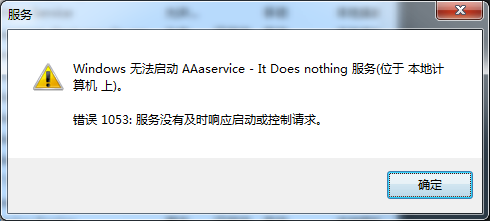
当直接运行py文件访问是可以添加服务,且服务也可运行,但是使用pyinstaller打包exe后程序就不能正常执行,
提示:错误1053 服务没有及时相应启动或控制请求
google 后找到解决方法,
原理我也不是很懂,貌似是要在实例化windows服务类时候,监控服务调度
 1     if len(sys.argv) == 1:
 2         try:
 3             evtsrc_dll = os.path.abspath(servicemanager.__file__)
 4             servicemanager.PrepareToHostSingle(PythonService)
 5             servicemanager.Initialize('PythonService', evtsrc_dll)
 6             servicemanager.StartServiceCtrlDispatcher()
 7         except win32service.error, details:
 8             if details[0] == winerror.ERROR_FAILED_SERVICE_CONTROLLER_CONNECT:
 9                 win32serviceutil.usage()
10     else:
11         win32serviceutil.HandleCommandLine(PythonService)
pyinstaller 打包为控制台文件
1 if __name__ == '__main__':
2     from PyInstaller.main import run
3     params=['windows_services_in_python.py', '-F', '-c', '--icon=favicon.ico']
4     run(params)
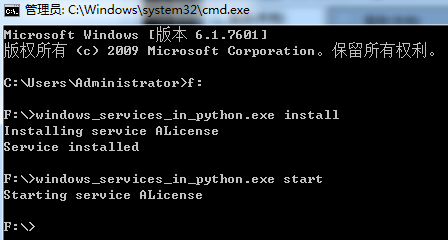
打包后CMD到改目录:
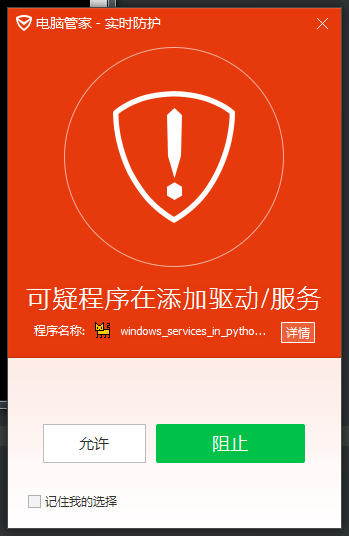
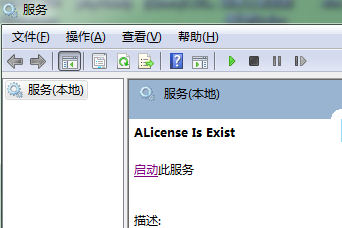
放行杀毒软件拦截
6.管理window服务操作
完整代码:
  1 #!/usr/bin/env python
  2 # -*- coding: UTF8 -*-
  3 #
  4 import win32service
  5 import win32con
  6 import time, sys
  7 import datetime
  8 reload(sys)
  9 sys.setdefaultencoding("utf8")
 10 class ServiceManager(object):
 11     """管理window服务"""
 12
 13     def __init__(self, name):
 14         """
 15         name: 服务的名称
 16         """
 17         self.name = name
 18
 19         #启动或停止服务时等待操作成功等待时间
 20         self.wait_time = 0.5
 21         #启动或停止服务时最大等待时间,超过时返回超时提示
 22         self.delay_time = 10
 23         self.scm = win32service.OpenSCManager(None, None, win32service.SC_MANAGER_ALL_ACCESS)
 24
 25
 26         if self.is_exists():
 27             try:
 28                 self.handle = win32service.OpenService(self.scm, self.name, win32service.SC_MANAGER_ALL_ACCESS)
 29             except Exception, e:
 30                 self.log(e)
 31         else:
 32             print '服务 %s 没有安装'.encode('gbk') % self.name
 33
 34
 35     def is_stop(self):
 36         """检查服务是否停止"""
 37         flag = False
 38         try:
 39             if self.handle:
 40                 ret = win32service.QueryServiceStatus(self.handle)
 41                 flag = ret[1] != win32service.SERVICE_RUNNING
 42         except Exception, e:
 43             self.log(e)
 44         return flag
 45
 46     def start(self):
 47         """开启服务"""
 48         try:
 49             if self.handle:
 50                 win32service.StartService(self.handle, None)
 51         except Exception, e:
 52             self.log(e)
 53         status_info = win32service.QueryServiceStatus(self.handle)
 54
 55         if status_info[1] == win32service.SERVICE_RUNNING:
 56             return '启动服务%s成功'.encode('gbk') % self.name
 57         elif status_info[1] == win32service.SERVICE_START_PENDING:
 58             #如果服务正在启动中则延迟返回启动信息,直到启动成功,或返回启动时间过长信息
 59             start_time = datetime.datetime.now()
 60             while True:
 61                 if (datetime.datetime.now() - start_time).seconds > self.delay_time:
 62                     return '启动服务%s时间太长'.encode('gbk') % self.name
 63
 64                 time.sleep(self.wait_time)
 65                 if win32service.QueryServiceStatus(self.handle)[1] == win32service.SERVICE_RUNNING:
 66                     return '启动服务%s成功'.encode('gbk') % self.name
 67         else:
 68             return '启动服务%s失败'.encode('gbk') % self.name
 69
 70     def stop(self):
 71         """停止服务"""
 72         try:
 73             status_info = win32service.ControlService(self.handle, win32service.SERVICE_CONTROL_STOP)
 74         except Exception, e:
 75             self.log(e)
 76         if status_info[1] == win32service.SERVICE_STOPPED:
 77             return '停止服务%s成功'.encode('gbk') % self.name
 78         elif status_info[1] == win32service.SERVICE_STOP_PENDING:
 79             start_time = datetime.datetime.now()
 80             while True:
 81                 if (datetime.datetime.now() - start_time).seconds > self.delay_time:
 82                     return '停止服务%s时间太长'.encode('gbk') % self.name
 83
 84                 time.sleep(self.wait_time)
 85                 if win32service.QueryServiceStatus(self.handle)[1] == win32service.SERVICE_STOPPED:
 86                     return '停止服务%s成功'.encode('gbk') % self.name
 87         else:
 88             return '停止服务%s失败'.encode('gbk') % self.name
 89
 90     def restart(self):
 91         """重启服务"""
 92         if not self.is_stop():
 93             self.stop()
 94         self.start()
 95         return win32service.QueryServiceStatus(self.handle)
 96
 97     def status(self):
 98         """获取运行的状态"""
 99         try:
100             status_info = win32service.QueryServiceStatus(self.handle)
101             status = status_info[1]
102             if status == win32service.SERVICE_STOPPED:
103                 return "STOPPED"
104             elif status == win32service.SERVICE_START_PENDING:
105                 return "STARTING"
106             elif status == win32service.SERVICE_STOP_PENDING:
107                 return "STOPPING"
108             elif status == win32service.SERVICE_RUNNING:
109                 return "RUNNING"
110         except Exception, e:
111             self.log(e)
112
113     def close(self):
114         """释放资源"""
115         try:
116             if self.scm:
117                 win32service.CloseServiceHandle(self.handle)
118                 win32service.CloseServiceHandle(self.scm)
119         except Exception, e:
120             self.log(e)
121
122     def is_exists(self):
123         """windows服务是否已安装"""
124         statuses = win32service.EnumServicesStatus(self.scm, win32service.SERVICE_WIN32, win32service.SERVICE_STATE_ALL)
125         for (short_name, desc, status) in statuses:
126             if short_name == self.name:
127                 return True
128         return False
129
130     def log(self, exception):
131
132         print(exception)
133
134
135
136 if __name__=='__main__':
137
138     app= ServiceManager('AAaservice')
139     msg= app.is_exists()  # 判断是否安装  (以下操作必须先判断服务是否存在)
140     #msg= app.is_stop()  # 判断服务是否停止
141     #msg= app.status()  # 查看服务的状态
142     #msg= app.start()  # 开启服务
143     #msg= app.stop()  # 暂停服务   (服务开启才能停止,else error)
144     #msg= app.restart()  # 重启服务
145
146     print(msg)
7.参考地址:
python添加服务: http://blog.csdn.net/kmust20093211/article/details/42169323
python添加服务: http://www.chrisumbel.com/article/windows_services_in_python
打包无法运行服务: http://zhangweide.cn/archive/2013/pyinstaller-package-windows-service.html
python管理window服务 https://github.com/zhulin3141/PPServ/edit/master/service_manager.py