例如:点击后会把另一个iframe中的值得到弹出
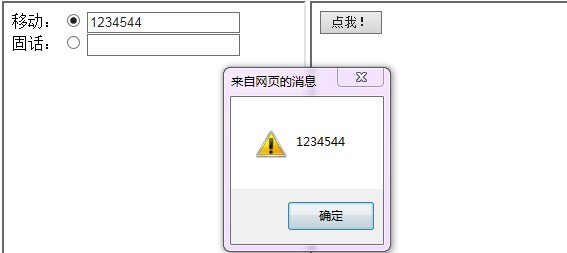
Main:
<html lang="en" xmlns="http://www.w3.org/1999/xhtml">
<head>
    <meta charset="utf-8" />
    <title></title>
</head>
<body>
    <iframe id="A" src="A.html" height="300"></iframe>
    <iframe id="B" src="B.html" height="300"></iframe>
</body>
</html>
页面A.html
<html lang="en" xmlns="http://www.w3.org/1999/xhtml">
<head>
    <meta charset="utf-8" />
    <title></title>
    <script type="text/javascript">


        function GetPhone () {
            var phone = ""
            var rdos = document.getElementsByName("rdo");
            for (var i = 0; i < rdo.length; i++) {
                if (rdos[i].checked) {
                    phone = document.getElementById(rdos[i].id + "_demo").value;
                    return phone;
                }
            }
        }

    </script>
</head>
<body>
    移动:
    <input type="radio" name="rdo" id="mobile" />
    <input type="text" name="name" id="mobile_demo" /><br />
    固话:
    <input type="radio" name="rdo" id="tel" />
    <input type="text" name="name" id="tel_demo" />
    </body>
</html>
页面B,调用页面A的js方法得到用户选择的电话
<html lang="en" xmlns="http://www.w3.org/1999/xhtml">
<head>
    <meta charset="utf-8" />
    <title></title>
    <script type="text/javascript">
        window.onload = function () {
            document.getElementById("btn").onclick = function () {
                var tel = parent.A.GetPhone();//调用页面A方法
                alert(tel);
            }
        }

    </script>

</head>
<body>
    <input type="button" name="" value="点我!" id="btn" />
</body>
</html>