1.开发需要环境
首先安卓SDK支持多种语言,只是java的支持较先推出,使用比较多
需要去谷歌下载ADT,还有eclipse,jdk。然后把ADT作为eclipse插件装入。
2.安卓项目结构简介
src - 存放代码文件
gen - xml和代码的中转文件,由程序自动生成。不用去修改
assets - 资源目录
bin - 输出目录,不用去修改
AndroidManifest.xml - 整体的配置文件
3.安卓应用的基本结构
application - 作用域最广
activity - 一个单个视图的控制,activity之间传输信息需要借助application。作用域在application之下
最终启动application用哪一个,activity入口用哪一个。都在AndroidManifest.xml配置完成。
4.基于视图的Hellow world程序
4.1 创建一个空安卓项目
4.2 在res-layout下创建一个mylayout xml文件,作为视图摆放的配置。然后拖一个按钮上去
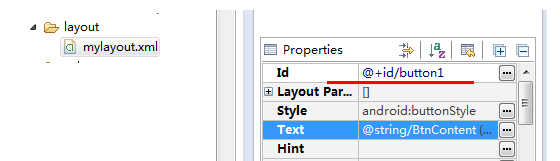
4.3 然后在默认Activity下设置显示的视图,还有按钮内容绑定。
package com.Hont.Learn2;

import android.app.Activity;
import android.os.Bundle;
import android.view.View;
import android.widget.Button;

public class Learn2Activity extends Activity {
    /** Called when the activity is first created. */
    @Override
    public void onCreate(Bundle savedInstanceState) {
        super.onCreate(savedInstanceState);
        setContentView(R.layout.mylayout);

        final Button button = (Button)this.findViewById(R.id.button1);
        button.setOnClickListener(new View.OnClickListener() {

            public void onClick(View v) {
                // TODO Auto-generated method stub
                button.setHeight(button.getHeight()+5);
            }
        });
    }
}
4.4 然后配置Activity到manifest.xml,这里给出一个参考Activity配置
<activity
     android:label="@string/app_name"
     android:screenOrientation="landscape"
     android:launchMode="singleTask"
     android:configChanges="screenSize|keyboardHidden|orientation"
     android:name="[your namespace path].DebugActivity">

     <intent-filter>
     <action android:name="android.intent.action.MAIN" />
     <category android:name="android.intent.category.LAUNCHER" />
     <category android:name="android.intent.category.LEANBACK_LAUNCHER" />
   </intent-filter>
 </activity>
4.5 这时候,每点击一次按钮,按钮就会高一些。