protected void Page_Load(object sender, EventArgs e) { string strBody="housh,<br/><br/>感谢您注册 宁皓网,点击下面的链接可以登录:<br/><br/>http://ninghao.net/user/reset/23206/1428324932/zO8Tk2embvlNxvrfvOMrI7Yh8oSRW3rRLHfW5XUaWPg<br/><br/>这个链接只能使用一次,会引导您到设置密码。<br/><br/>在设置好您的密码之后,您就可以在 http://ninghao.net/user 使用下列帐号和密码登录了:<br/><br/>用户名: housh<br/>密码: 您的密码<br/><br/>- 宁皓网 团队<br/><br/><br/>"; SendSMTPEMail("10612345@qq.com", "ggssgs", "qingceshi"); SendSMTPEMail("smtp.163.com", "13812345@163.com", "12345", "10612345@qq.com", "宁皓网 的 housh 帐户详情", strBody); } /// <summary> /// 发送邮件 /// </summary> /// <param name="strSmtpServer">包含用于 SMTP 事务的主机的名称或 IP 地址。System.String</param> /// <param name="strFrom">包含电子邮件发件人的地址的 System.String。/与凭据关联的用户名。</param> /// <param name="strFromPass">与凭据关联的用户名的密码。</param> /// <param name="strto">包含电子邮件收件人的地址的 System.String。</param> /// <param name="strSubject">包含主题文本的 System.String。</param> /// <param name="strBody">包含邮件正文的 System.String。</param> /// <param name="strfiles">附件 System.String[]。绝对路径名称+文件名</param> public void SendSMTPEMail(string strSmtpServer, string strFrom, string strFromPass, string strto, string strSubject, string strBody, string[] strfiles=null) { System.Net.Mail.SmtpClient client = new SmtpClient(strSmtpServer); client.UseDefaultCredentials = false; client.Credentials = new System.Net.NetworkCredential(strFrom, strFromPass); client.DeliveryMethod = SmtpDeliveryMethod.Network; System.Net.Mail.MailMessage message = new System.Net.Mail.MailMessage(strFrom, strto, strSubject, strBody); if (strfiles != null && strfiles.Length > 0) { foreach (string file in strfiles) { message.Attachments.Add(new System.Net.Mail.Attachment(file)); } } message.BodyEncoding = System.Text.Encoding.UTF8; message.IsBodyHtml = true; client.Send(message); } /// <summary> /// 固定邮箱发送 /// </summary> /// <param name="strto"></param> 收件人地址 /// <param name="strSubject"></param> 邮件主题 /// <param name="strBody"></param>邮件主体 /// <param name="strfiles"></param>附件 默认传 null public bool SendSMTPEMail(string strto, string strSubject, string strBody) { try { System.Net.Mail.SmtpClient client = new SmtpClient("smtp.163.com"); client.UseDefaultCredentials = false; client.Credentials = new System.Net.NetworkCredential("13812345@163.com", "12345"); client.DeliveryMethod = SmtpDeliveryMethod.Network; System.Net.Mail.MailMessage message = new System.Net.Mail.MailMessage("13854221413@163.com", strto, strSubject, strBody); //if (strfiles != null && strfiles.Length > 0) //{ // foreach (string file in strfiles) // { // message.Attachments.Add(new System.Net.Mail.Attachment(file)); // } //} message.BodyEncoding = System.Text.Encoding.UTF8; message.IsBodyHtml = true; client.Send(message); } catch (Exception ex) { return false; } return true; }
这里注意的是你要去配置你的邮件服务器,例如我的邮件服务器是163的,需要配置POP3/SMTP/IMAP,开启IMAP服务,会有短信验证通知,其余邮箱类似 如下图:
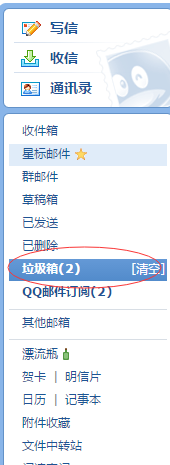
到这有可能你发的邮件你的邮箱还是收不到,因为你发送多次,邮箱自动归类为垃圾邮件,在垃圾邮件里应该能找到你发送的验证邮件,如下图:
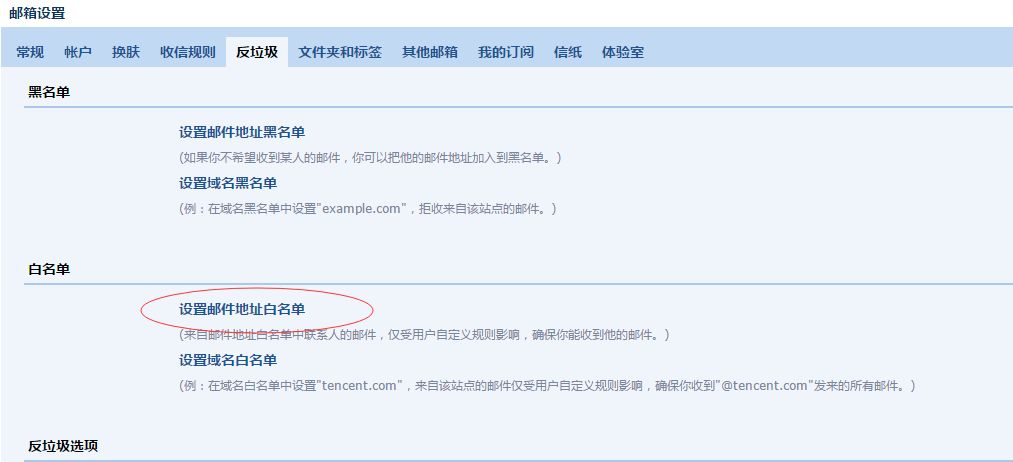
你可以去邮箱设置里的反垃圾里面去设置白名单: