前言
C# WinFrm程序调用ZXing.NET实现条码、二维码和带有Logo的二维码生成。
ZXing.NET导入
GitHub开源库
ZXing.NET开源库githib下载地址:https://github.com/zxing/zxing
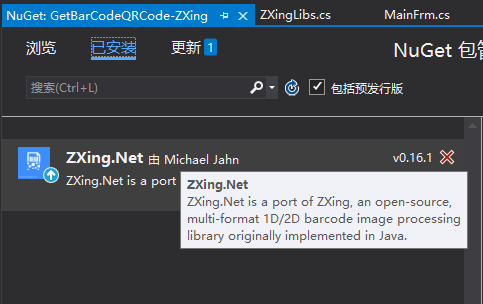
NuGet包管理
选择安装ZXing.NET v0.16.1版本。

前台部署搭建
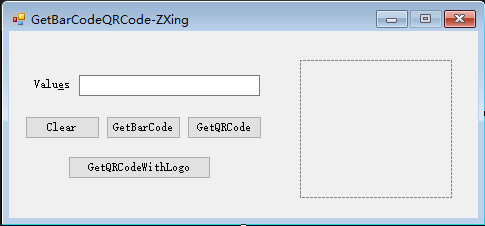
如下图,创建WinFrm桌面应用程序后,添加如下必要的控件。
封装ZXingLibs类
核心代码如下:
注意条形码暂时只支持数字(Requested contents should only contain digits, but got 'i');
只支持偶数个(The lenght of the input should be even);
码值最大长度为80(Requested contents should be less than 80 digits long, but got 102)。


  1 using System;
  2 using System.Collections.Generic;
  3 using System.Drawing;
  4 using System.Drawing.Imaging;
  5 using System.Linq;
  6 using System.Text;
  7 using System.Threading.Tasks;
  8 using ZXing;
  9 using ZXing.Common;
 10 using ZXing.QrCode;
 11 using ZXing.QrCode.Internal;
 12
 13 namespace GetBarCodeQRCode_ZXing
 14 {
 15     /// <summary>
 16     /// 重新封装条码、二维码生成方法和带有图片的二维码生成方法
 17     /// </summary>
 18     public class ZXingLibs
 19     {
 20         /// <summary>
 21         /// 生成二维码
 22         /// </summary>
 23         /// <param name="text">内容</param>
 24         /// <param name="width">宽度</param>
 25         /// <param name="height">高度</param>
 26         /// <returns></returns>
 27         public static Bitmap GetQRCode(string text, int width, int height)
 28         {
 29             BarcodeWriter writer = new BarcodeWriter();
 30             writer.Format = BarcodeFormat.QR_CODE;
 31             QrCodeEncodingOptions options = new QrCodeEncodingOptions()
 32             {
 33                 DisableECI = true,//设置内容编码
 34                 CharacterSet = "UTF-8",  //设置二维码的宽度和高度
 35                 Width = width,
 36                 Height = height,
 37                 Margin = 1//设置二维码的边距,单位不是固定像素
 38             };
 39
 40             writer.Options = options;
 41             Bitmap map = writer.Write(text);
 42             return map;
 43         }
 44
 45         /// <summary>
 46         /// 生成一维条形码
 47         /// 只支持数字 Requested contents should only contain digits, but got 'i'
 48         /// 只支持偶数个 The lenght of the input should be even
 49         /// 最大长度80  Requested contents should be less than 80 digits long, but got 102
 50         /// </summary>
 51         /// <param name="text">内容</param>
 52         /// <param name="width">宽度</param>
 53         /// <param name="height">高度</param>
 54         /// <returns></returns>
 55         public static Bitmap GetBarCode(string text, int width, int height)
 56         {
 57             BarcodeWriter writer = new BarcodeWriter();
 58             //使用ITF 格式,不能被现在常用的支付宝、微信扫出来
 59             //如果想生成可识别的可以使用 CODE_128 格式
 60             //writer.Format = BarcodeFormat.ITF;
 61             writer.Format = BarcodeFormat.CODE_39;
 62             EncodingOptions options = new EncodingOptions()
 63             {
 64                 Width = width,
 65                 Height = height,
 66                 Margin = 2
 67             };
 68             writer.Options = options;
 69             Bitmap map = writer.Write(text);
 70             return map;
 71         }
 72
 73         /// <summary>
 74         /// 生成带Logo的二维码
 75         /// </summary>
 76         /// <param name="text">内容</param>
 77         /// <param name="width">宽度</param>
 78         /// <param name="height">高度</param>
 79         public static Bitmap GetQRCodeWithLogo(string text, int width, int height)
 80         {
 81             //Logo 图片
 82             string logoPath = System.AppDomain.CurrentDomain.BaseDirectory + @"imglogo.bmp";
 83             Bitmap logo = new Bitmap(logoPath);
 84             //构造二维码写码器
 85             MultiFormatWriter writer = new MultiFormatWriter();
 86             Dictionary<EncodeHintType, object> hint = new Dictionary<EncodeHintType, object>();
 87             hint.Add(EncodeHintType.CHARACTER_SET, "UTF-8");
 88             hint.Add(EncodeHintType.ERROR_CORRECTION, ErrorCorrectionLevel.H);
 89             //hint.Add(EncodeHintType.MARGIN, 2);//旧版本不起作用,需要手动去除白边
 90
 91             //生成二维码
 92             BitMatrix bm = writer.encode(text, BarcodeFormat.QR_CODE, width + 80, height+80, hint);
 93             bm = deleteWhite(bm);
 94             BarcodeWriter barcodeWriter = new BarcodeWriter();
 95             Bitmap map = barcodeWriter.Write(bm);
 96
 97             //获取二维码实际尺寸(去掉二维码两边空白后的实际尺寸)
 98             int[] rectangle = bm.getEnclosingRectangle();
 99
100             //计算插入图片的大小和位置
101             int middleW = Math.Min((int)(rectangle[2] / 3.5), logo.Width);
102             int middleH = Math.Min((int)(rectangle[3] / 3.5), logo.Height);
103             int middleL = (map.Width - middleW) / 2;
104             int middleT = (map.Height - middleH) / 2;
105
106             Bitmap bmpimg = new Bitmap(map.Width, map.Height, PixelFormat.Format32bppArgb);
107             using (Graphics g = Graphics.FromImage(bmpimg))
108             {
109                 g.InterpolationMode = System.Drawing.Drawing2D.InterpolationMode.HighQualityBicubic;
110                 g.SmoothingMode = System.Drawing.Drawing2D.SmoothingMode.HighQuality;
111                 g.CompositingQuality = System.Drawing.Drawing2D.CompositingQuality.HighQuality;
112                 g.DrawImage(map, 0, 0, width, height);
113                 //白底将二维码插入图片
114                 g.FillRectangle(Brushes.White, middleL, middleT, middleW, middleH);
115                 g.DrawImage(logo, middleL, middleT, middleW, middleH);
116             }
117             return bmpimg;
118         }
119
120         /// <summary>
121         /// 删除默认对应的空白
122         /// </summary>
123         /// <param name="matrix"></param>
124         /// <returns></returns>
125         private static BitMatrix deleteWhite(BitMatrix matrix)
126         {
127             int[] rec = matrix.getEnclosingRectangle();
128             int resWidth = rec[2] + 1;
129             int resHeight = rec[3] + 1;
130
131             BitMatrix resMatrix = new BitMatrix(resWidth, resHeight);
132             resMatrix.clear();
133             for (int i = 0; i < resWidth; i++)
134             {
135                 for (int j = 0; j < resHeight; j++)
136                 {
137                     if (matrix[i + rec[0], j + rec[1]])
138                         resMatrix[i, j] = true;
139                 }
140             }
141             return resMatrix;
142         }
143     }
144 }
 1 using System;
 2 using System.Collections.Generic;
 3 using System.ComponentModel;
 4 using System.Data;
 5 using System.Drawing;
 6 using System.Linq;
 7 using System.Text;
 8 using System.Threading.Tasks;
 9 using System.Windows.Forms;
10
11
12 namespace GetBarCodeQRCode_ZXing
13 {
14     public partial class FrmMain : Form
15     {
16         public FrmMain()
17         {
18             InitializeComponent();
19         }
20         // 实例化ZXingLibs类
21         public ZXingLibs zxTools = new ZXingLibs();
22
23         /// <summary>
24         /// 清空输入框内容
25         /// </summary>
26         /// <param name="sender"></param>
27         /// <param name="e"></param>
28         private void btnClear_Click(object sender, EventArgs e)
29         {
30             this.tbValues.Text = "";
31         }
32
33         /// <summary>
34         /// 生成条码
35         /// </summary>
36         /// <param name="sender"></param>
37         /// <param name="e"></param>
38         private void btnBarCode_Click(object sender, EventArgs e)
39         {
40             if (this.tbValues.Text.ToString().Trim() != "")
41             {
42                 this.pbImage.Image = ZXingLibs.GetBarCode(this.tbValues.Text.ToString(), this.pbImage.Width, this.pbImage.Height);
43             }
44         }
45
46         /// <summary>
47         /// 生成二维码
48         /// </summary>
49         /// <param name="sender"></param>
50         /// <param name="e"></param>
51         private void btnQRCode_Click(object sender, EventArgs e)
52         {
53             if (this.tbValues.Text.ToString().Trim() != "")
54             {
55                 this.pbImage.Image = ZXingLibs.GetQRCode(this.tbValues.Text.ToString(), this.pbImage.Width, this.pbImage.Height);
56             }
57         }
58
59         /// <summary>
60         /// 生成带有Logo的二维码
61         /// </summary>
62         /// <param name="sender"></param>
63         /// <param name="e"></param>
64         private void btnGetQRCodeWithLogo_Click(object sender, EventArgs e)
65         {
66             this.pbImage.Image = ZXingLibs.GetQRCodeWithLogo(this.tbValues.Text.ToString(), this.pbImage.Width, this.pbImage.Height);
67         }
68     }
69 }
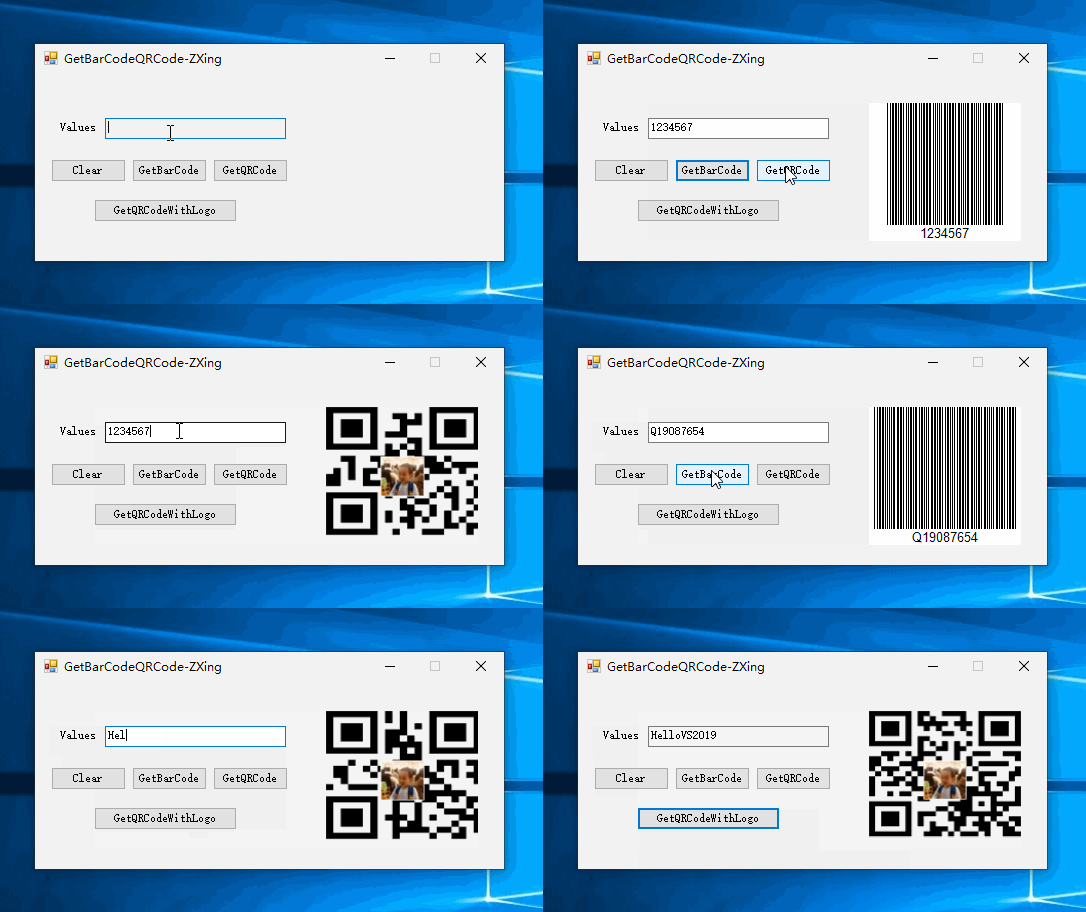
实现效果
参考资料 GitHub
作者:Jeremy.Wu
出处:https://www.cnblogs.com/jeremywucnblog/
本文版权归作者和博客园共有,欢迎转载,但未经作者同意必须保留此段声明,且在文章页面明显位置给出原文连接,否则保留追究法律责任的权利。