To achieve the requirement, you can refer to the following steps:
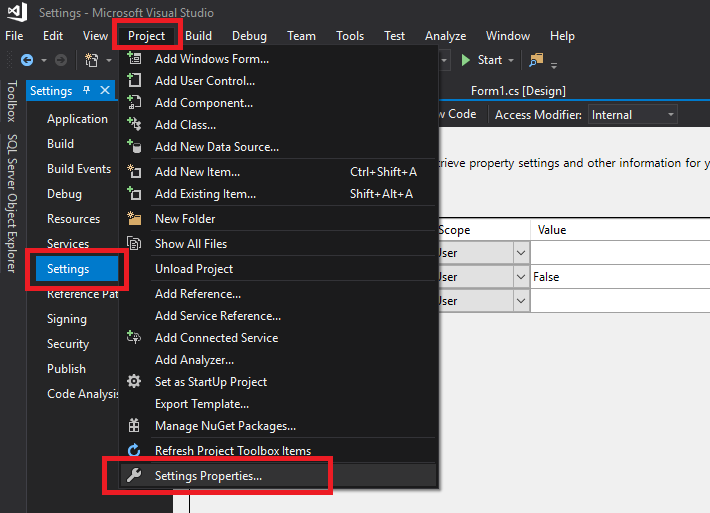
1.Click "Project" and choose "Setting Properties…", then choose "Settings".
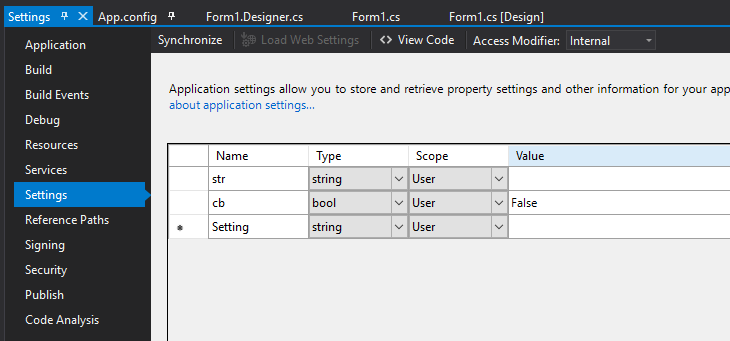
2.Add new setting in "Settings"
3.Try the following code:
private void Accept_Click(object sender, EventArgs e)
{
    Properties.Settings.Default.cb = checkBox1.Checked;
    Properties.Settings.Default.str = textBox1.Text;
    Properties.Settings.Default.Save();
}

private void LoadSetting_Click(object sender, EventArgs e)
{
    checkBox1.Checked = Properties.Settings.Default.cb;
    textBox1.Text = Properties.Settings.Default.str;
}

private void Cancel_Click(object sender, EventArgs e)
{
    Properties.Settings.Default.cb = false;
    Properties.Settings.Default.str = "";
    Properties.Settings.Default.Save();
}
Result:
