Microsoft released a best network monitoring tool recently. Its an good idea to use this product with your MS Operating systems since both from same place. This post explains how to monitor network traffic in windows 7 with latest Microsoft Network Monitor 3.4.
Sometimes, it will be very useful at home user level to check your network activity. When Windows 7 network slow, internet browsing very slow, connection problems and high network activity when you do nothing then this tool is very helpful.
Here is the way of Monitor Network Traffic in Windows 7
1) Download MS Network Monitor 3.4 from official site. ( Download correct version for x86 or x64)
2) Install it. You have to log out and log in to detect network adapters of your computer.
3) Once network adapters listed under ‘ Select Networks’ at left bottom corner, click on New Capture.
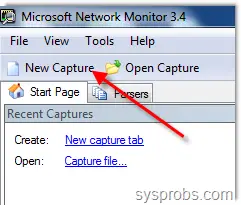
4) Press Start to start the monitoring. This will start to capture all outgoing and incoming network packet details in Windows 7. All details will be shown under Frame Summary.
You can view the programs that using network traffic under Network conversions.

5) Click on the program you want to monitor separately. For example, if you click Yahoo messenger, you can view its network activity under Frame Summery.
See Also
Best Network Stumbler for Windows 7
6) Another best part is filtering. Just select the type of network traffic you want to monitor in Windows 7 computer.
To enable filtering in Microsoft network monitor 3.4, click on Load Filters drop down button under Display Filter. Pre defined filers available under Standard Filters. Select the required type and press Apply. You can edit them and save as in different name too.

7) Don’t forget to press ‘Autoscroll’ button under Frame Summary to view activity without scrolling.

8.) You are ready to start monitoring.
These are the very basic methods, there are lot of advanced functions available on Network Monitor 3.4, try them.
I would recommend to use Microsoft Network Monitor 3.4 with Windows 7 to monitor network traffic on home or office computers. This works with almost all MS OS products including Windows 2008 R2.