还是处理视频下载所相关的问题。
有些网站,它的页面代码是由页面加载后js动态生成,那么其原始的html便不能用。页面渲染后的代码,是我们需要的
c#中,我用WebBrowser这个控件处理。设置项目类型为控制台程序,加Form承载WebBrowser实现。
记录代码以做备忘:
using System;
using System.IO;
using System.Net;
using System.Runtime.InteropServices;
using System.Text;
using System.Windows.Forms;
using Microsoft.Win32;

namespace crpj
{
    [ComVisible(true)]
    public class Form : System.Windows.Forms.Form
    {
        protected override void SetVisibleCore(bool value)
        {
            base.SetVisibleCore(false);
        }

        public string GetHtmlCode(string url)
        {
            using (var wc = new WebClient())
            {
                wc.Encoding = Encoding.UTF8;
                return wc.DownloadString(url);
            }
        }
    }

    class Program
    {
        private static Timer tmrGet = new Timer();
        private static Timer tmrExit = new Timer();
        private static WebBrowser browser = new WebBrowser();
        //延时获取?
        private static int delay = 0;
        //js注入脚本
        private static string jsCode;

        //禁止网页跳转声音
        const int FEATURE_DISABLE_NAVIGATION_SOUNDS = 21;
        const int SET_FEATURE_ON_PROCESS = 0x00000002;

        [DllImport("urlmon.dll")]
        [PreserveSig]
        [return: MarshalAs(UnmanagedType.Error)]
        static extern int CoInternetSetFeatureEnabled(
            int FeatureEntry,
            [MarshalAs(UnmanagedType.U4)] int dwFlags,
            bool fEnable);

        /// <summary>
        /// 应用程序的主入口点。
        /// </summary>
        /// 参数列表:url delay jscode
        [STAThread]
        static void Main(string[] args)
        {
            if (args.Length == 0)
            {
                Console.WriteLine("error: You must provide at least one URL.");
                return;
            }

            CoInternetSetFeatureEnabled(
                FEATURE_DISABLE_NAVIGATION_SOUNDS,
                SET_FEATURE_ON_PROCESS,
                true);
            ChackAndSetBrowserEmulation();

            var form = new Form();
            form.Controls.Add(browser);
            browser.ObjectForScripting = form;
            browser.ScriptErrorsSuppressed = true;
            browser.DocumentCompleted += browser_DocumentCompleted;
            browser.Navigate(args[0]);

            if (args.Length > 1)
                delay = int.Parse(args[1]);
            if (args.Length > 2)
                jsCode = args[2];

            //因为页面有时需加载js初始化等操作,延时获取其页面内容
            tmrGet.Tick += new EventHandler(tmrGet_Tick);
            if (delay > 0)
                tmrGet.Interval = delay;

            //有些网页不触发complete事件,或者时间很长,此定时器做判断,以60秒为界,自结束
            tmrExit.Tick += new EventHandler(tmrExit_Tick);
            tmrExit.Interval = 90000;
            tmrExit.Start();

            Application.Run(form);
        }

        static void tmrExit_Tick(object sender, EventArgs e)
        {
            OutputHtml();
        }

        //WebBrowser以IE11版本做页面渲染
        static void ChackAndSetBrowserEmulation()
        {
            try
            {
                string keyName = @"SOFTWAREMicrosoftInternet ExplorerMAINFeatureControlFEATURE_BROWSER_EMULATION";
                using (var key = Registry.CurrentUser.OpenSubKey(keyName, true))
                {
                    string valueName = Path.GetFileName(Application.ExecutablePath);
                    if (key.GetValue(valueName) == null)
                        key.SetValue(valueName, 11001);
                }
            }
            catch
            {
            }
        }

        static void tmrGet_Tick(object sender, EventArgs e)
        {
            tmrGet.Stop();
            OutputHtml();
        }

        static void OutputHtml()
        {
            tmrExit.Stop();
            //避免韩文等乱码
            Console.OutputEncoding = Encoding.UTF8;
            //browser.DocumentText取不到执行js之后的body文件
            string html = browser.Document.GetElementsByTagName("html")[0].OuterHtml;
            Console.Write(html);
            Application.Exit();
        }

        static void ExecJS(string jsCode)
        {
            var script = browser.Document.CreateElement("script");
            script.SetAttribute("type", "text/javascript");
            script.SetAttribute("text", "function _func() {" + jsCode + "}");
            browser.Document.Body.AppendChild(script);
            browser.Document.InvokeScript("_func");
        }

        static void browser_DocumentCompleted(object sender, WebBrowserDocumentCompletedEventArgs e)
        {
            if (browser.ReadyState == WebBrowserReadyState.Complete && e.Url == browser.Url)
            {
                //是否需要js注入?
                if (!string.IsNullOrEmpty(jsCode))
                {
                    ExecJS(jsCode);
                    System.Threading.Thread.Sleep(500);
                }

                if (delay == 0)
                    OutputHtml();
                else
                    tmrGet.Start();
            }
        }
    }
}
如此处理,可能得到所需要的html代码。
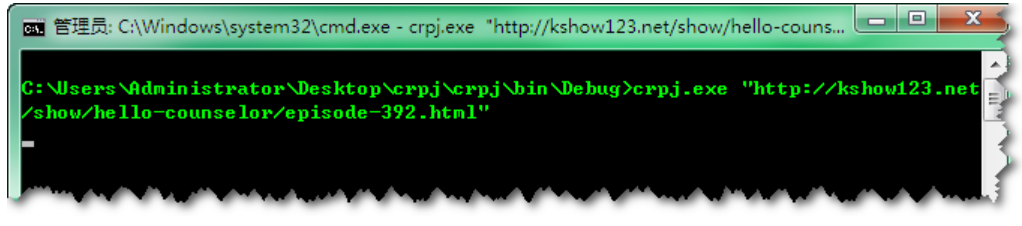
其在控制台输出图示效果

并基于此思路,设计进程输出管理器:
internal class ProcessOutputMgr
    {
        private static object syncObj = new Object();
        private Process process = new Process();
        private StringBuilder allData = new StringBuilder();
        private bool exitedCalled = false;

        public ProcessMgr(string fileName, string args)
        {
            var startInfo = new ProcessStartInfo(fileName);
            startInfo.WindowStyle = ProcessWindowStyle.Hidden;
            startInfo.Arguments = args;
            startInfo.UseShellExecute = false;
            startInfo.CreateNoWindow = true;
       //crpj皆以utf-8输出,避免乱码
       startInfo.StandardOutputEncoding = Encoding.UTF8;
            startInfo.RedirectStandardOutput = true;
            startInfo.RedirectStandardError = true;

            process.StartInfo = startInfo;
            process.EnableRaisingEvents = true;  //一定要有这个才能触发Exited 事件
            process.Exited += process_Exited;
            process.OutputDataReceived += process_OutputDataReceived;
            process.ErrorDataReceived += process_ErrorDataReceived;
        }

        public event DataReceivedEventHandler OutputDataReceived;
        public event DataReceivedEventHandler ErrorDataReceived;
        public event Action<string> AllDataReceived;

        public bool Start()
        {
            bool result = process.Start();
            process.BeginOutputReadLine();
            process.BeginErrorReadLine();
            return result;
        }

        public void WaitForExit()
        {
            process.WaitForExit();
        }

        public bool WaitForExit(int milliseconds)
        {
            return process.WaitForExit(milliseconds);
        }

        private void process_Exited(object sender, EventArgs e)
        {
            if (!this.exitedCalled && this.allData.Length != 0)
            {
                this.exitedCalled = true;
                var handler = AllDataReceived;
                if (handler != null)
                    handler(this.allData.ToString());
            }
        }

        private void process_OutputDataReceived(object sender, DataReceivedEventArgs e)
        {
            lock (syncObj)
            {
                var handler = OutputDataReceived;
                if (handler != null)
                    handler(sender, e);

                if (e.Data != null)
                    this.allData.AppendLine(e.Data);
                else
                {
                    var process = sender as Process;
                    if (process.HasExited && !this.exitedCalled)
                    {
                        this.exitedCalled = true;
                        if (AllDataReceived != null)
                            AllDataReceived(this.addData.ToString());
                    }
                }
            }
        }

        private void process_ErrorDataReceived(object sender, DataReceivedEventArgs e)
        {
            lock (syncObj)
            {
                var handler = ErrorDataReceived;
                if (handler != null)
                    handler(sender, e);
            }
        }
    }