|
要安装对应k8s版本的helm
|
tar -zxvf helm-v2.10.0-linux-amd64.tgz
mv linux-amd64/helm /usr/local/bin/helm
或脚本安装
安装Tiller服务端
helm init
|
|
遇到错误failed to list: configmaps is forbidden: User “system:serviceaccount:kube-system:default” cannot list configmaps in the namespace “kube-system” |
自Kubernetes 1.6版本开始,API Server启用了RBAC授权。而目前的Tiller部署没有定义授权的ServiceAccount,这会导致访问API Server时被拒绝。
我们可以采用如下方法,明确为Tiller部署添加授权。
kubectl create serviceaccount --namespace kube-system tiller
kubectl create clusterrolebinding tiller-cluster-rule --clusterrole=cluster-admin --serviceaccount=kube-system:tiller
kubectl patch deploy --namespace kube-system tiller-deploy -p '{"spec":{"template":{"spec":{"serviceAccount":"tiller"}}}}'
|
|
删除helm tiller
|
|
|
helm是为了配置分离, operator则是针对复杂应用的自动化管理 |
  Helm Chart : 应用包
安装: helm install <chart>
更新: helm upgrade <release>
删除: helm delete <release>
创建chart: helm create demoapp
chart结构:
 values.yaml:templates里面的文件从values文件中读取出来的变量
requirements:声明子chart,和charts同时使用
 使用另外的配置 ,覆盖部分默认变量
 |
|
Values.*的值可以来自以下 |
+ Values.yaml文件
如果是子chart,值来自父chart的values.yaml
+ 通过helm install -f标志的文件
+ 来自–set中的配置
|
|
helm yaml语法 |
{{ .Values.* }}
从value.yaml文件中读取
{{ .Release.* }}
从运行Release的元数据读取
{{ .Template.* }} {{ .Chart.* }}
从Chart.yaml文件中读取
{{ .Files.* }}
一、文件数量少情况下:
在chart的根目录下有三个文件
 在模板文件中使用
 二、文件多情况下:
 {{ .Capabilities.* }}
{{quote }}
{{ quote .Values.favorite.drink }}
是最常用的模板函数,它能把ABC转化为“ABC”。它带一个参数
{{ template }} {{ include }}
1、 先在_helpers.tpl中定义命名模板
 2、使用命名模版
 3、渲染后
 {{ |default }}
drink: {{ .Values.favorite.drink | default “tea” | quote }}
如果在values中无法找到favorite.drink,则配置为“tea”。
{{ |indent }}
{{ include "mychart_app" . | indent 2 }}
对左空出空格
|
| 在这个循环中使用.Values | 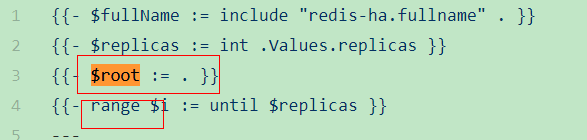
|