1.1 dialer拨号
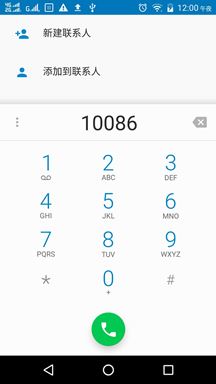
拨号盘点击拨号DialpadFragment的onClick方法会被调用
public void onClick(View view) {
        int resId = view.getId();
        if (resId == R.id.dialpad_floating_action_button) {
            view.performHapticFeedback(HapticFeedbackConstants.VIRTUAL_KEY);
            handleDialButtonPressed();
        } else if (resId == R.id.deleteButton) {
            keyPressed(KeyEvent.KEYCODE_DEL);
        } else if (resId == R.id.digits) {
            if (!isDigitsEmpty()) {
                mDigits.setCursorVisible(true);
            }
        } else if (resId == R.id.dialpad_overflow) {
            mOverflowPopupMenu.show();
        } else {
            Log.wtf(TAG, "Unexpected onClick() event from: " + view);
            return;
        }
}
handleDialButtonPressed方法处理具体的拨号事件
private void handleDialButtonPressed() {
            ............
            ............
         DialerUtils.startActivityWithErrorToast(getActivity(), intent);
         hideAndClearDialpad(false);
}
跟踪DialerUtils的startActivityWithErrorToast方法,内部判断了一些是否有拨号权限的判断后,最后调用TelecomManagerCompat的placeCall事件
public static void placeCall(@Nullable Activity activity,
            @Nullable TelecomManager telecomManager, @Nullable Intent intent) {
        if (activity == null || telecomManager == null || intent == null) {
            return;
        }
        if (CompatUtils.isMarshmallowCompatible()) {
            telecomManager.placeCall(intent.getData(), intent.getExtras());
            return;
        }
        activity.startActivityForResult(intent, 0);
    }
这里根据当前系统版本如果是大于等于6.0,则调用TelecomManager的placeCall,否则直接调用startActivity呼出该intent
看看TelecomManager的placeCall方法
android.telecom. TelecomManager
public void placeCall(Uri address, Bundle extras) {
        ITelecomService service = getTelecomService();
        if (service != null) {
            if (address == null) {
                Log.w(TAG, "Cannot place call to empty address.");
            }
            try {
                service.placeCall(address, extras == null ? new Bundle() : extras, mContext.getOpPackageName());
            } catch (RemoteException e) {
                Log.e(TAG, "Error calling ITelecomService#placeCall", e);
            }
        }
}
通过aidl接口调用ITelecomService的placeCall方法
1.2 telecomService处理拨号事件
TelecomServiceImpl里的mBinderImpl变量是ITelecomService的具体实现类
com.android.server.telecom. TelecomServiceImpl
private final ITelecomService.Stub mBinderImpl = new ITelecomService.Stub() {

  @Override
       public void placeCall(Uri handle, Bundle extras, String callingPackage) {
        ………………………………
         ………………………………
         final UserHandle userHandle = Binder.getCallingUserHandle();
        long token = Binder.clearCallingIdentity();
        final Intent intent = new Intent(Intent.ACTION_CALL, handle);
        if (extras != null) {
             extras.setDefusable(true);
             intent.putExtras(extras);
             mUserCallIntentProcessorFactory.create(mContext, userHandle).processIntent
             (intent, callingPackage, hasCallAppOp && hasCallPermission);
        }
}
这里创建了一个UserCallIntentProcessor对象,并调用其processIntent事件处理,前面提到android 6.0以下用startActivity启动拨号,三方应用拨号都是用这种方式,启动的也是telecom里的UserCallActivity类,同样也是通过UserCallIntentProcessor处理相关事件
com.android.server.telecom.components.UserCallIntentProcessor
    public void processIntent(Intent intent, String callingPackageName,
            boolean canCallNonEmergency) {
        // Ensure call intents are not processed on devices that are not capable of calling.
        if (!isVoiceCapable()) {
            return;
        }

        String action = intent.getAction();

        if (Intent.ACTION_CALL.equals(action) ||
                Intent.ACTION_CALL_PRIVILEGED.equals(action) ||
                Intent.ACTION_CALL_EMERGENCY.equals(action)) {
            processOutgoingCallIntent(intent, callingPackageName, canCallNonEmergency);
        }
}
进入processOutgoingCallIntent方法
private void processOutgoingCallIntent(Intent intent, String callingPackageName,
            boolean canCallNonEmergency) {
    ………………………………
     ………………………………

    sendBroadcastToReceiver(intent);
}
内部校验一些是否能拨号权限以及其它操作限制看是否需要直接弹框拒绝,如果都通过了最后会调用sendBroadcastToReceiver方法发送广播
private boolean sendBroadcastToReceiver(Intent intent) {
       intent.putExtra(CallIntentProcessor.KEY_IS_INCOMING_CALL, false);
       intent.setFlags(Intent.FLAG_RECEIVER_FOREGROUND);
       intent.setClass(mContext, PrimaryCallReceiver.class);
       Log.d(this, "Sending broadcast as user to CallReceiver");
       mContext.sendBroadcastAsUser(intent, UserHandle.SYSTEM);
       return true;
}
该广播直接指定发给PrimaryCallReceiver处理
com.android.server.telecom.components. PrimaryCallReceiver
   public void onReceive(Context context, Intent intent) {
        Log.startSession("PCR.oR");
        synchronized (getTelecomSystem().getLock()) {
            getTelecomSystem().getCallIntentProcessor().processIntent(intent);
        }
        Log.endSession();
}
接着调用CallIntentProcessor. processIntent(intent)
com.android.server.telecom. CallIntentProcessor
public void processIntent(Intent intent) {
        final boolean isUnknownCall = intent.getBooleanExtra(KEY_IS_UNKNOWN_CALL, false);
        Log.i(this, "onReceive - isUnknownCall: %s", isUnknownCall);

        Trace.beginSection("processNewCallCallIntent");
        if (isUnknownCall) {
            processUnknownCallIntent(mCallsManager, intent);
        } else {
            processOutgoingCallIntent(mContext, mCallsManager, intent);
        }
        Trace.endSection();
  }
如果是未知号码如空号由processUnknownCallIntent方法处理
否则调用processOutgoingCallIntent方法
static void processOutgoingCallIntent(Context context, CallsManager callsManager, Intent intent) {
       ………………………………
        ………………………………

        // Send to CallsManager to ensure the InCallUI gets kicked off before the broadcast returns
        Call call = callsManager.startOutgoingCall(handle, phoneAccountHandle, clientExtras, initiatingUser);
        if (call != null) {
              NewOutgoingCallIntentBroadcaster broadcaster = new NewOutgoingCallIntentBroadcaster(
              context, callsManager, call, intent, new PhoneNumberUtilsAdapterImpl(), isPrivilegedDialer);
final int result = broadcaster.processIntent();
              final boolean success = result == DisconnectCause.NOT_DISCONNECTED;
              if (!success && call != null) {
                 disconnectCallAndShowErrorDialog(context, call, result);
              }
        }
}
方法内部获取一些拨号参数,比如是否视频通话,调用者是否是默认拨号盘应用等,然后调用callsManager的startOutgoingCall方法得到一个call对象,这是一个很重要的方法,来看看它的实现:
Call startOutgoingCall(Uri handle, PhoneAccountHandle phoneAccountHandle, Bundle extras,
            UserHandle initiatingUser) {
        boolean isReusedCall = true;
        Call call = reuseOutgoingCall(handle);

        // 创建一个call对象
        if (call == null) {
            call = new Call(getNextCallId(), mContext,
                    this,
                    mLock,
                    mConnectionServiceRepository,
                    mContactsAsyncHelper,
                    mCallerInfoAsyncQueryFactory,
                    handle,
                    null /* gatewayInfo */,
                    null /* connectionManagerPhoneAccount */,
                    null /* phoneAccountHandle */,
                    Call.CALL_DIRECTION_OUTGOING /* callDirection */,
                    false /* forceAttachToExistingConnection */,
                    false /* isConference */
            );
            call.setInitiatingUser(initiatingUser);

            call.initAnalytics();

            isReusedCall = false;
        }

           ...... ...... ......
           ...... ...... ......
        List<PhoneAccountHandle> accounts = constructPossiblePhoneAccounts(handle, initiatingUser);       // 获取当前激活的卡列表
         Log.v(this, "startOutgoingCall found accounts = " + accounts);

        if (phoneAccountHandle != null) {
            if (!accounts.contains(phoneAccountHandle)) {
                phoneAccountHandle = null;
            }
        }


       // 获取当前应该使用哪张卡呼出
         if (phoneAccountHandle == null && accounts.size() > 0 && !call.isEmergencyCall()) {
            // No preset account, check if default exists that supports the URI scheme for the
            // handle and verify it can be used.
            if(accounts.size() > 1) {
                  // 双激活卡下取通话主卡账户,没有通话主卡则为空
                    PhoneAccountHandle defaultPhoneAccountHandle = mPhoneAccountRegistrar.getOutgoingPhoneAccountForScheme(handle.getScheme(),
                                initiatingUser);
                if (defaultPhoneAccountHandle != null && accounts.contains(defaultPhoneAccountHandle)) {
                    phoneAccountHandle = defaultPhoneAccountHandle;
                }
            } else {
                // Use the only PhoneAccount that is available
                // 单激活卡直接取该卡账户)
                   phoneAccountHandle = accounts.get(0);
            }

        }

        call.setTargetPhoneAccount(phoneAccountHandle); // 设置当前通话账户
         boolean isPotentialInCallMMICode = isPotentialInCallMMICode(handle);

        // 检查当前是否允许呼出该电话,比如当前已有一通电话在正在呼出,
        // 这时候不允许再呼出一路通话(紧急号码除外)
        if (!isPotentialInCallMMICode && (!isReusedCall &&
                !makeRoomForOutgoingCall(call, call.isEmergencyCall()))) {
            // just cancel at this point.
            Log.i(this, "No remaining room for outgoing call: %s", call);
            if (mCalls.contains(call)) {
                // This call can already exist if it is a reused call,
                // See {@link #reuseOutgoingCall}.
                call.disconnect();
            }
            return null;
        }

       // 是否需要弹出双卡选择框(双卡下没有指定账户呼出非紧急号码且当前无通话主卡)
        boolean needsAccountSelection = phoneAccountHandle == null && accounts.size() > 1 && !call.isEmergencyCall();

        if (needsAccountSelection) {
          // 设置当前call状态为等待账户选择
            // This is the state where the user is expected to select an account
            call.setState(CallState.SELECT_PHONE_ACCOUNT, "needs account selection");
            // Create our own instance to modify (since extras may be Bundle.EMPTY)
            extras = new Bundle(extras);
            extras.putParcelableList(android.telecom.Call.AVAILABLE_PHONE_ACCOUNTS, accounts);
        } else {
           // 设置当前call状态为正在连接
            call.setState(CallState.CONNECTING, phoneAccountHandle == null ? "no-handle" : phoneAccountHandle.toString());
        }

        setIntentExtrasAndStartTime(call, extras);

        // Do not add the call if it is a potential MMI code.
        if((isPotentialMMICode(handle)||isPotentialInCallMMICode)&& !needsAccountSelection){
            call.addListener(this);
         } else if (!mCalls.contains(call)) {
            // We check if mCalls already contains the call because we could potentially be reusing
            // a call which was previously added (See {@link #reuseOutgoingCall}).
addCall(call);
            // 添加当前call到call列表
          }
        return call;
}
看看addCall的具体实现:
private void addCall(Call call) {
        Trace.beginSection("addCall");
        Log.v(this, "addCall(%s)", call);
        call.addListener(this);
        mCalls.add(call);

        // Specifies the time telecom finished routing the call. This is used by the dialer for
        // analytics.
        Bundle extras = call.getIntentExtras();
        extras.putLong(TelecomManager.EXTRA_CALL_TELECOM_ROUTING_END_TIME_MILLIS,
                SystemClock.elapsedRealtime());

        updateCallsManagerState();
        // onCallAdded for calls which immediately take the foreground (like the first call).
        for (CallsManagerListener listener : mListeners) {
            if (Log.SYSTRACE_DEBUG) {
                Trace.beginSection(listener.getClass().toString() + " addCall");
            }
            listener.onCallAdded(call);
            if (Log.SYSTRACE_DEBUG) {
                Trace.endSection();
            }
        }
        Trace.endSection();
    }
这里会遍历call状态变化的观察者并逐个回调通知,这里的观察者比较多,在callsManager创建的时候注册监听的
mListeners.add(mInCallWakeLockController);
        mListeners.add(statusBarNotifier);
        mListeners.add(mCallLogManager);
        mListeners.add(mPhoneStateBroadcaster);
        mListeners.add(mInCallController);
        mListeners.add(mCallAudioManager);
        mListeners.add(missedCallNotifier);
        mListeners.add(mHeadsetMediaButton);
        mListeners.add(mProximitySensorManager);
这里说一下mInCallController这个对象,是一个InCallController实例,内部封装了与incallui服务的相关操作,实际上就是一个远程服务代理类,当callsmanager添加一路call时, 回调InCallController的onCallAdded方法,如下:
public void onCallAdded(Call call) {
        if (!isBoundToServices()) {
            bindToServices(call);
        } else {
            adjustServiceBindingsForEmergency();

            Log.i(this, "onCallAdded: %s", System.identityHashCode(call));
            // Track the call if we don't already know about it.
            addCall(call);
         for (Map.Entry<ComponentName, IInCallService> entry : mInCallServices.entrySet()) {
                ComponentName componentName = entry.getKey();
                IInCallService inCallService = entry.getValue();
                ParcelableCall parcelableCall = ParcelableCallUtils.toParcelableCall(call, true /* includeVideoProvider */, mCallsManager.getPhoneAccountRegistrar());
                 try {
                        inCallService.addCall(parcelableCall);
                 } catch (RemoteException ignored) {
                 }
            }
        }
    }
最后调用inCallService的addCall方法告诉incallui当前添加了一路通话,incallui收到后会拉起界面,具体过程在此就不详述了,OK回到前面startOutgoingCall的结尾
在成功返回一个call对象之后,新建一个NewOutgoingCallIntentBroadcaster对象,用processIntent方法处理请求
com.android.server.telecom. NewOutgoingCallIntentBroadcaster
public int processIntent() {
        ………………………………
        ………………………………
         final boolean isPotentialEmergencyNumber = isPotentialEmergencyNumber(number);
        rewriteCallIntentAction(intent, isPotentialEmergencyNumber);
        action = intent.getAction();
        boolean callImmediately = false;

        if (Intent.ACTION_CALL.equals(action)) {
            if (isPotentialEmergencyNumber) {
                if (!mIsDefaultOrSystemPhoneApp) {
                    launchSystemDialer(intent.getData());
                    return DisconnectCause.OUTGOING_CANCELED;
                } else {
                    callImmediately = true;
                }
            }
        } else if (Intent.ACTION_CALL_EMERGENCY.equals(action)) {
            if (!isPotentialEmergencyNumber) {
                return DisconnectCause.OUTGOING_CANCELED;
            }
            callImmediately = true;
        } else {
            return DisconnectCause.INVALID_NUMBER;
        }

       if (callImmediately) {
            String scheme = isUriNumber ? PhoneAccount.SCHEME_SIP : PhoneAccount.SCHEME_TEL;
            boolean speakerphoneOn = mIntent.getBooleanExtra(
                    TelecomManager.EXTRA_START_CALL_WITH_SPEAKERPHONE, false);
            int videoState = mIntent.getIntExtra(
                    TelecomManager.EXTRA_START_CALL_WITH_VIDEO_STATE,
                    VideoProfile.STATE_AUDIO_ONLY);
            mCallsManager.placeOutgoingCall(mCall, Uri.fromParts(scheme, number, null), null, speakerphoneOn, videoState);
        }

        UserHandle targetUser = mCall.getInitiatingUser();
        broadcastIntent(intent, number, !callImmediately, targetUser);
        return DisconnectCause.NOT_DISCONNECTED;
}
该方法主要处理三种类型的call:
普通call Intent.ACTION_CALL
系统call Intent.ACTION_CALL_PRIVILEGED
紧急呼叫call Intent.ACTION_CALL_EMERGENCY
普通call任何应用都可以发起,第三方应用拨号都是使用该intent
系统call只有系统应用才能使用
紧急呼叫call 同样只有系统应用才能使用,并且可以在无卡状态下呼出
对于一个Intent.ACTION_CALL_PRIVILEGED的拨号请求,会根据当前号码是否为紧急号码来转化该intent
private void rewriteCallIntentAction(Intent intent, boolean isPotentialEmergencyNumber) {
        String action = intent.getAction();
        if (Intent.ACTION_CALL_PRIVILEGED.equals(action)) {
            if (isPotentialEmergencyNumber) {

                action = Intent.ACTION_CALL_EMERGENCY;
            } else {
                action = Intent.ACTION_CALL;
            }
            intent.setAction(action);
       }
}
如果是紧急号码则转化为Intent.ACTION_CALL_EMERGENCY
如果不是紧急号码则转化为Intent.ACTION_CALL
所以实际上处理call只有两种情况Intent.ACTION_CALL和Intent.ACTION_CALL_EMERGENCY
1.对于Intent.ACTION_CALL的处理:
如果当前是紧急号码,会校验调用者是否为系统默认拨号盘
如果是则置变量callImmediately为true,后续直接呼出该电话
如果不是则拉起系统默认拨号盘,当前方法调用返回DisconnectCause.OUTGOING_CANCELED
2. 对于Intent.ACTION_CALL_EMERGENCY的处理:
直接设置变量callImmediately为true,直接呼出该电话
综上所述紧急拨号会直接调用CallsManager的placeOutgoingCall方法后再进入broadcastIntent方法,看看该方法实现
private void broadcastIntent(Intent originalCallIntent,  String number,
                        boolean receiverRequired, UserHandle targetUser) {
        Intent broadcastIntent = new Intent(Intent.ACTION_NEW_OUTGOING_CALL);
        if (number != null) {
            broadcastIntent.putExtra(Intent.EXTRA_PHONE_NUMBER, number);
        }
        broadcastIntent.addFlags(Intent.FLAG_RECEIVER_FOREGROUND);
        checkAndCopyProviderExtras(originalCallIntent, broadcastIntent);
        mContext.sendOrderedBroadcastAsUser(
                broadcastIntent,
                targetUser,
                android.Manifest.permission.PROCESS_OUTGOING_CALLS,
                AppOpsManager.OP_PROCESS_OUTGOING_CALLS,
                receiverRequired ? new NewOutgoingCallBroadcastIntentReceiver() : null,
                null,  // scheduler
                Activity.RESULT_OK,  // initialCode
                number,  // initialData: initial value for the result data (number to be modified)
                null);  // initialExtras
    }
发送一个Intent.ACTION_NEW_OUTGOING_CALL广播,对于非紧急拨号,才会生成一个
NewOutgoingCallBroadcastIntentReceive 实例来接收该广播
NewOutgoingCallBroadcastIntentReceiver内部做了一些处理后最后还是调用到CallsManager
的placeOutgoingCall方法,所以该方法是去电的关键方法
com.android.server.telecom. CallsManager
public void placeOutgoingCall(Call call, Uri handle, GatewayInfo gatewayInfo,
            boolean speakerphoneOn, int videoState) {
        ………………………………
        ………………………………
        if (call.isEmergencyCall()) {
            // Emergency -- CreateConnectionProcessor will choose accounts automatically
            // 如果是紧急号码,则取消已指定的通话卡账户
            call.setTargetPhoneAccount(null);
            new AsyncEmergencyContactNotifier(mContext).execute();
        }

        Final Boolean requireCallCapableAccountByHandle = mContext.getResources().getBoolean(
                com.android.internal.R.bool.config_requireCallCapableAccountForHandle);
        if (call.getTargetPhoneAccount() != null || call.isEmergencyCall()) {
            // If the account has been set, proceed to place the outgoing call.
            // Otherwise the connection will be initiated when the account is set by the user.
            // 如果是紧急号码或者已指定通话账户,则创建连接
            call.startCreateConnection(mPhoneAccountRegistrar);
        } else if (mPhoneAccountRegistrar.getCallCapablePhoneAccounts(
           requireCallCapableAccountByHandle ? call.getHandle().getScheme() : null, false, call.getInitiatingUser()).isEmpty()) {
          // 如果当前没有激活的卡,则断开此连接
            // If there are no call capable accounts, disconnect the call.
            markCallAsDisconnected(call, new DisconnectCause(DisconnectCause.CANCELED,
                    "No registered PhoneAccounts"));
            markCallAsRemoved(call);
        }
}
该方法内部做了一些设置操作后,确认可以呼出则call的startCreateConnection方法
com.android.server.telecom.call
 void startCreateConnection(PhoneAccountRegistrar phoneAccountRegistrar) {
        if (mCreateConnectionProcessor != null) {
            return;
        }
        mCreateConnectionProcessor = new CreateConnectionProcessor(this, mRepository, this, phoneAccountRegistrar, mContext);
        mCreateConnectionProcessor.process();
}
新建了一个CreateConnectionProcessor对象,处理连接请求
com.android.server.telecom. CreateConnectionProcessor
public void process() {
        Log.v(this, "process");
        clearTimeout();
        mAttemptRecords = new ArrayList<>();
        if (mCall.getTargetPhoneAccount() != null) {
            mAttemptRecords.add(new CallAttemptRecord(
                    mCall.getTargetPhoneAccount(), mCall.getTargetPhoneAccount()));
        }
        adjustAttemptsForConnectionManager();
        adjustAttemptsForEmergency();
        mAttemptRecordIterator = mAttemptRecords.iterator();
        attemptNextPhoneAccount();
}
进入attemptNextPhoneAccount方法
private void attemptNextPhoneAccount() {
        ………………………………
        ………………………………

        if (mCallResponse != null && attempt != null) {
         PhoneAccountHandle phoneAccount = attempt.connectionManagerPhoneAccount;
         // 获取ConnectionServiceWrapper对象
          mService = mRepository.getService(phoneAccount.getComponentName(),
                    phoneAccount.getUserHandle());
            if (mService == null) {
                 attemptNextPhoneAccount();
            } else {
               mCall.setConnectionManagerPhoneAccount(attempt.connectionManagerPhoneAccount);
                mCall.setTargetPhoneAccount(attempt.targetPhoneAccount);
                mCall.setConnectionService(mService);
                setTimeoutIfNeeded(mService, attempt);
             // 已成功获取ConnectionServiceWrapper对象,创建连接
mService.createConnection(mCall, this);
            }
        } else {
            DisconnectCause disconnectCause = mLastErrorDisconnectCause != null ?
                    mLastErrorDisconnectCause : new DisconnectCause(DisconnectCause.ERROR);
            notifyCallConnectionFailure(disconnectCause);
        }
}
这里的mService是ConnectionServiceWrapper实例,实际上就是一个包装了绑定远程服务的代理类,看看它的构造方法
看看ConnectionServiceWrapper的构造函数
ConnectionServiceWrapper(
            ComponentName componentName,
            ConnectionServiceRepository connectionServiceRepository,
            PhoneAccountRegistrar phoneAccountRegistrar,
            CallsManager callsManager,
            Context context,
            TelecomSystem.SyncRoot lock,
            UserHandle userHandle) {
        super(ConnectionService.SERVICE_INTERFACE, componentName, context, lock, userHandle);
        mConnectionServiceRepository = connectionServiceRepository;
        phoneAccountRegistrar.addListener(new PhoneAccountRegistrar.Listener() {
            // TODO -- Upon changes to PhoneAccountRegistrar, need to re-wire connections
            // To do this, we must proxy remote ConnectionService objects
        });
        mPhoneAccountRegistrar = phoneAccountRegistrar;
        mCallsManager = callsManager;
    }
这里的ConnectionService.SERVICE_INTERFACE就是"android.telecom.ConnectionService"
也就是它所绑定的远程服务的action
获取该对象后调用createConnection方法
com.android.server.telecom. ConnectionServiceWrapper
    public void createConnection(final Call call, final CreateConnectionResponse response) {
        Log.d(this, "createConnection(%s) via %s.", call, getComponentName());
        BindCallback callback = new BindCallback() {
            @Override
            public void onSuccess() {
                ...... ...... ...... ......
                ...... ...... ...... ......
                try {
                    mServiceInterface.createConnection(
                            call.getConnectionManagerPhoneAccount(),
                            callId,
                            new ConnectionRequest(
                                    call.getTargetPhoneAccount(),
                                    call.getHandle(),
                                    extras,
                                    call.getVideoState(),
                                    callId),
                            call.shouldAttachToExistingConnection(),
                            call.isUnknown());
                }
                ...... ...... ...... ......

            @Override
            public void onFailure() {
                Log.e(this, new Exception(), "Failure to call %s", getComponentName());
                  response.handleCreateConnectionFailure(new DisconnectCause(DisconnectCause.ERROR));
            }
        };

        mBinder.bind(callback, call);
    }
这里的mBinder对象是ConnectionServiceWrapper的父类ServiceBinder里的一个内部类
封装了绑定远程服务的一些操作,若当前还未绑定服务,则直接调用bindService获取远程服务的aidl接口,成功获取到aidl接口后将其赋值给mServiceInterface,如下:
@Override
protected void setServiceInterface(IBinder binder) {
if (binder == null) {
// We have lost our service connection. Notify the world that this service is done.
// We must notify the adapter before CallsManager. The adapter will force any pending
// outgoing calls to try the next service. This needs to happen before CallsManager
// tries to clean up any calls still associated with this service.
            handleConnectionServiceDeath();
            mCallsManager.handleConnectionServiceDeath(this);
            mServiceInterface = null;
        } else {
            mServiceInterface = IConnectionService.Stub.asInterface(binder);
            addConnectionServiceAdapter(mAdapter);
        }
    }
最终不管是初次绑定还是之前已绑定服务,调用 mBinder.bind(callback, call)成功后都会回到Callback的onSuccess方法,接着调用远程服务的createConnection方法
mServiceInterface.createConnection(
                call.getConnectionManagerPhoneAccount(),
                callId,
                new ConnectionRequest(
                      call.getTargetPhoneAccount(),
                      call.getHandle(),
                      extras,
                      call.getVideoState(),
                      callId),
                      call.shouldAttachToExistingConnection(),
                      call.isUnknown());
接下来的流程就到了远程服务的createConnection实现了
1.3 telecomFramework处理连接请求
查找IConnectionService的实现类,是ConnectionService的匿名内部类
android.telecom. ConnectionService
  private final IBinder mBinder = new IConnectionService.Stub() {

       @Override
        public void createConnection(
                PhoneAccountHandle connectionManagerPhoneAccount,
                String id,
                ConnectionRequest request,
                boolean isIncoming,
                boolean isUnknown) {
            SomeArgs args = SomeArgs.obtain();
            args.arg1 = connectionManagerPhoneAccount;
            args.arg2 = id;
            args.arg3 = request;
            args.argi1 = isIncoming ? 1 : 0;
            args.argi2 = isUnknown ? 1 : 0;
            mHandler.obtainMessage(MSG_CREATE_CONNECTION, args).sendToTarget();
        }
}
Handle处理消息最后进入createConnection方法
private void createConnection(final PhoneAccountHandle callManagerAccount,
            final String callId, final ConnectionRequest request, boolean isIncoming,  boolean isUnknown) {

        Connection connection = isUnknown ? onCreateUnknownConnection(callManagerAccount, request): isIncoming ?
            onCreateIncomingConnection(callManagerAccount, request) : onCreateOutgoingConnection(callManagerAccount, request); //去电事件在这里
         Log.d(this, "createConnection, connection: %s", connection);

        if (connection == null) { //创建连接失败
            connection = Connection.createFailedConnection(
                    new DisconnectCause(DisconnectCause.ERROR));
        }

        connection.setTelecomCallId(callId);
        if (connection.getState() != Connection.STATE_DISCONNECTED) {
            addConnection(callId, connection); //创建连接成功,添加到队列
         }

        Uri address = connection.getAddress();
        String number = address == null ? "null" : address.getSchemeSpecificPart();
        Log.v(this, "createConnection, number: %s, state: %s, capabilities: %s, properties: %s",
                Connection.toLogSafePhoneNumber(number),
                Connection.stateToString(connection.getState()),
                Connection.capabilitiesToString(connection.getConnectionCapabilities()),
                Connection.propertiesToString(connection.getConnectionProperties()));

        Log.d(this, "createConnection, calling handleCreateConnectionSuccessful %s", callId);
        mAdapter.handleCreateConnectionComplete(
                callId,
                request,
                new ParcelableConnection(
                        request.getAccountHandle(),
                        connection.getState(),
                        connection.getConnectionCapabilities(),
                        connection.getConnectionProperties(),
                        connection.getAddress(),
                        connection.getAddressPresentation(),
                        connection.getCallerDisplayName(),
                        connection.getCallerDisplayNamePresentation(),
                        connection.getVideoProvider() == null ?
                                null : connection.getVideoProvider().getInterface(),
                        connection.getVideoState(),
                        connection.isRingbackRequested(),
                        connection.getAudioModeIsVoip(),
                        connection.getConnectTimeMillis(),
                        connection.getStatusHints(),
                        connection.getDisconnectCause(),
                        createIdList(connection.getConferenceables()),
                        connection.getExtras(),
                        connection.getUserData()));//MOTO Calling Code - IKPIM-1774 (ftr 33860)
        if (isUnknown) {
            triggerConferenceRecalculate();
        }
}
这里根据来电或去掉创建不同的Connection对象,去电走onCreateOutgoingConnection流程,该方法返回null,所以具体是由其子类实现的,也就是TelephonyConnectionService
1.4 telephonyService创建呼出连接
public Connection onCreateOutgoingConnection(
            PhoneAccountHandle connectionManagerPhoneAccount,
            final ConnectionRequest request) {
        Log.i(this, "onCreateOutgoingConnection, request: " + request);

        ............. .............
        ............ .............
        // 这里会有很多情况会直接返回连接错误,比如未指定卡账户拨打语音信息,
         // 或者拨打的号码为空,指定卡被禁用(非紧急拨号)等

        final TelephonyConnection connection =
        createConnectionFor(phone, null, true /* isOutgoing */, request.getAccountHandle(),
               request.getTelecomCallId(), request.getAddress());
              ............ .............
             placeOutgoingConnection(connection, phone, request);
        }

        return connection;
    }
方法内部作了很多预处理,如果失败则直接返回错误连接对象failedConnection,如果成功则创建一个TelephonyConnection对象,看看该对象是如何创建的:
private TelephonyConnection createConnectionFor(
            Phone phone, com.android.internal.telephony.Connection originalConnection,
            boolean isOutgoing,PhoneAccountHandle phoneAccountHandle,
            String telecomCallId, Uri address) {
        TelephonyConnection returnConnection = null;
        int phoneType = phone.getPhoneType();
        if (phoneType == TelephonyManager.PHONE_TYPE_GSM) {
            returnConnection = new GsmConnection(originalConnection, telecomCallId);
        } else if (phoneType == TelephonyManager.PHONE_TYPE_CDMA) {
            boolean allowsMute = allowsMute(phone);
            returnConnection = new CdmaConnection(originalConnection, mEmergencyTonePlayer,  allowsMute, isOutgoing, telecomCallId);
        }
        if (returnConnection != null) {
            // Listen to Telephony specific callbacks from the connection
            returnConnection.addTelephonyConnectionListener(mTelephonyConnectionListener);
            returnConnection.setVideoPauseSupported(
                    TelecomAccountRegistry.getInstance(this).isVideoPauseSupported(
                            phoneAccountHandle));
            boolean isEmergencyCall = (address != null && PhoneNumberUtils.isEmergencyNumber(
                    address.getSchemeSpecificPart()));
            returnConnection.setConferenceSupported(!isEmergencyCall
                    && TelecomAccountRegistry.getInstance(this).isMergeCallSupported(
                            phoneAccountHandle));
        }
        return returnConnection;
如果是GSM,则创建GsmConnection对象,如果是CDMA,则创建CdmaConnection对象,获取到对象connection对象后,最后调用placeOutgoingConnection(connection, phone, request);进入呼出流程
private void placeOutgoingConnection(
            TelephonyConnection connection, Phone phone, ConnectionRequest request) {
        String number = connection.getAddress().getSchemeSpecificPart();

        com.android.internal.telephony.Connection originalConnection;
        try {
            originalConnection
= phone.dial(number, null, request.getVideoState(), request.getExtras());
        } catch (CallStateException e) {
            Log.e(this, e, "placeOutgoingConnection, phone.dial exception: " + e);
            int cause = android.telephony.DisconnectCause.OUTGOING_FAILURE;
            if (e.getError() == CallStateException.ERROR_DISCONNECTED) {
                cause = android.telephony.DisconnectCause.OUT_OF_SERVICE;
            }
            connection.setDisconnected(DisconnectCauseUtil.toTelecomDisconnectCause(
                    cause, e.getMessage()));
            return;
        }
          ………………………………
          ………………………………

}
这里的originalConnection = phone.dial(number, null, request.getVideoState(), request.getExtras());就是实际的phone呼出入口,由此进入telephonyFramework模块
1.5 telepnonyFramework处理phone呼出
在android N上,cdma和gsm都由GsmCdmaPhone对象统一处理,看看dial的实现:
com.android.internal.telephony.GsmCdmaPhone
public Connection dial(String dialString, UUSInfo uusInfo, int videoState, Bundle intentExtras)
            throws CallStateException {
            ………………………………
            ………………………………

        if ((imsUseEnabled && (!isUt || useImsForUt)) || useImsForEmergency) {
            try {
                if (DBG) logd("Trying IMS PS call");
                return imsPhone.dial(dialString, uusInfo, videoState, intentExtras);
            } catch (CallStateException e) {
                if (DBG) logd("IMS PS call exception " + e +
                        "imsUseEnabled =" + imsUseEnabled + ", imsPhone =" + imsPhone);
                if (!Phone.CS_FALLBACK.equals(e.getMessage())) {
                    CallStateException ce = new CallStateException(e.getMessage());
                    ce.setStackTrace(e.getStackTrace());
                    throw ce;
                }
            }
        }

        if (mSST != null && mSST.mSS.getState() == ServiceState.STATE_OUT_OF_SERVICE
                && mSST.mSS.getDataRegState() != ServiceState.STATE_IN_SERVICE && !isEmergency) {
            throw new CallStateException("cannot dial in current state");
        }
        if (DBG) logd("Trying (non-IMS) CS call");

        if (isPhoneTypeGsm()) {
            return dialInternal(dialString, null, VideoProfile.STATE_AUDIO_ONLY, intentExtras);
        } else {
            return dialInternal(dialString, null, videoState, intentExtras);
        }
}
这里还涉及到一个ImsPhone对象,它也是Phone的子类是专门用于处理volte通话的,这里先不讨论它,最后进入dialInternal方法
@Override
    protected Connection dialInternal(String dialString, UUSInfo uusInfo, int videoState,
                                      Bundle intentExtras)
            throws CallStateException {

        // Need to make sure dialString gets parsed properly
        String newDialString = PhoneNumberUtils.stripSeparators(dialString);

        if (isPhoneTypeGsm()) {
            // handle in-call MMI first if applicable
            if (handleInCallMmiCommands(newDialString)) {
                return null;
            }

            // Only look at the Network portion for mmi
            String networkPortion = PhoneNumberUtils.extractNetworkPortionAlt(newDialString);
            GsmMmiCode mmi = GsmMmiCode.newFromDialString(networkPortion, this, mUiccApplication.get());
            if (DBG) logd("dialing w/ mmi '" + mmi + "'...");

            if (mmi == null) {
                return mCT.dial(newDialString, uusInfo, intentExtras);
            } else if (mmi.isTemporaryModeCLIR()) {
                return mCT.dial(mmi.mDialingNumber, mmi.getCLIRMode(), uusInfo, intentExtras);
            } else {
                mPendingMMIs.add(mmi);
                mMmiRegistrants.notifyRegistrants(new AsyncResult(null, mmi, null));
                try {
                    mmi.processCode();
                } catch (CallStateException e) {
                    //do nothing
                }

                // FIXME should this return null or something else?
                return null;
            }
        } else {
            return mCT.dial(newDialString);
        }
}
这里将号码进行格式化,去除无效字符,然后调用mCT的dial方法,这里的mCT就是GsmCdmaCallTracker对象
com.android.internal.telephony. GsmCdmaCallTracker
public synchronized Connection dial(String dialString, int clirMode, UUSInfo uusInfo,
                                        Bundle intentExtras)
            throws CallStateException {
        // note that this triggers call state changed notif
        clearDisconnected();
          ………………………………
           ………………………………
         mCi.dial(mPendingMO.getAddress(), clirMode, uusInfo, obtainCompleteMessage());
        if (mNumberConverted) {
            mPendingMO.setConverted(origNumber);
            mNumberConverted = false;
        }
        updatePhoneState();   //更新phone状态
         mPhone.notifyPreciseCallStateChanged(); //发起phone状态变化通知

        return mPendingMO; //返回通话连接

}
这里的mCi是CommandsInterface接口,执行dial呼叫操作,追溯mCi的源头,发现是在创建GsmCdmaCallTracker时从GsmCdmaPhone里获取的,而GsmCdmaPhone对象又是由PhoneFactory创建,看看代码片段:
com.android.internal.telephony.PhoneFactory
public static void makeDefaultPhone(Context context) {
       ………………………………
       ………………………………
      for (int i = 0; i < numPhones; i++) {
          try {
            networkModes[i]  = TelephonyManager.getIntAtIndex(
                  context.getContentResolver(),
                    Settings.Global.PREFERRED_NETWORK_MODE, i);
           } catch (SettingNotFoundException snfe) {
               Rlog.d(LOG_TAG, "Network Mode is not available for " + i);
                  networkModes[i] = RILConstants.PREFERRED_NETWORK_MODE;
           }
       Rlog.i(LOG_TAG, "Network Mode set to " + Integer.toString(networkModes[i]));
       sCommandsInterfaces[i] = new RIL(context, networkModes[i], cdmaSubscription, i);
     }
    ………………………………
    for (int i = 0; i < numPhones; i++) {
         Phone phone = null;
         int phoneType = TelephonyManager.getPhoneType(networkModes[i]);
         if (phoneType == PhoneConstants.PHONE_TYPE_GSM) {
            phone = TelephonyPluginDelegate.getInstance().makeGsmCdmaPhone(context,
                                sCommandsInterfaces[i], sPhoneNotifier, i,
                                PhoneConstants.PHONE_TYPE_GSM,
                                TelephonyComponentFactory.getInstance());
          } else if (phoneType == PhoneConstants.PHONE_TYPE_CDMA) {
            phone = TelephonyPluginDelegate.getInstance().makeGsmCdmaPhone(context,
                                sCommandsInterfaces[i], sPhoneNotifier, i,
                                PhoneConstants.PHONE_TYPE_CDMA_LTE,
                                TelephonyComponentFactory.getInstance());
           }
           Rlog.i(LOG_TAG, "Creating Phone with type = " + phoneType + " sub = " + i);
           sPhones[i] = phone;
     }
}
sCommandsInterfaces的创建的是RIL实例,所以呼叫操作实际上试执行RIL的dial方法:
com.android.internal.telephony.RIL
    dial(String address, int clirMode, UUSInfo uusInfo, Message result) {
        RILRequest rr = RILRequest.obtain(RIL_REQUEST_DIAL, result);

        rr.mParcel.writeString(address);
        rr.mParcel.writeInt(clirMode);

        if (uusInfo == null) {
            rr.mParcel.writeInt(0); // UUS information is absent
        } else {
            rr.mParcel.writeInt(1); // UUS information is present
            rr.mParcel.writeInt(uusInfo.getType());
            rr.mParcel.writeInt(uusInfo.getDcs());
            rr.mParcel.writeByteArray(uusInfo.getUserData());
        }

        if (RILJ_LOGD) riljLog(rr.serialString() + "> " + requestToString(rr.mRequest));

        mEventLog.writeRilDial(rr.mSerial, clirMode, uusInfo);

        send(rr);
    }
这里创建了一个RILRequest对象,将自己包装到Message里然后发送到RILSender的消息队列里,
send(RILRequest rr) {
        Message msg;

        if (mSocket == null) {
            rr.onError(RADIO_NOT_AVAILABLE, null);
            rr.release();
            return;
        }

        msg = mSender.obtainMessage(EVENT_SEND, rr);
        acquireWakeLock(rr, FOR_WAKELOCK);
        msg.sendToTarget();
    }
RILSender接收处理:
class RILSender extends Handler implements Runnable {

  handleMessage(Message msg) {
            RILRequest rr = (RILRequest)(msg.obj);
            RILRequest req = null;

            switch (msg.what) {
            case EVENT_SEND:
            case EVENT_SEND_ACK:
                        LocalSocket s;
                        s = mSocket;
                         ………………………………
                            s.getOutputStream().write(dataLength);
                        s.getOutputStream().write(data);
                         ………………………………
                    break;
                         ………………………………
                }
               ………………………………
               ………………………………
}
这里就涉及到framework跟RIL进程的Socket通信,交互框架图如下:

RILSender负责发送请求,RILReceiver负责接收消息,RILReceiver接收到消息后执行
processResponse方法
processResponse (Parcel p) {
      int type;
      type = p.readInt();
       if (type == RESPONSE_UNSOLICITED || type == RESPONSE_UNSOLICITED_ACK_EXP) {
            processUnsolicited (p, type);
       } else if (type == RESPONSE_SOLICITED || type == RESPONSE_SOLICITED_ACK_EXP) {
            RILRequest rr = processSolicited (p, type);
        if (rr != null) {
                if (type == RESPONSE_SOLICITED) {
                    decrementWakeLock(rr);
                }
                rr.release();
                return;
            }
        } else if (type == RESPONSE_SOLICITED_ACK) {

        }
    }
对于RILReceiver收到底层上报上来的消息分为两种
RESPONSE_UNSOLICITED代表modem主动上报的事件如来电,对方主动挂断等
RESPONSE_SOLICITED代表modem回应上层下发的事件如拨号,接听电话等
所以刚刚的拨号请求应该是由processSolicited处理
processSolicited (Parcel p, int type) {
        int serial, error;
        boolean found = false;

        serial = p.readInt();
        error = p.readInt();

        RILRequest rr;
        rr = findAndRemoveRequestFromList(serial);
         ………………………………
        switch (rr.mRequest){
             case RIL_REQUEST_DIAL: ret =  responseVoid(p); break;
              ………………………………
           }
              ………………………………
          if (rr.mResult != null) {
                AsyncResult.forMessage(rr.mResult, ret, null);
                rr.mResult.sendToTarget();
        }
        mEventLog.writeOnRilSolicitedResponse(rr.mSerial, error, rr.mRequest, ret);
        return rr;
}
findAndRemoveRequestFromList查找对应的发送请求对象RILRequest,取出Message并发送通知,这里Message就是发给GsmCdmaCallTracker,处理消息为EVENT_OPERATION_COMPLETE
进入operationComplete
private void operationComplete() {
        mPendingOperations--;
        if (DBG_POLL) log("operationComplete: pendingOperations=" +
                mPendingOperations + ", needsPoll=" + mNeedsPoll);
        if (mPendingOperations == 0 && mNeedsPoll) {
            mLastRelevantPoll = obtainMessage(EVENT_POLL_CALLS_RESULT);
            mCi.getCurrentCalls(mLastRelevantPoll);
        } else if (mPendingOperations < 0) {
            // this should never happen
            Rlog.e(LOG_TAG,"GsmCdmaCallTracker.pendingOperations < 0");
            mPendingOperations = 0;
        }
    }
这里又封装了一个Message对象,调用RIL的getCurrentCalls方法主动获取一次call状态,接下来的流程又进入与RIL层的socket通信,过程与前面一样,最后GsmCdmaCallTracker收到
@Override
    protected synchronized void handlePollCalls(AsyncResult ar) {
        List polledCalls;
          ………………………………
          ………………………………

         updatePhoneState();

        if (unknownConnectionAppeared) {
            if (isPhoneTypeGsm()) {
                for (Connection c : newUnknownConnectionsGsm) {
                    log("Notify unknown for " + c);
                    mPhone.notifyUnknownConnection(c);
                }
            } else {
                mPhone.notifyUnknownConnection(newUnknownConnectionCdma);
            }
        }

        if (hasNonHangupStateChanged || newRinging != null || hasAnyCallDisconnected) {
            mPhone.notifyPreciseCallStateChanged();
        }
}
最后更新phone状态,注册了该phone电话状态监听的对象将会收到通知
后续modem会主动上报一些电话状态的变化:RIL_UNSOL_RESPONSE_CALL_STATE_CHANGED
processUnsolicited (Parcel p, int type) {

           ………………………………

        try {switch(response) {
             case RIL_UNSOL_RESPONSE_CALL_STATE_CHANGED:
                if (RILJ_LOGD) unsljLog(response);

                 mCallStateRegistrants.notifyRegistrants(new AsyncResult(null, null, null));
              break;
            ………………………………
        }
}
mCallStateRegistrants发出通知(RegistrantList消息处理机制)
GsmCdmaCallTracker在创建的时候注册了该通知
mCi.registerForCallStateChanged(this, EVENT_CALL_STATE_CHANGE, null);
具体处理由它的父类CallTracker实现
com.android.internal.telephony. pollCallsWhenSafe
    protected void pollCallsWhenSafe() {
        mNeedsPoll = true;
        if (checkNoOperationsPending()) {
            mLastRelevantPoll = obtainMessage(EVENT_POLL_CALLS_RESULT);
            mCi.getCurrentCalls(mLastRelevantPoll);
        }
    }
与前面主动获取call状态的处理一样,只不过现在是收到modem主动上报的call状态变化消息然后处理并更新phone状态
1.6 小结
至此,一个拨号流程就完成了,大致流程如
Dialer→TeleComService→TeleComFramework→TeleponyService→TelephonyFramework→RIL
