堡垒机前戏
开发堡垒机之前,先来学习Python的paramiko模块,该模块机遇SSH用于连接远程服务器并执行相关操作
SSHClient
用于连接远程服务器并执行基本命令
基于用户名密码连接:
|
1
2
3
4
5
6
7
8
9
10
11
12
13
14
15
16
|
import paramiko# 创建SSH对象ssh = paramiko.SSHClient()# 允许连接不在know_hosts文件中的主机ssh.set_missing_host_key_policy(paramiko.AutoAddPolicy())# 连接服务器ssh.connect(hostname='c1.salt.com', port=22, username='wupeiqi', password='123')# 执行命令stdin, stdout, stderr = ssh.exec_command('df')# 获取命令结果result = stdout.read()# 关闭连接ssh.close() |


import paramiko

transport = paramiko.Transport(('hostname', 22))
transport.connect(username='wupeiqi', password='123')

ssh = paramiko.SSHClient()
ssh._transport = transport

stdin, stdout, stderr = ssh.exec_command('df')
print stdout.read()

transport.close()
基于公钥密钥连接:
|
1
2
3
4
5
6
7
8
9
10
11
12
13
14
15
16
17
18
|
import paramikoprivate_key = paramiko.RSAKey.from_private_key_file('/home/auto/.ssh/id_rsa')# 创建SSH对象ssh = paramiko.SSHClient()# 允许连接不在know_hosts文件中的主机ssh.set_missing_host_key_policy(paramiko.AutoAddPolicy())# 连接服务器ssh.connect(hostname='c1.salt.com', port=22, username='wupeiqi', key=private_key)# 执行命令stdin, stdout, stderr = ssh.exec_command('df')# 获取命令结果result = stdout.read()# 关闭连接ssh.close() |
import paramiko

private_key = paramiko.RSAKey.from_private_key_file('/home/auto/.ssh/id_rsa')

transport = paramiko.Transport(('hostname', 22))
transport.connect(username='wupeiqi', pkey=private_key)

ssh = paramiko.SSHClient()
ssh._transport = transport

stdin, stdout, stderr = ssh.exec_command('df')

transport.close()
SFTPClient
用于连接远程服务器并执行上传下载
基于用户名密码上传下载
|
1
2
3
4
5
6
7
8
9
10
11
12
|
import paramikotransport = paramiko.Transport(('hostname',22))transport.connect(username='wupeiqi',password='123')sftp = paramiko.SFTPClient.from_transport(transport)# 将location.py 上传至服务器 /tmp/test.pysftp.put('/tmp/location.py', '/tmp/test.py')# 将remove_path 下载到本地 local_pathsftp.get('remove_path', 'local_path')transport.close() |
基于公钥密钥上传下载
|
1
2
3
4
5
6
7
8
9
10
11
12
13
14
|
import paramikoprivate_key = paramiko.RSAKey.from_private_key_file('/home/auto/.ssh/id_rsa')transport = paramiko.Transport(('hostname', 22))transport.connect(username='wupeiqi', pkey=private_key )sftp = paramiko.SFTPClient.from_transport(transport)# 将location.py 上传至服务器 /tmp/test.pysftp.put('/tmp/location.py', '/tmp/test.py')# 将remove_path 下载到本地 local_pathsftp.get('remove_path', 'local_path')transport.close() |
#!/usr/bin/env python
# -*- coding:utf-8 -*-
import paramiko
import uuid

class Haproxy(object):

    def __init__(self):
        self.host = '172.16.103.191'
        self.port = 22
        self.username = 'wupeiqi'
        self.pwd = '123'
        self.__k = None

    def create_file(self):
        file_name = str(uuid.uuid4())
        with open(file_name,'w') as f:
            f.write('sb')
        return file_name

    def run(self):
        self.connect()
        self.upload()
        self.rename()
        self.close()

    def connect(self):
        transport = paramiko.Transport((self.host,self.port))
        transport.connect(username=self.username,password=self.pwd)
        self.__transport = transport

    def close(self):

        self.__transport.close()

    def upload(self):
        # 连接,上传
        file_name = self.create_file()

        sftp = paramiko.SFTPClient.from_transport(self.__transport)
        # 将location.py 上传至服务器 /tmp/test.py
        sftp.put(file_name, '/home/wupeiqi/tttttttttttt.py')

    def rename(self):

        ssh = paramiko.SSHClient()
        ssh._transport = self.__transport
        # 执行命令
        stdin, stdout, stderr = ssh.exec_command('mv /home/wupeiqi/tttttttttttt.py /home/wupeiqi/ooooooooo.py')
        # 获取命令结果
        result = stdout.read()


ha = Haproxy()
ha.run()
堡垒机的实现
实现思路:
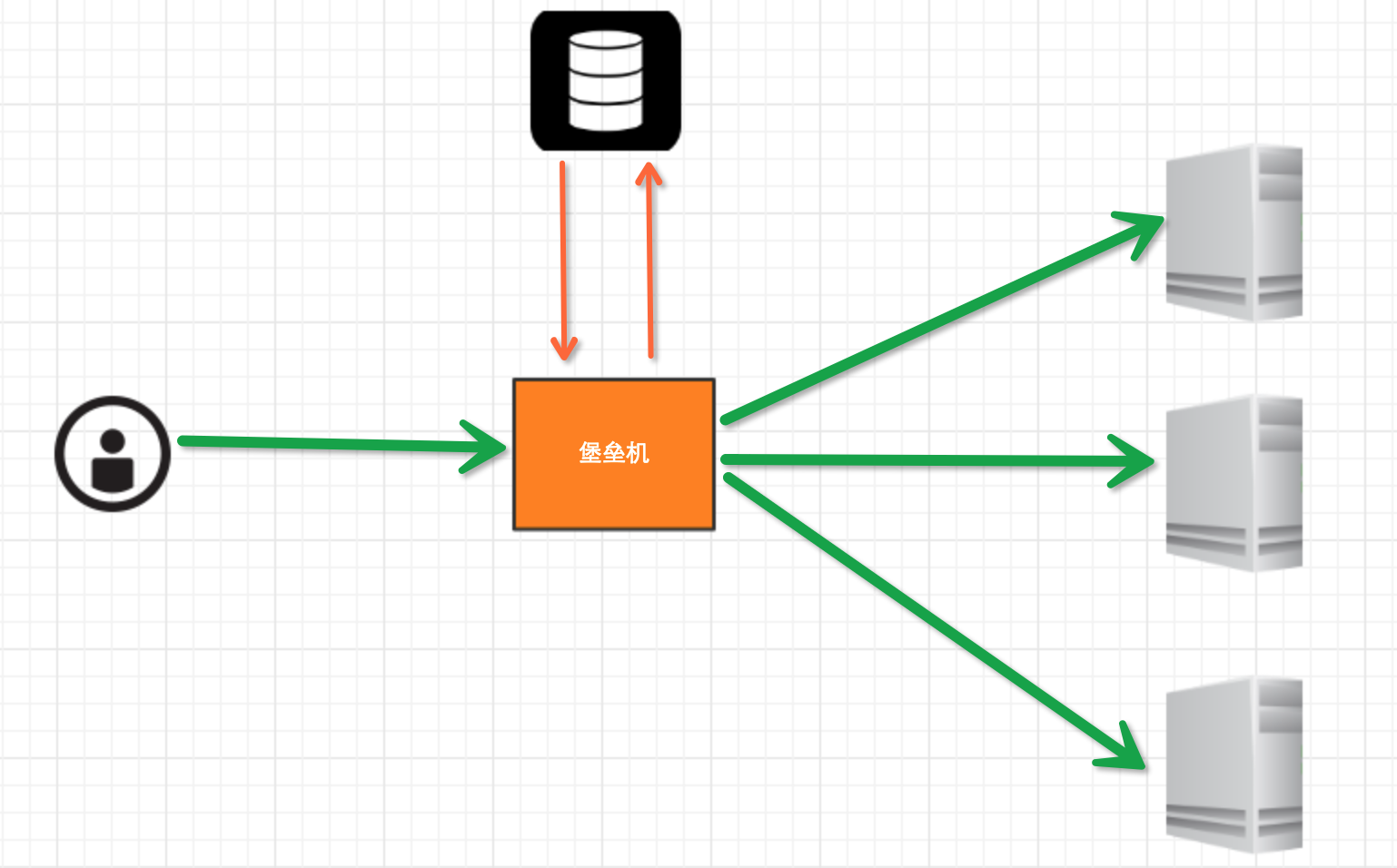
堡垒机执行流程:
- 管理员为用户在服务器上创建账号(将公钥放置服务器,或者使用用户名密码)
- 用户登陆堡垒机,输入堡垒机用户名密码,现实当前用户管理的服务器列表
- 用户选择服务器,并自动登陆
- 执行操作并同时将用户操作记录
注:配置.brashrc实现ssh登陆后自动执行脚本,如:/usr/bin/python /home/wupeiqi/menu.py
实现过程
步骤一,实现用户登陆
|
1
2
3
4
5
6
7
8
|
import getpassuser = raw_input('username:')pwd = getpass.getpass('password')if user == 'alex' and pwd == '123': print '登陆成功'else: print '登陆失败' |
步骤二,根据用户获取相关服务器列表
|
1
2
3
4
5
6
7
8
9
10
11
12
13
14
15
16
17
18
19
20
21
|
dic = { 'alex': [ '172.16.103.189', 'c10.puppet.com', 'c11.puppet.com', ], 'eric': [ 'c100.puppet.com', ]}host_list = dic['alex']print 'please select:'for index, item in enumerate(host_list, 1): print index, iteminp = raw_input('your select (No):')inp = int(inp)hostname = host_list[inp-1]port = 22 |
步骤三,根据用户名、私钥登陆服务器
|
1
2
3
4
5
6
7
8
9
10
11
12
13
14
15
16
17
18
19
20
21
22
|
tran = paramiko.Transport((hostname, port,))tran.start_client()default_path = os.path.join(os.environ['HOME'], '.ssh', 'id_rsa')key = paramiko.RSAKey.from_private_key_file(default_path)tran.auth_publickey('wupeiqi', key)# 打开一个通道chan = tran.open_session()# 获取一个终端chan.get_pty()# 激活器chan.invoke_shell()########## 利用sys.stdin,肆意妄为执行操作# 用户在终端输入内容,并将内容发送至远程服务器# 远程服务器执行命令,并将结果返回# 用户终端显示内容#########chan.close()tran.close() |
while True:
    # 监视用户输入和服务器返回数据
    # sys.stdin 处理用户输入
    # chan 是之前创建的通道,用于接收服务器返回信息
    readable, writeable, error = select.select([chan, sys.stdin, ],[],[],1)
    if chan in readable:
        try:
            x = chan.recv(1024)
            if len(x) == 0:
                print '
*** EOF
',
                break
            sys.stdout.write(x)
            sys.stdout.flush()
        except socket.timeout:
            pass
    if sys.stdin in readable:
        inp = sys.stdin.readline()
        chan.sendall(inp)
# 获取原tty属性
oldtty = termios.tcgetattr(sys.stdin)
try:
    # 为tty设置新属性
    # 默认当前tty设备属性:
    #   输入一行回车,执行
    #   CTRL+C 进程退出,遇到特殊字符,特殊处理。

    # 这是为原始模式,不认识所有特殊符号
    # 放置特殊字符应用在当前终端,如此设置,将所有的用户输入均发送到远程服务器
    tty.setraw(sys.stdin.fileno())
    chan.settimeout(0.0)

    while True:
        # 监视 用户输入 和 远程服务器返回数据(socket)
        # 阻塞,直到句柄可读
        r, w, e = select.select([chan, sys.stdin], [], [], 1)
        if chan in r:
            try:
                x = chan.recv(1024)
                if len(x) == 0:
                    print '
*** EOF
',
                    break
                sys.stdout.write(x)
                sys.stdout.flush()
            except socket.timeout:
                pass
        if sys.stdin in r:
            x = sys.stdin.read(1)
            if len(x) == 0:
                break
            chan.send(x)

finally:
    # 重新设置终端属性
    termios.tcsetattr(sys.stdin, termios.TCSADRAIN, oldtty)
def windows_shell(chan):
    import threading

    sys.stdout.write("Line-buffered terminal emulation. Press F6 or ^Z to send EOF.

")

    def writeall(sock):
        while True:
            data = sock.recv(256)
            if not data:
                sys.stdout.write('
*** EOF ***

')
                sys.stdout.flush()
                break
            sys.stdout.write(data)
            sys.stdout.flush()

    writer = threading.Thread(target=writeall, args=(chan,))
    writer.start()

    try:
        while True:
            d = sys.stdin.read(1)
            if not d:
                break
            chan.send(d)
    except EOFError:
        # user hit ^Z or F6
        pass
注:密码验证 t.auth_password(username, pw)
详见:paramiko源码demo
数据库操作
Python 操作 Mysql 模块的安装
|
1
2
3
4
5
|
linux: yum install MySQL-pythonwindow: http://files.cnblogs.com/files/wupeiqi/py-mysql-win.zip |
SQL基本使用
1、数据库操作
|
1
2
3
|
show databases; use [databasename];create database [name]; |
2、数据表操作
|
1
2
3
4
5
6
7
8
9
10
|
show tables;create table students ( id int not null auto_increment primary key, name char(8) not null, sex char(4) not null, age tinyint unsigned not null, tel char(13) null default "-" ); |
CREATE TABLE `wb_blog` (
    `id` smallint(8) unsigned NOT NULL,
    `catid` smallint(5) unsigned NOT NULL DEFAULT '0',
    `title` varchar(80) NOT NULL DEFAULT '',
    `content` text NOT NULL,
    PRIMARY KEY (`id`),
    UNIQUE KEY `catename` (`catid`)
) ;
3、数据操作
|
1
2
3
4
5
6
7
|
insert into students(name,sex,age,tel) values('alex','man',18,'151515151')delete from students where id =2;update students set name = 'sb' where id =1;select * from students |
4、其他
|
1
2
3
|
主键外键左右连接 |
Python MySQL API
一、插入数据
|
1
2
3
4
5
6
7
8
9
10
11
12
13
14
15
|
import MySQLdbconn = MySQLdb.connect(host='127.0.0.1',user='root',passwd='1234',db='mydb')cur = conn.cursor()reCount = cur.execute('insert into UserInfo(Name,Address) values(%s,%s)',('alex','usa'))# reCount = cur.execute('insert into UserInfo(Name,Address) values(%(id)s, %(name)s)',{'id':12345,'name':'wupeiqi'})conn.commit()cur.close()conn.close()print reCount |
import MySQLdb

conn = MySQLdb.connect(host='127.0.0.1',user='root',passwd='1234',db='mydb')

cur = conn.cursor()

li =[
     ('alex','usa'),
     ('sb','usa'),
]
reCount = cur.executemany('insert into UserInfo(Name,Address) values(%s,%s)',li)

conn.commit()
cur.close()
conn.close()

print reCount
注意:cur.lastrowid
二、删除数据
|
1
2
3
4
5
6
7
8
9
10
11
12
13
14
|
import MySQLdbconn = MySQLdb.connect(host='127.0.0.1',user='root',passwd='1234',db='mydb')cur = conn.cursor()reCount = cur.execute('delete from UserInfo')conn.commit()cur.close()conn.close()print reCount |
三、修改数据
|
1
2
3
4
5
6
7
8
9
10
11
12
13
|
import MySQLdbconn = MySQLdb.connect(host='127.0.0.1',user='root',passwd='1234',db='mydb')cur = conn.cursor()reCount = cur.execute('update UserInfo set Name = %s',('alin',))conn.commit()cur.close()conn.close()print reCount |
四、查数据
|
1
2
3
4
5
6
7
8
9
10
11
12
13
14
15
16
17
18
19
20
21
22
23
24
25
26
27
28
29
30
31
32
33
34
35
36
37
38
39
40
41
42
43
44
|
# ############################## fetchone/fetchmany(num) ##############################import MySQLdbconn = MySQLdb.connect(host='127.0.0.1',user='root',passwd='1234',db='mydb')cur = conn.cursor()reCount = cur.execute('select * from UserInfo')print cur.fetchone()print cur.fetchone()cur.scroll(-1,mode='relative')print cur.fetchone()print cur.fetchone()cur.scroll(0,mode='absolute')print cur.fetchone()print cur.fetchone()cur.close()conn.close()print reCount# ############################## fetchall ##############################import MySQLdbconn = MySQLdb.connect(host='127.0.0.1',user='root',passwd='1234',db='mydb')#cur = conn.cursor(cursorclass = MySQLdb.cursors.DictCursor)cur = conn.cursor()reCount = cur.execute('select Name,Address from UserInfo')nRet = cur.fetchall()cur.close()conn.close()print reCountprint nRetfor i in nRet: print i[0],i[1] |