共享文件word / excel /ppt 被用戶自己鎖定無法編輯,但用戶嘗試過關閉所有文件和重啓過系統,依然無法編輯。
搜到解決方法:
Just in case someone looking for a solution to this for a Windows based system or NAS:
There is a built-in function in Windows that show you what files on the local computer are open/locked by remote computer (which has the file open throught a file share):
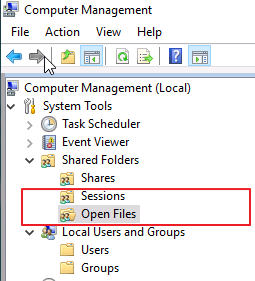
1. Select "Manage Computer " (Open "Computer Management")
2. Click "Share Folders"
3. choose "Open Files"
There you can even close the file forcefully.
首先最好让锁定的用户登出所有设备(最好关机),如图所示,在Windows 文件共享服务器打开计算机管理,
打开“共享文件夹”——“共用阶段”和“打开的文件” 这里找到锁定的用户,
清除所有Sessions 和 该用户打开的文件。
然后应该就可以了。(另外有可能文件属性被修改为只读,还需要更改该文件属性去掉“只读”)