项目结构:

一、配置路由
本来src文件夹下,router文件夹中有一个index.js
建议创建一个router.js,与main.js平级
然后在router.js中引入需要的组件,创建router对象
import App from './App'
import Login from '@/pages/login'
import Home from '@/pages/home'
import Footer from '@/components/footer'

const routers = [
  {
    path: '/',
    component: App,
   children: [
         {
          path: '/login',
           component: Login,
              meta: {
                title: '登录'
              }
          },
            {
            path: '/home',
             component: Home,
                meta: {
                  title: '首页'
                }
          },
            {
              path: '/',
               component: Home,
                  meta: {
                    title: '首页'
                  }
            }
  ]
  }
]
export default routers
main.js也需要修改
import Vue from 'vue'
import App from './App'
import VueRouter from 'vue-router';
import routes from "./router";

Vue.use(VueRouter);

const router = new VueRouter({
mode: 'history',
routes: routes
})

new Vue({
el: '#app',
router,
render: h => h(App)
})
vue-router默认hash模式,该模式会将路径格式化为#开头
在添加mode:‘history’后将使用html5 history模式,该模式下没有#前缀
二、嵌套路由
App.vue
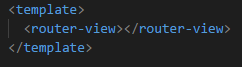
为了加深项目层级,app.vue只是作为一个存放组件的容器
router.js
const routers = [
  {
    path: '/',
    component: App,
   children: [
         {
          path: '/login',
           component: Login,
              meta: {
                title: '登录'
              }
          },
            {
            path: '/home',
             component: Home,
                meta: {
                  title: '首页'
                }
          },
            {
              path: '/',
               component: Home,
                  meta: {
                    title: '首页'
                  }
            }
  ]
  }
]
在配置的路由后面,添加 children,并在 children 中添加二级路由,就能实现路由嵌套
三、使用router-link跳转页面

在编译之后,<router-link>会被渲染为a标签,to相当于href
使用v-bind指令,to后面还可以加变量
还可以通过 $route.params 来获取到指定的参数,如 $route.params.id