Lighthouse3d.com >> GLUT Tutorial >> Subwindows >> Creating and Destroying Subwindows
利用GLUT我们可以定义子窗体,例如切分主窗体到不同区域,每个子窗体有自己的OpenGL上下文和回调函数.一个可行的程序是可以同时提供几种相同场景的视觉.
为了创建子窗体,我们可以使用glutCreateSubWindow函数,原型如下:
int glutCreateSubWindow(int parentWindow, int x, int y, int width, int height);
parentwindow - 父窗体的ID
x, y - 子窗体的左上角,相对于父窗体的原始
width, height - 子窗体的大小
父窗体的ID是创建父窗体时的返回值.下面代码显示了关系:
    mainWindow = glutCreateWindow("SnowMen from Lighthouse3D");
    ...
    subWindow1 = glutCreateSubWindow(mainWindow, 10,10,100,100);
一个子窗体也是变成其它子窗体的父窗体.根据GLUT的说明文档,窗体可以任意嵌套.
前面说过,一个子窗体有自己的OpenGL上下文,如果我们要用VBOs时,需要为每个窗体和子窗体创建它们.回调函数也一样.
最低限度我们必须用glutDisplayFunc函数为每个窗体注册显示函数.我们还必须为每个窗体注册光标更改和鼠标事件控制的回调函数,如果我们要用到这些特性的话.弹出菜单也分配给一个特定的窗体.注意的是,空闲函数只有一个.
假定我们要创建三个视觉.一个主镜头,另一个是顶部视觉,在主镜头的中间,第三个是在旁边,也是在主镜头的中间.下面是例图:
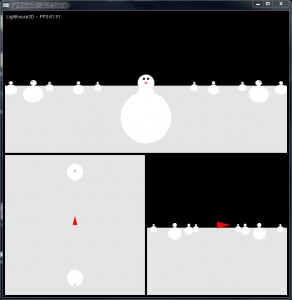
下面是初始化必需的一个更完整的版本.我们创建了函数来注册回调和演示一些OpenGL初始化,用到所有子窗体中.我们也声明了三个变量来保存窗体和子窗体的ID,稍后会用到.
int mainWindow, subWindow1,subWindow2,subWindow3;
...
void init() {

    glEnable(GL_DEPTH_TEST);
    glEnable(GL_CULL_FACE);

    // register callbacks
    glutIgnoreKeyRepeat(1);
    glutKeyboardFunc(processNormalKeys);
    glutSpecialFunc(pressKey);
    glutSpecialUpFunc(releaseKey);
    glutMouseFunc(mouseButton);
    glutMotionFunc(mouseMove);
}

int main(int argc, char **argv) {

    // init GLUT and create main window
    glutInit(&argc, argv);
    glutInitDisplayMode(GLUT_DEPTH | GLUT_DOUBLE | GLUT_RGBA);
    glutInitWindowPosition(100,100);
    glutInitWindowSize(800,800);
    mainWindow = glutCreateWindow("Lighthouse3D - GLUT Tutorial");

    // callbacks for main window
    glutDisplayFunc(renderScene);
    glutReshapeFunc(changeSize);
    glutIdleFunc(renderSceneAll);
    init();

    // sub windows
    subWindow1 = glutCreateSubWindow(mainWindow, border,border,w-2*border, h/2 - border*3/2);
    glutDisplayFunc(renderScenesw1);
    init();

    subWindow2 = glutCreateSubWindow(mainWindow, border,(h+border)/2,w/2-border*3/2, h/2 - border*3/2);
    glutDisplayFunc(renderScenesw2);
    init();

    subWindow3 = glutCreateSubWindow(mainWindow, (w+border)/2,(h+border)/2,w/2-border*3/2,h/2 - border*3/2);
    glutDisplayFunc(renderScenesw3);
    init();

    // enter GLUT event processing cycle
    glutMainLoop();

    return 1;
}
上面的代码创建了三个子窗体.每个子窗体都用户显示同一个场景的不同视点.顶部的子窗体显示自由移动的镜头,从顶端观察底部的左边到右边.
当窗体创建后,无论窗体还是子窗体,都会变成当前窗体(获得焦点).所有回调会被注册到当前新创建窗体,除了空闲函数之外,之前说过该函数是整个应用程序唯一的.
注意我们要调用initScene函数来为所有子窗体初始化OpenGL上下文.还要注意我们只为主窗体注册一次重整函数.
子窗体不用时可以关闭.用到的函数是glutDestroyWindow.
void glutDestroyWindow(int windowIdentifier)
windowIdentifier - 创建窗体时的返回值
该函数会关闭窗体和它包含的子窗体,还有它绑定的所有OpenGL上下文.
下一节我们会探讨重整函数和渲染函数.