参考:http://blog.csdn.net/xiaanming/article/details/21696315
参考:http://blog.csdn.net/wangjinyu501/article/details/22584465
android系统中的每个ViewGroup的子类都具有下面三个和TouchEvent处理密切相关的方法:
1)public boolean dispatchTouchEvent(MotionEvent ev) 这个方法用来分发TouchEvent
2)public boolean onInterceptTouchEvent(MotionEvent ev) 这个方法用来拦截TouchEvent
3)public boolean onTouchEvent(MotionEvent ev) 这个方法用来处理TouchEvent
注意:不是所有的View的子类,很多教程都说的是所有的View的子类,只有可以向里面添加View的控件才需要分发,比如TextView它本身就是最小的view了,所以不用再向它的子视图分发了,它也没有子视图了,所以它没有dispatch和Intercept,只有touchEvent。
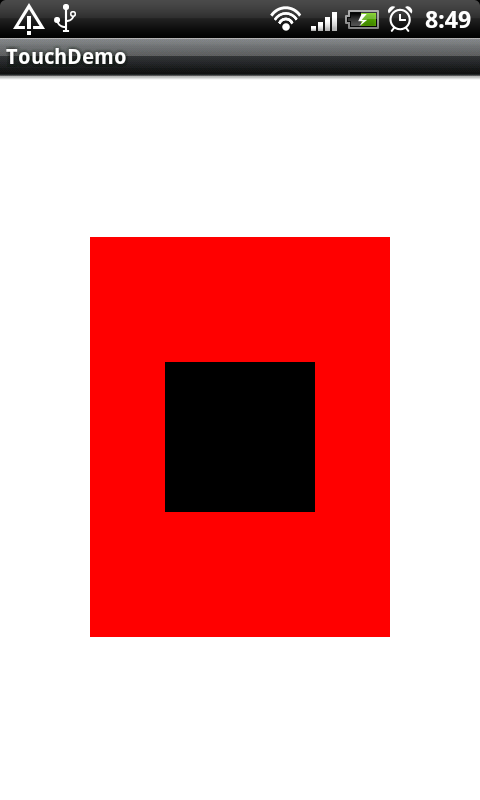
说明: 白色为最外层,它占满整个屏幕;
红色为中间区域,属于白色中的一层;
黑色为中心区域,必于红色中的一层。
注意:他们本质上是:LinearLayout,而不是RelativeLayout或者其它布局
1.由中心区域处理touch事件
布局文件如下:
 1 <?xml version="1.0" encoding="utf-8"?>
 2 <LinearLayout xmlns:android="http://schemas.android.com/apk/res/android"
 3     android:layout_width="fill_parent"
 4     android:layout_height="fill_parent"
 5     android:orientation="vertical">
 6     <com.kris.touch.widget.TouchView
 7         android:id="@+id/view_out"
 8         android:layout_width="fill_parent"
 9         android:layout_height="fill_parent"
10         android:background="#fff"
11         android:gravity="center">
12             <com.kris.touch.widget.TouchView
13                 android:id="@+id/view_mid"
14                 android:layout_width="300px"
15                 android:layout_height="400px"
16                 android:background="#f00"
17                 android:gravity="center">
18             <com.kris.touch.widget.TouchView
19                 android:id="@+id/view_center"
20                 android:layout_width="150px"
21                 android:layout_height="150px"
22                 android:background="#000"
23                 android:gravity="center"
24                 android:clickable="true">
25             </com.kris.touch.widget.TouchView>
26             </com.kris.touch.widget.TouchView>
27     </com.kris.touch.widget.TouchView>
28 </LinearLayout>
注意: android:clickable="true"
接下来我们看一下打印的日志:

结合是上面的日志,我们可以看一下ACTION_DOWN事件处理流程:
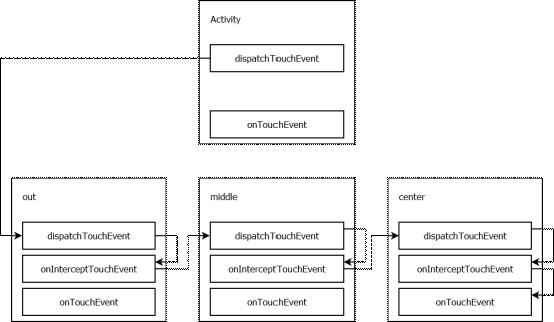
说明:
首先触摸事件发生时(ACTION_DOWN),由系统调用Activity的dispatchTouchEvent方法,分发该事件。根据触摸事件的坐标,将此事件传递给out的dispatchTouchEvent处理,out则调用onInterceptTouchEvent 判断事件是由自己处理,还是继续分发给子View。此处由于out不处理Touch事件,故根据事件发生坐标,将事件传递给out的直接子View(即middle)。
Middle及Center中事件处理过程同上。但是由于Center组件是clickable 表示其能处理Touch事件,故center中的onInterceptTouchEvent方法将事件传递给center自己的onTouchEvent方法处理。至此,此Touch事件已被处理,不继续进行传递。
2.没有指定谁会处理touch事件
布局文件如下:
 1 <?xml version="1.0" encoding="utf-8"?>
 2 <LinearLayout xmlns:android="http://schemas.android.com/apk/res/android"
 3     android:layout_width="fill_parent"
 4     android:layout_height="fill_parent"
 5     android:orientation="vertical">
 6     <com.kris.touch.widget.TouchView
 7         android:id="@+id/view_out"
 8         android:layout_width="fill_parent"
 9         android:layout_height="fill_parent"
10         android:background="#fff"
11         android:gravity="center">
12             <com.kris.touch.widget.TouchView
13                 android:id="@+id/view_mid"
14                 android:layout_width="300px"
15                 android:layout_height="400px"
16                 android:background="#f00"
17                 android:gravity="center">
18             <com.kris.touch.widget.TouchView
19                 android:id="@+id/view_center"
20                 android:layout_width="150px"
21                 android:layout_height="150px"
22                 android:background="#000"
23                 android:gravity="center">
24             </com.kris.touch.widget.TouchView>
25             </com.kris.touch.widget.TouchView>
26     </com.kris.touch.widget.TouchView>
27 </LinearLayout>
注意:只是比上一次的布局少了android:clickable="true"
接下来我们看一下打印的日志
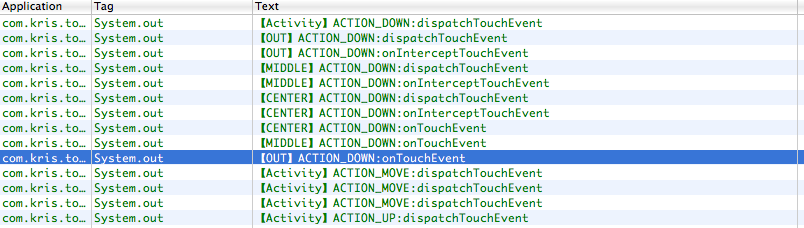
结合是上面的日志,我们可以看一下ACTION_DOWN事件处理流程:

说明:
事件处理流程大致同上,区别是此状态下,所有组件都不会处理事件,事件并不会被center的onTouchEvent方法“消费”,则事件会层层逆向传递回到Activity,若Activity也不对此事件进行处理,此事件相当于消失了(无效果)。
对于后续的move、up事件,由于第一个down事件已经确定由Activity处理事件,故up事有由Activity的dispatchTouchEvent直接分发给自己的onTouchEvent方法处理。
总结:
1) Touchevent 中,返回值是 true ,则说明消耗掉了这个事件,返回值是 false ,则没有消耗掉,会继续传递下去,这个是最基本的。
2) 事件传递的两种方式:
隧道方式:从根元素依次往下传递直到最内层子元素或在中间某一元素中由于某一条件停止传递。
冒泡方式:从最内层子元素依次往外传递直到根元素或在中间某一元素中由于某一条件停止传递。 android对Touch Event的分发逻辑是View从上层分发到下层(dispatchTouchEvent函数)类似于隧道方式,然后下层优先开始处理Event(先mOnTouchListener,再onTouchEvent)并向上返回处理情况(boolean值),若返回true,则上层不再处理。类似于冒泡方式
于是难题出现了,你若把Touch Event都想办法给传到上层了(只能通过返回false来传到上层),那么下层的各种子View就不能处理后续事件了。而有的时候我们需要在下层和上层都处理Touch事件
举个例子,ViewFlipper用来检测手势,在内部我们放几个Image,有点像gallery的效果,也就是左右滑动切换图片,但是图片有时候我们希望可以放大缩小!这样就会存在ViewFlipper里面需要touch事件,而在image里面也需要一个touch事件(当图片大小屏幕边界的时候可以拖动图片,而不是左右切换图片)。
我首先的思路是着手于事件回传的方式,研究了n久,实际了n久,都没达到自己想要的结果 ,我甚至于把gallery和gallery3D 的源码下载下来看了N久也没办法去解决,在这里随便说一下gallery吧,gallery虽然在这个效果,但是人家并不是ViewFlipper加image这样来实现的,人家是像游戏这样用一个view来统一处理的,我们可以简单的理解成自定义了一个控件,这样touch事件想怎么处理就怎么处理,不过就是逻辑复杂了,我们想偷懒就没办法了,呵呵。。。
最后不停的试啊试啊,想到一个可行的方案,但是我觉得不是很靠谱,也就是:我们在ViewFlipper这里,我们先把所有的touch都截取到,然后在他的onTouchEvent中,我们先调用imageview的onTouchEvent事件,如果返回true,证明这个事件,imageview要用,那么ViewFlipper就当什么事都没发生,如果imageview返回的false,则调用自己的touchEvent.