原文:https://blog.csdn.net/wo18237095579/article/details/83384134?utm_medium=distribute.pc_relevant_t0.none-task-blog-BlogCommendFromMachineLearnPai2-1.nonecase&depth_1-utm_source=distribute.pc_relevant_t0.none-task-blog-BlogCommendFromMachineLearnPai2-1.nonecase
参考:https://blog.csdn.net/Jaycrees/article/details/105467629?utm_medium=distribute.pc_relevant.none-task-blog-baidujs-1
Ribbon 的负载均衡策略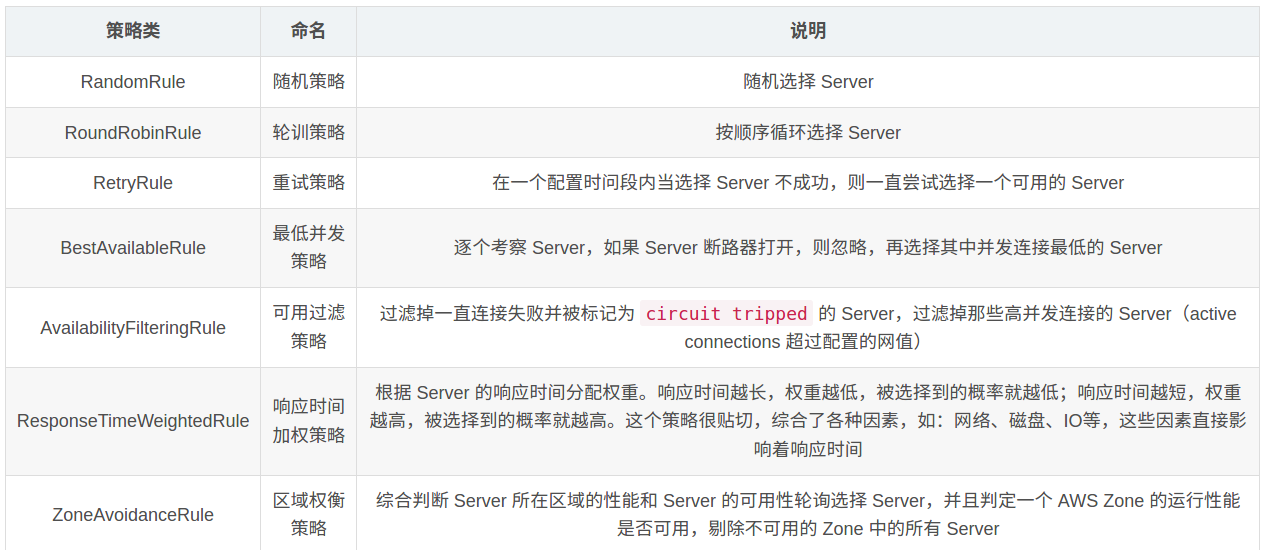
默认为轮询策略
全局策略设置
增加 Ribbon 负载均衡策略配置类
@Configuration
public class RibbonGlobalLoadBalancingConfiguration {
    /**
     * 随机规则
     */
    @Bean
    public IRule ribbonRule() {
        return new RandomRule();
    }

}
基于注解的针对单个服务的 Ribbon 负载均衡策略
这里把上一步的的全局配置给删掉。
基于注解的针对单个服务的 Ribbon 负载均衡策略
这里把上一步的的全局配置给删掉。
注解方式
增加一个针对单个服务的 Ribbon 负载聚恒策略配置类:
@Configuration
/** 用来标记使用的注解,方便排除或者引用 **/
@AvoidScan
public class RibbonRandomLoadBalancingConfiguration {

    @Resource
    IClientConfig clientConfig;

    @Bean
    public IRule ribbonRule(IClientConfig clientConfig) {
        return new RandomRule();
    }

}
- **IClientConfig:**针对客户端的配置管理器。
在主启动类上方做针对单个服务的负载均衡策略:
/** 配置针对单个服务的 Ribbon 负载均衡策略 **/
@RibbonClient(
     //服务名
        name = "demo-goods", configuration = RibbonRandomLoadBalancingConfiguration.class
)
/** 此处配置根据标识 @AvoidScan 过滤掉需要单独配置的 Ribbon 负载均衡策略,不然就会作用于全局,启动就会报错 */
@ComponentScan(
        excludeFilters = @ComponentScan.Filter(
                type = FilterType.ANNOTATION, value = AvoidScan.class
        )
)
基于配置文件方式:
我个人也不太喜欢上方的那种注解方式针对单个服务的负载均衡策略,下面是配置文件的方式:
- .ribbon.*
-
### 针对单个服务的 Ribbon 配置
demo-goods:
  ribbon:
    # 基于配置文件形式的 针对单个服务的 Ribbon 负载均衡策略
    NFLoadBalancerRuleClassName: com.netflix.loadbalancer.RandomRule