Spring Cloud简介
Spring Cloud是一个基于Spring Boot实现的云应用开发工具,它为基于JVM的云应用开发中涉及的配置管理、服务发现、断路器、智能路由、微代理、控制总线、全局锁、决策竞选、分布式会话和集群状态管理等操作提供了一种简单的开发方式。
微服务架构
那么什么是“微服务架构”呢?简单的说,微服务架构就是将一个完整的应用从数据存储开始垂直拆分成多个不同的服务,每个服务都能独立部署、独立维护、独立扩展,服务与服务间通过诸如RESTful API的方式互相调用。
服务治理
Spring Cloud Eureka
Spring Cloud Eureka是Spring Cloud Netflix项目下的服务治理模块。而Spring Cloud Netflix项目是Spring Cloud的子项目之一
它主要提供的模块包括:服务发现(Eureka),断路器(Hystrix),智能路由(Zuul),客户端负载均衡(Ribbon)等。
一、创建“服务注册中心”
创建一个基础的Spring Boot工程,命名为eureka-server pom.xml
    <parent>
        <groupId>org.springframework.boot</groupId>
        <artifactId>spring-boot-starter-parent</artifactId>
        <version>1.5.4.RELEASE</version>
        <relativePath />
    </parent>

    <dependencies>
        <dependency>
            <groupId>org.springframework.boot</groupId>
            <artifactId>spring-boot-starter-test</artifactId>
            <scope>test</scope>
        </dependency>

        <dependency>
            <groupId>org.springframework.cloud</groupId>
            <artifactId>spring-cloud-starter-eureka-server</artifactId>
        </dependency>
    </dependencies>

    <dependencyManagement>
        <dependencies>
            <dependency>
                <groupId>org.springframework.cloud</groupId>
                <artifactId>spring-cloud-dependencies</artifactId>
                <version>Dalston.SR1</version>
                <type>pom</type>
                <scope>import</scope>
            </dependency>
        </dependencies>
    </dependencyManagement>
通过@EnableEurekaServer注解启动一个服务注册中心提供给其他应用进行对话。
@EnableEurekaServer
@SpringBootApplication
public class AppleApplication {

    public static void main(String[] args) {
        new SpringApplicationBuilder(AppleApplication.class)
                    .web(true).run(args);
    }
}
在默认设置下,该服务注册中心也会将自己作为客户端来尝试注册它自己,所以我们需要禁用它的客户端注册行为,
只需要在application.properties配置文件中增加如下信息:
spring.application.name=eureka-server
server.port=1001

eureka.instance.hostname=localhost
eureka.client.register-with-eureka=false
eureka.client.fetch-registry=false
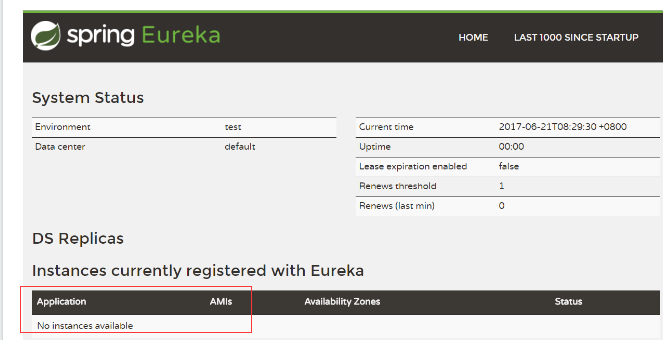
启动工程后,访问:http://localhost:1001/ 可以看到下面的页面,其中还没有发现任何服务。
二、创建“服务提供方”
下面我们创建提供服务的客户端,并向服务注册中心注册自己
创建一个基本的Spring Boot应用。命名为eureka-client,在pom.xml中,加入如下配置:
    <parent>
        <groupId>org.springframework.boot</groupId>
        <artifactId>spring-boot-starter-parent</artifactId>
        <version>1.5.4.RELEASE</version>
        <relativePath />
    </parent>

    <dependencies>
        <dependency>
            <groupId>org.springframework.cloud</groupId>
            <artifactId>spring-cloud-starter-eureka</artifactId>
        </dependency>
        <dependency>
            <groupId>org.springframework.boot</groupId>
            <artifactId>spring-boot-starter-web</artifactId>
        </dependency>
    </dependencies>

    <dependencyManagement>
        <dependencies>
            <dependency>
                <groupId>org.springframework.cloud</groupId>
                <artifactId>spring-cloud-dependencies</artifactId>
                <version>Dalston.SR1</version>
                <type>pom</type>
                <scope>import</scope>
            </dependency>
        </dependencies>
    </dependencyManagement>
其次,实现/dc请求处理接口,通过DiscoveryClient 对象,在日志中打印出服务实例的相关内容。
@RestController
public class ComputeController {
    @Autowired
    DiscoveryClient discoveryClient;

    @GetMapping("/dc")
    public String dc() {
        String services = "Services: " + discoveryClient.getServices();
        System.out.println(services);
        return services;
    }
}
最后在应用主类中通过加上@EnableDiscoveryClient注解,该注解能激活Eureka中的DiscoveryClient实现,这样才能实现Controller中对服务信息的输出。
@EnableDiscoveryClient
@SpringBootApplication
public class AppleApplication {

    public static void main(String[] args) {
        new SpringApplicationBuilder(
                AppleApplication.class)
                .web(true).run(args);
    }
}
我们在完成了服务内容的实现之后,再继续对application.properties做一些配置工作,具体如下:
spring.application.name=eureka-client
server.port=2001
eureka.client.serviceUrl.defaultZone=http://localhost:1001/eureka/
通过spring.application.name属性,我们可以指定微服务的名称后续在调用的时候只需要使用该名称就可以进行服务的访问。
eureka.client.serviceUrl.defaultZone属性对应服务注册中心的配置内容,指定服务注册中心的位置。
为了在本机上测试区分服务提供方和服务注册中心,使用server.port属性设置不同的端口。
启动该工程后,再次访问:http://localhost:1001
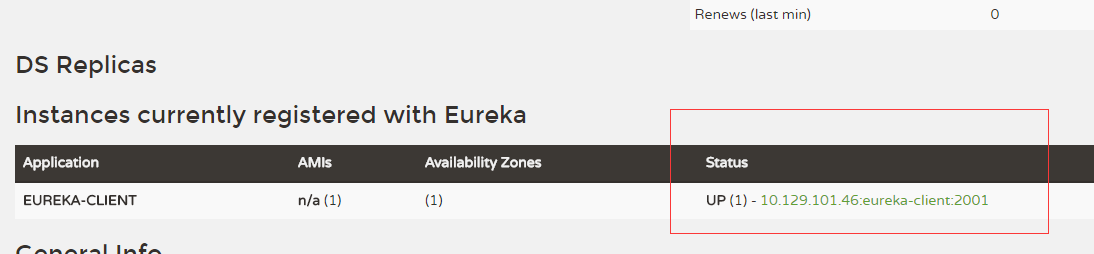
可以如上图内容,我们定义的服务被成功注册了
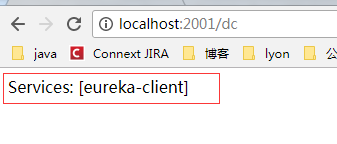
当然,我们也可以通过直接访问eureka-client服务提供的/dc接口来获取当前的服务清单,
只需要访问:http://localhost:2001/dc,我们可以得到如下输出返回: