zoukankan      html  css  js  c++  java
  • 一步一步学RenderMonkey(5)--渲染到纹理(RTT) 【转】

    转载请注明出处:  http://blog.csdn.net/tianhai110

    渲染到纹理:

    1. 新建一个空effect;
    2. 添加渲染目标纹理, Add Texture-> Add Render Texture
          

      3. 添加一个渲染pass


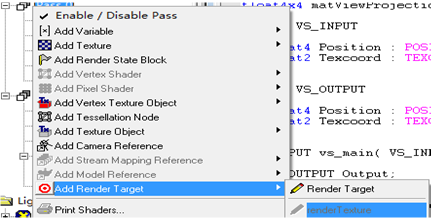
      4. 将pass0 渲染到纹理上,   add Render Target->renderTexture;
       

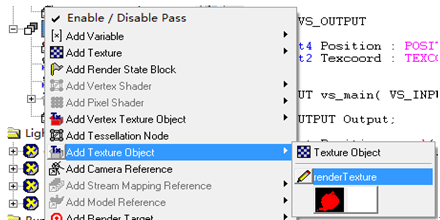
      5. 在pass1中,引用纹理 Add Texture Object->renderTexture;   并改名为rttTexture;
        

      6. 修改pass1的vertex shader 和pixel shader;


    [c-sharp] view plain copy
    1. float4x4 matViewProjection;  
    2.   
    3. struct VS_INPUT   
    4. {  
    5.    float4 Position : POSITION0;  
    6.    float2 Texcoord : TEXCOORD0;  
    7. };  
    8.   
    9. struct VS_OUTPUT   
    10. {  
    11.    float4 Position : POSITION0;  
    12.    float2 Texcoord : TEXCOORD0;  
    13. };  
    14.   
    15. VS_OUTPUT vs_main( VS_INPUT Input )  
    16. {  
    17.    VS_OUTPUT Output;  
    18.   
    19.    Output.Position = mul( Input.Position, matViewProjection );  
    20.    Output.Texcoord = Input.Texcoord;  
    21.      
    22.    return( Output );  
    23.      
    24. }  

    PS:

    [c-sharp] view plain copy
    1. sampler2D rttTexture;  
    2. float4 ps_main( float2 tex:TEXCOORD0) : COLOR0  
    3. {     
    4.    return tex2D(rttTexture, tex) + float4( 0.6, 0.2, 0.5, 1);  
    5.      
    6. }  

    运行效果如下:


  • 相关阅读:
    es6的解构赋值
    防抖
    resources saver 实现资源批量下载
    flutter了解
    export, export default 和 import的使用
    5,vue过滤和高阶函数
    4,v-for循环
    3,v-if的使用
    2,v-on绑定事件和修饰符
    怎样统一管理vue项目中的大量api和异步操作
  • 原文地址:https://www.cnblogs.com/mazhenyu/p/6676713.html
Copyright © 2011-2022 走看看