生成微博授权url(二维码登陆页面)
目录
1、创建apps/oauthapp进行oauth认证
'''2.1 在apps文件夹下新建应用: oauth'''
cd syl/apps python ../manage.py startapp oauth # 切换到apps文件夹下执行创建命令

'''2.2 添加子路由: oauth/urls.py'''
from django.urls import path from . import views urlpatterns = [ ]

'''2.3 在syl/settings.py中添加应用'''
INSTALLED_APPS = [
    'oauth.apps.OauthConfig',
]

'''2.4 在syl/urls.py主路由中添加'''
urlpatterns = [
    path('oauth/',include('oauth.urls')),
]
2、生成微博授权url接口
2.1、添加子路由:oauth/urls.py
urlpatterns = [
    path('weibo/',views.WeiboUrl.as_view()), # /oauth/weibo/ 返回微博登陆地址
]
2.2、syl/settings.py中配微博地址
url = 'https://api.weibo.com/oauth2/authorize?' # 微博授权的
url地址 data = { 'client_id': '3516473472', # WEIBO_APP_KEY,
              'response_type': 'code',
              'redirect_uri': 'http://127.0.0.1:8888/oauth/callback/', # VUE的回 调,微博后台授权的回调地址 }
2.3、视图函数:oauth/views.py
from rest_framework.permisstions import AllowAny
from rest_framework.response import Response
from rest_framework.views import Views
from urllib.parse import urlencode

# 生成前端调转到微博扫码页面的url
class WeiboUrl(APIViews):
    '''
    	生成微博的登陆页面路由
    	https://api.weibo.com/oauth2/authorize?  # 微博授权的url地址
    	client_id=4152203033& # 注册开发者id
    	response_type=code&
    	redirect_uri=http://127.0.0.1:8888/oauth/callback/ # 获取code后将code回 调给后端地址
    '''
    # 自定义权限
    permission_classes = (AllowAny,)

    def post(self,request):
        url:"https://api.weibo.com/oauth2/authorize"
            data = {
                'client_id':"3516473472",    # WEIBO_APP_KEY
                'response_type':"code",
                "redirect_url":"http://127.0.0.1:8888/oauth/callback",  # VUE回调,微博后台授权的回调地址
            }
            weibo_url = url +urlencode(data)
            # https://api.weibo.com/oauth2/authorize? client_id=4152203033&response_type=code&redirect_uri=http://127.0.0.1:8000/api/we ibo_back/
            # return Response({'weibo_url': weibo_url})
			return Response({'code': '0', 'msg': '成功', 'data': {'url': weibo_url}})
3.测试生成微博授权URL接口
-
测试接口获取新浪微博地址
-
http://192.168.56.100:8888/oauth/weibo/
-
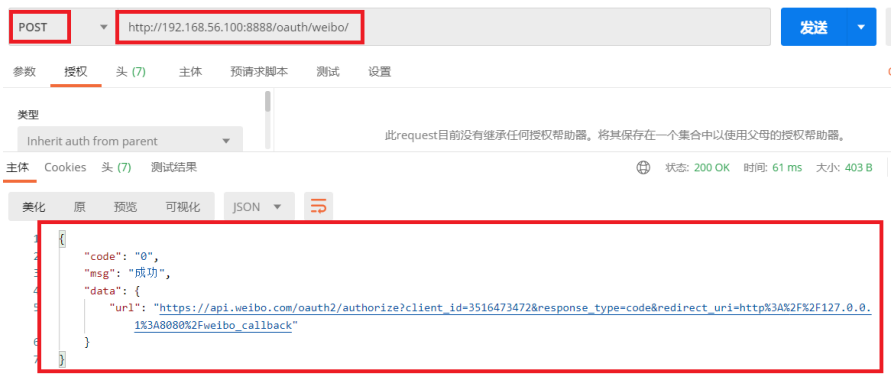
- 再浏览器访问返回地址既可会到新浪扫码界面
https://api.weibo.com/oauth2/authorize? client_id=3516473472&response_type=code&redirect_uri=http%3A%2F%2F127.0.0.1%3A808 0%2Fweibo_callback
4、在VUE页面加载时动态发送请求获取微博授权url
4.1、在compontenscommonlab_header.vue中写oauth动态获取微博授权url
 // 获取微博登陆地址
oauth(){
    // 从后端获取 微博登陆地址
    oauth_post().then((resp)=>{
        console.log(resp)
        // //{'code': '0', 'msg': '成功', 'data': {'url': url}}
        let url = resp.data.url;
        this.weibo_url = url
    })
}
4.2、在vue的mouted函数中调用获取微博登陆授权url函数
mounted(){
    this.oauth()
}
4.3、点击“登陆”弹出form表单中加入url
<form
	action="/login"
	method="post" >
        <div class="form-group widget-signin">
            <a :href="weibo_url"><i class="fa fa-weibo"></i></a>
        </div>
</form>