不需要像eclipse那样添加驱动包,在pycharm里面下载一个pymysql包即可。
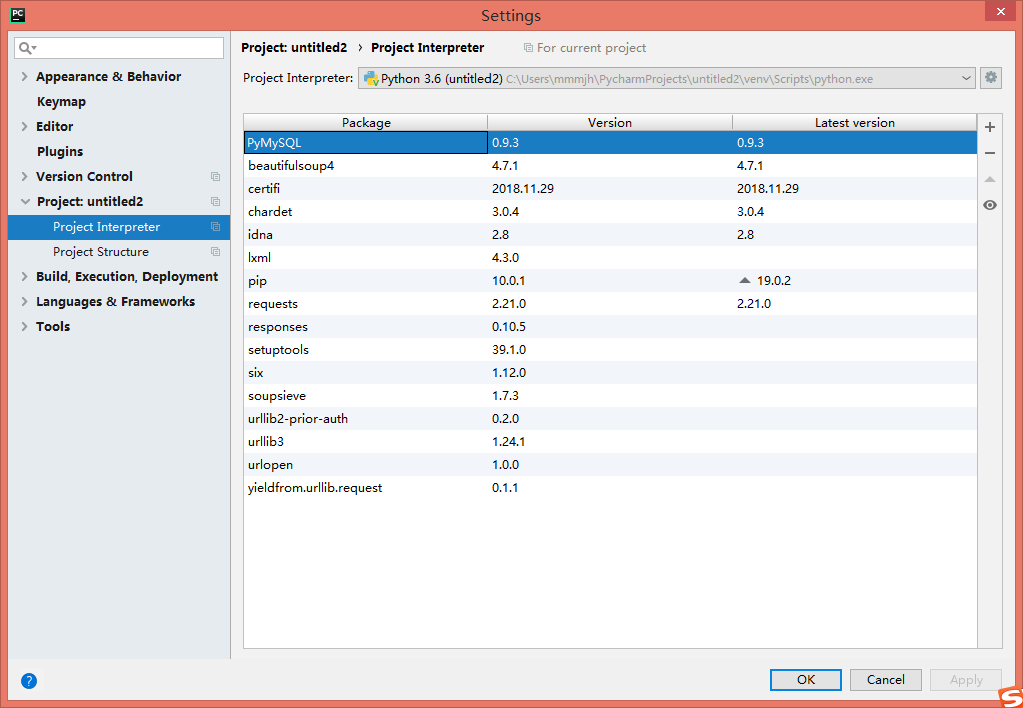
然后链接自己电脑的mysql并进行访问即可。
源码如下(参考博客:https://blog.csdn.net/just_so_so_fnc/article/details/72995731)
import pymysql

# 建立数据库连接
conn = pymysql.Connect(
    host='localhost',
    port=3306,
    user='用户',
    passwd='密码',
    db='数据库',
    charset='utf8'
)

# 获取游标
cursor = conn.cursor()
# print(conn)
# print(cursor)

# 1、从数据库中查询
# sql="INSERT INTO userinfor(user_name,pass_word)"
sql = "SELECT * FROM userinfor"
# cursor执行sql语句
cursor.execute(sql)
# 打印执行结果的条数
print(cursor.rowcount)

# 使用fetch方法进行遍历结果  总共有三条数据

# rs=cursor.fetchone()#将第一条结果放入rs中
# re=cursor.fetchmany(3)#将多个结果放入re中
rr = cursor.fetchall()  # 将所有的结果放入rr中
# 对结果进行处理
for row in rr:
    print("ID是:=%s, 姓名是:=%s, 密码是:=%s" % row)
# print(re)#输出两条数据,因为fetch()方法是建立在上一次fetch()方法基础上的


# 2数据库中插入数据
sql_insert = "INSERT INTO userinfor(username,password) values('中兴','123')"
# 执行语句
cursor.execute(sql_insert)
# 事务提交,否则数据库得不到更新
conn.commit()
print(cursor.rowcount)

# 修改数据库中的内容
sql_update = "UPDATE userinfor SET username='121' WHERE id=21"
cursor.execute(sql_update)
conn.commit()

# 删除数据库中的内容,并利用try catch语句进行事务回滚
try:
    sql_delete = "DELETE FROM userinfor WHERE id=6"
    cursor.execute(sql_delete)
    conn.commit()
except Exception as e:
    print(e)
    # 事务回滚,即出现错误后,不会继续执行,而是回到程序未执行的状态,原先执行的也不算了
    conn.rollback()

# 数据库连接和游标的关闭
conn.close()
cursor.close()