https://appuals.com/how-to-switch-login-method-from-pin-to-password/
https://computerinfobits.com/windows-10-how-to-use-password-instead-of-pin/
https://www.google.com.hk/search?q=login+windows+10+with+passwd+instead+of+pin&newwindow=1&source=hp&ei=RuSVYdXtHvvi2roPjPml6A4&iflsig=ALs-wAMAAAAAYZXyVq2JGK2T_DMHDf7sfC_gQRbxz3Mb&ved=0ahUKEwjVqNPTlqH0AhV7sVYBHYx8Ce0Q4dUDCAc&uact=5&oq=login+windows+10+with+passwd+instead+of+pin&gs_lcp=Cgdnd3Mtd2l6EAM6CwguEIAEEMcBENEDOgsILhCABBDHARCjAjoFCC4QgAQ6BQgAEIAEOgQIABAeOgQIABATOgYIABAeEBM6CAgAEAgQHhATOggIABAFEB4QEzoFCCEQoAE6BwghEAoQoAFKBQg8EgEyUABYhlxg6l1oAnAAeACAAasBiAGQMpIBBDAuNDWYAQCgAQE&sclient=gws-wiz
Navigate to the following Registry key
HKEY_LOCAL_MACHINE\SOFTWARE\Microsoft\Windows\CurrentVersion\Authentication\LogonUI\UserTile
- In the Edit String Dialog Box, copy and paste one of the following GUIDs into the Value box and click Ok. In this example, we will paste the GUID for Password because we want to set this as the default login method, if you prefer any other method copy and paste the GUID for that method.
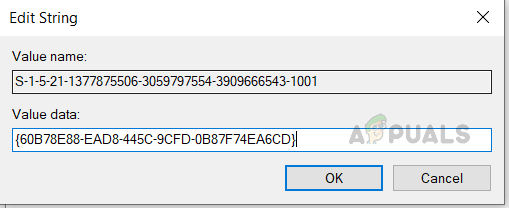 Set Password Login
- PIN: {D6886603-9D2F-4EB2-B667-1971041FA96B}
- Picture Logon: {2135F72A-90B5-4ED3-A7F1-8BB705AC276A}
- Password: {60B78E88-EAD8-445C-9CFD-0B87F74EA6CD}
- Microsoft Account: {F8A0B131-5F68-486C-8040-7E8FC3C85BB6}
- Fingerprint Logon: {BEC09223-B018-416D-A0AC-523971B639F5}
- Now close the Registry Editor and Restart your system. You see will your preferred Sign-In option set as default at the Log-In screen.