JDBC快速入门
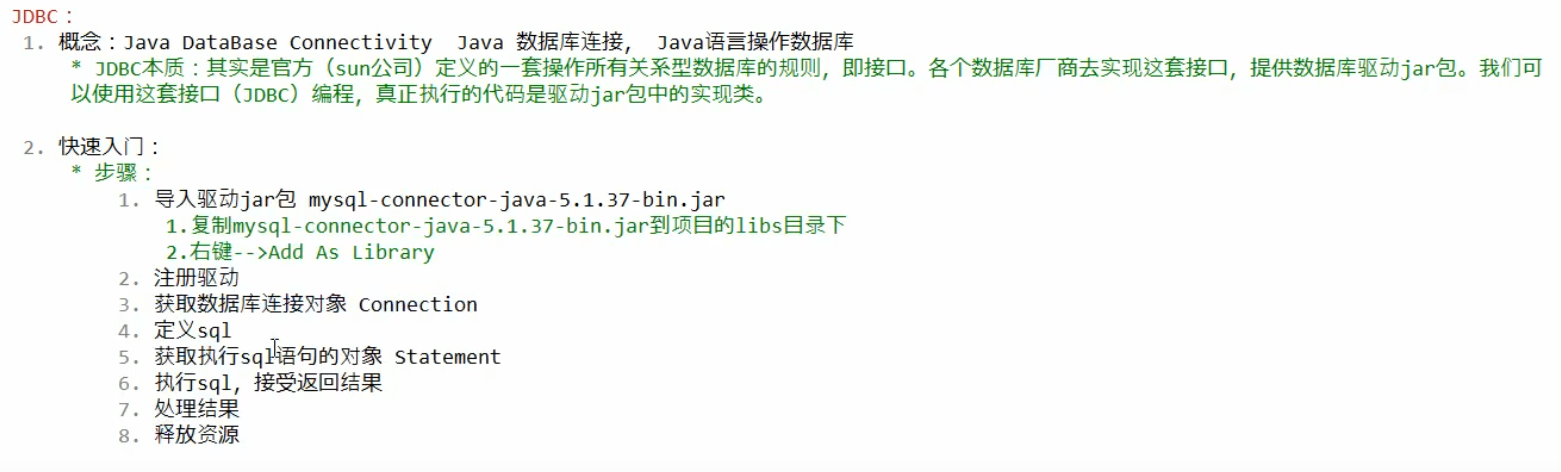
详解
1.0DriverManager
功能1
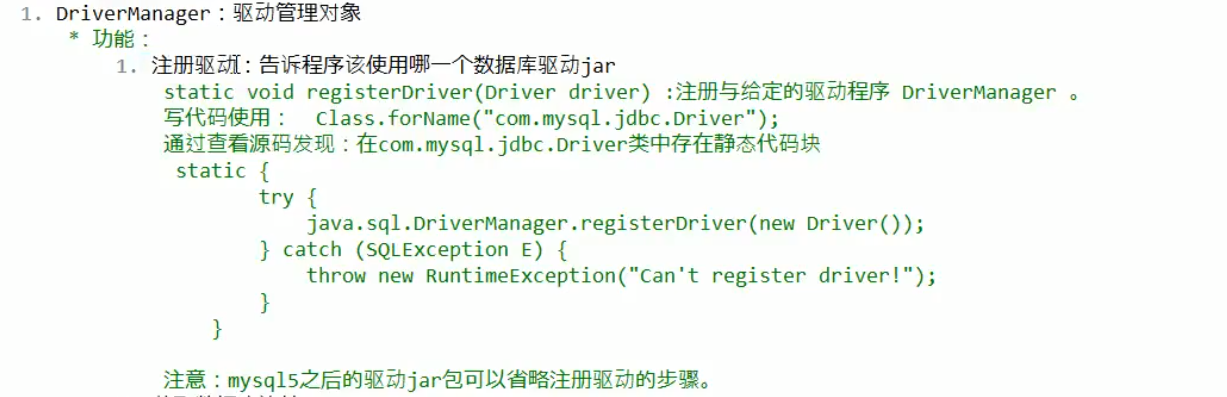
功能2

2.0 connection对象

3.0 statement对象

4.0 ResultSet

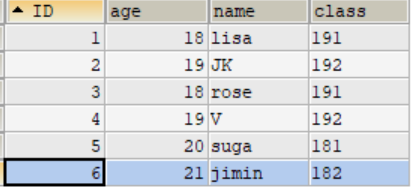
遍历结果集的一个案例
import java.sql.*;

public class DQLtest {
    public static void main(String[] args)  {
        //注册驱动
        Connection connection=null;
        Statement statement=null;
        ResultSet resultSet =null;
        try{
            Class.forName("com.mysql.cj.jdbc.Driver");
            //定义一个SQL语句
            String sql="select * from student";
            //数据库连接对象 此处url要在原来数据库后加上 "?serverTimezone=GMT%2B8&useSSL=false"
            //因为我导入的jar包为最新版本 要添加ssl连接状态
            connection = DriverManager.getConnection("jdbc:mysql:///db2" +
                    "?serverTimezone=GMT%2B8&useSSL=false", "root", "root");
            //执行SQL的对象
            statement = connection.createStatement();
            //获取结果集对象
            resultSet = statement.executeQuery(sql);
            while(resultSet.next())//next方法判断游标是否位于最后一行,是则返回false 否则返回true
            {
                int id = resultSet.getInt("ID");
                int age= resultSet.getInt("age");
                String name = resultSet.getString("name");
                String cls = resultSet.getString("class");
                System.out.println(id+" "+age+" "+name+" "+cls);
            }

        } catch (ClassNotFoundException e) {
            e.printStackTrace();
        } catch (SQLException throwables) {
            throwables.printStackTrace();
        }finally {
            try {
                connection.close();
            } catch (SQLException throwables) {
                throwables.printStackTrace();
            }
            try {
                statement.close();
            } catch (SQLException throwables) {
                throwables.printStackTrace();
            }
            try {
                resultSet.close();
            } catch (SQLException throwables) {
                throwables.printStackTrace();
            }
        }

    }
}
打印结果:
1 18 lisa 191
2 19 JK 192
3 18 rose 191
4 19 V 192
5 20 suga 181
6 21 jimin 182
JDBC工具类的创建以及使用
1.0 配置文件
drive=com.mysql.cj.jdbc.Driver
url=jdbc:mysql:///db2?serverTimezone=GMT%2B8&useSSL=false
user=root
password=root
2.0 JDBCutil的创建
import java.io.FileReader;
import java.io.IOException;
import java.net.URL;
import java.sql.*;
import java.util.Properties;

public class JDBCutil {
    /*
    * 1.静态代码块中 注册驱动、数据库连接对象 url user password
    * 2.释放资源
    * */
    public static String drive;
    public static String url;
    public static String user;
    public static String password;
    static {
        Properties properties = new Properties();
        //获取src目录下的文件方式->类加载器 Classloader
        //先获取字节码文件
        ClassLoader classLoader = JDBCutil.class.getClassLoader();
        URL resource = classLoader.getResource("jdbc.properties");
        //URL 统一资源定位符 获取绝对路径
        String path = resource.getPath();
        try {
            properties.load(new FileReader(path));
        } catch (IOException e) {
            e.printStackTrace();
        }
        drive = properties.getProperty("drive");
         url = properties.getProperty("url");
         user = properties.getProperty("user");
         password = properties.getProperty("password");

    }
    public static Connection getConnection() throws SQLException {

        return DriverManager.getConnection(url,user,password);
    }

    public static void close(Connection conn, Statement stat)
    {
        try {
            conn.close();
        } catch (SQLException throwables) {
            throwables.printStackTrace();
        }
        try {
            stat.close();
        } catch (SQLException throwables) {
            throwables.printStackTrace();
        }
    }
    //重载
    public static void close(Connection conn, Statement stat, ResultSet res)
    {
        try {
            conn.close();
        } catch (SQLException throwables) {
            throwables.printStackTrace();
        }
        try {
            stat.close();
        } catch (SQLException throwables) {
            throwables.printStackTrace();
        }
        try {
            res.close();
        } catch (SQLException throwables) {
            throwables.printStackTrace();
        }
    }
}
对案例进行优化 使用JDBCutil类
import java.sql.*;

public class DQLtest {
    public static void main(String[] args)  {
        //注册驱动
        Connection connection=null;
        Statement statement=null;
        ResultSet resultSet =null;
        try{
            //Class.forName("com.mysql.cj.jdbc.Driver");
            //定义一个SQL语句
            String sql="select * from student";

           // connection = DriverManager.getConnection("jdbc:mysql:///db2" +
           //"?serverTimezone=GMT%2B8&useSSL=false", "root", "root");
           connection = JDBCutil.getConnection();

            //执行SQL的对象
           statement= connection.createStatement();
            //获取结果集对象
           resultSet = statement.executeQuery(sql);
            while(resultSet.next())//next方法判断游标是否位于最后一行,是则返回false 否则返回true
            {
                int id = resultSet.getInt("ID");
                int age= resultSet.getInt("age");
                String name = resultSet.getString("name");
                String cls = resultSet.getString("class");
                System.out.println(id+" "+age+" "+name+" "+cls);
            }

        } catch (SQLException throwables) {
            throwables.printStackTrace();
        }
        finally {
            JDBCutil.close(connection,statement,resultSet);
        }
    }
}
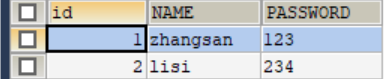
页面登录案例
PreparedStatement
import java.sql.*;
import java.util.Scanner;

public class Usertest {
    public static void main(String[] args) {
        Scanner input = new Scanner(System.in);
        System.out.println("请输入您的姓名:");
        String username=input.next();
        System.out.println("请输入您的密码:");
        String password=input.next();
        Connection conn=null;
        PreparedStatement prep =null;
        ResultSet set=null;
        try{
            conn = JDBCutil.getConnection();
            //String sql="SELECT *FROM USER WHERE NAME='"+username+"'AND PASSWORD='"+password+"'";
            String sql="SELECT *FROM USER WHERE NAME=? AND PASSWORD=?";
            prep = conn.prepareStatement(sql);
            //给?赋值
            prep.setString(1,username);
            prep.setString(2,password);
            ResultSet resultSet = prep.executeQuery();
           if(resultSet.next())
           {
               System.out.println("登录成功!");
           }
           else {
               System.out.println("登录失败!");
           }
        } catch (SQLException throwables) {
            throwables.printStackTrace();
        }finally {
            JDBCutil.close(conn,prep,set);
        }

    }
}
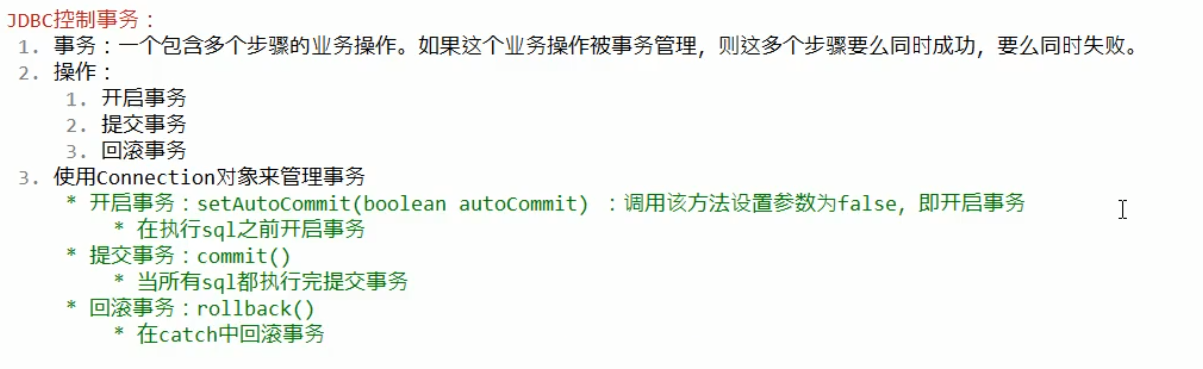
JDBC管理事务
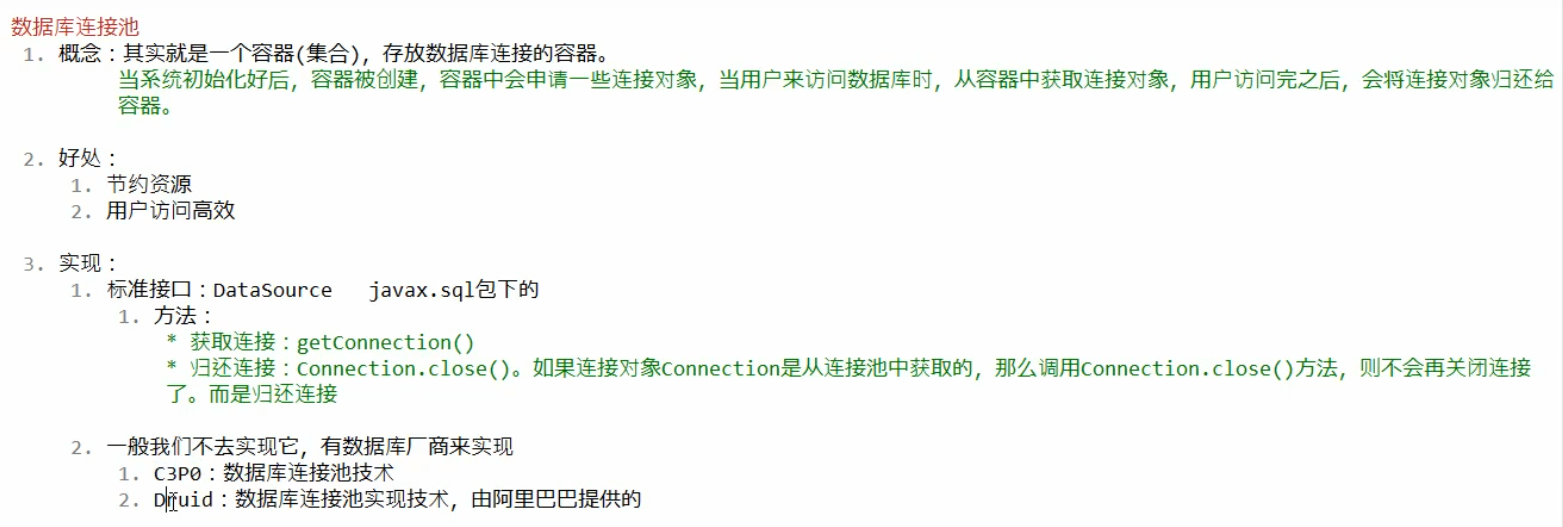
数据库连接池
1.0 介绍
重点介绍druid
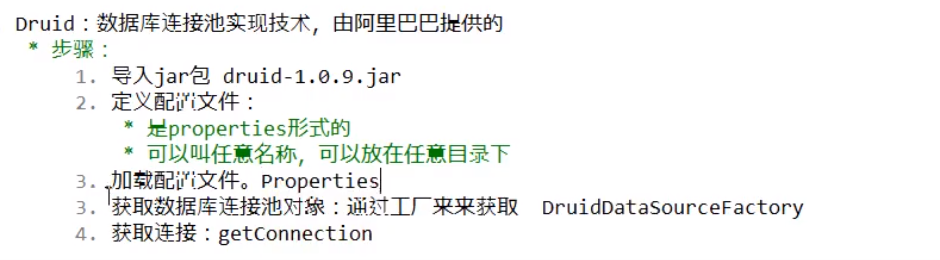
下面就建立一个druid工具类来使用(mysql-connector-java-8.0.11.jar)(druid-1.1.21.jar)
定义配置文件druid.properties
driverClassName=com.mysql.cj.jdbc.Driver
url=jdbc:mysql:///db2?serverTimezone=GMT%2B8&useSSL=false
username=root
password=root
#初始化连接数量
initialSize=5
#最大连接数
maxActive=10
#最大等待时间
maxWait=3000
定义一个工具类
package utils;

import com.alibaba.druid.pool.DruidDataSourceFactory;

import javax.sql.DataSource;
import java.sql.Connection;
import java.sql.ResultSet;
import java.sql.SQLException;
import java.sql.Statement;
import java.util.Properties;

public class Druidutil {
    public static DataSource ds;
    //导入jar包
    //定义配置文件
    //加载配置文件
    static{

        try {
            Properties prop = new Properties();
            prop.load(Druidutil.class.getClassLoader().getResourceAsStream("druid.properties"));
            ds = DruidDataSourceFactory.createDataSource(prop);
        } catch (Exception e) {
            e.printStackTrace();
        }
    }
    //获取连接对象
    public static Connection getConnection() throws SQLException {
        return ds.getConnection();
    }

    //释放资源

    public static void close(Statement stat,Connection conn)
    {
     close(null,stat,conn);
    }


    public static void close(ResultSet res,Statement stat, Connection conn)
    {
        if(res!=null)
        {
            try {
                res.close();
            } catch (SQLException throwables) {
                throwables.printStackTrace();
            }
        }
        if(stat!=null)
        {
            try {
                stat.close();
            } catch (SQLException throwables) {
                throwables.printStackTrace();
            }
        }
        if(conn!=null)
        {
            try {
                conn.close();
            } catch (SQLException throwables) {
                throwables.printStackTrace();
            }
        }
    }

    //获取连接池
    public static DataSource getDataSource()
    {
        return ds;
    }
}
定义一个测试类来测试一下这个工具类
import utils.Druidutil;

import java.sql.Connection;
import java.sql.PreparedStatement;
import java.sql.SQLException;

public class Druidtest {
    public static void main(String[] args) {
        //需求:给db2中的表 student 添加一条数据
        Connection conn=null;
        PreparedStatement prep=null;
        try {
            //1.获取连接
            conn = Druidutil.getConnection();
            //2.定义sql
            String sql="INSERT INTO student VALUES(NULL,?,?,?)";//使用prepareStatement
            //3.获取prepareStatement对象
            prep = conn.prepareStatement(sql);
            prep.setInt(1,18);
            prep.setString(2,"Jennie");
            prep.setString(3,"191");
            //4.执行sql
            int result = prep.executeUpdate();
            //打印结果
            System.out.println(result);
        } catch (SQLException throwables) {
            throwables.printStackTrace();
        }finally{
            Druidutil.close(prep,conn);
        }

    }
}
 (添加成功)
为了简化JDBC的使用 我们引入一个 Spring JDBC (JDBCTemplate)
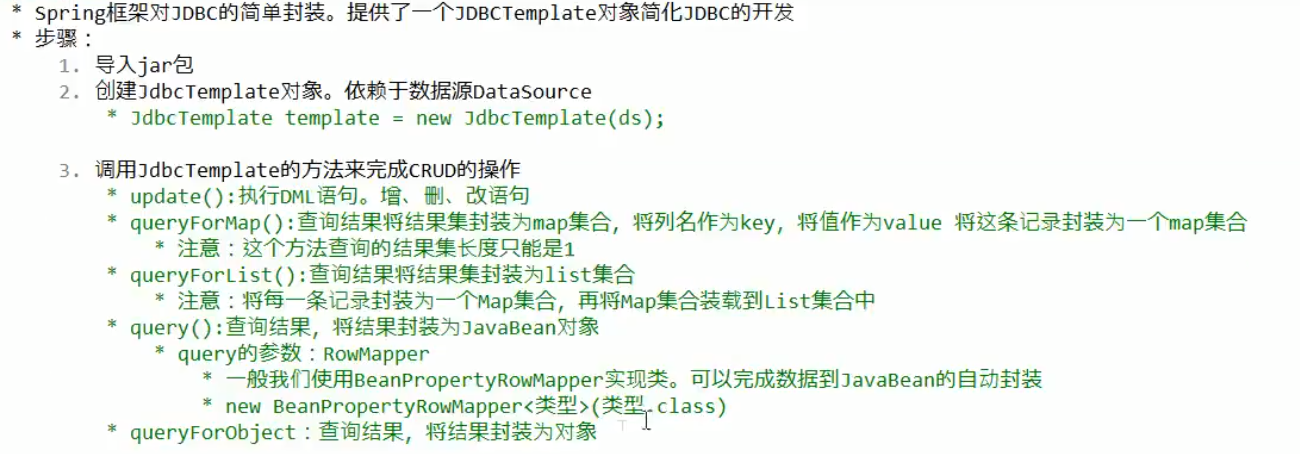
1.DML语句
import org.springframework.jdbc.core.JdbcTemplate;
import utils.Druidutil;

public class SpringJDBC {
    private static JdbcTemplate template;
    public static void main(String[] args) {

        //执行DML语句
        //导入jar包 获取JDBCtemplate
        template = new JdbcTemplate(Druidutil.getDataSource());
        //test1();//修改操作
        //test2();//添加操作
        //test3();//删除操作
    }

    private static void test3() {
        String sql="delete from user where id=?";
        int update = template.update(sql, 3);
        System.out.println(update);
    }

    private static void test2() {
        String sql="insert into user (id,name,password) values (?,?,?)";
        int update = template.update(sql, 4, "bts", "613");
        System.out.println(update);
    }

    private static void test1()
    {
        //定义sql语句
        String sql="update user set password='121' where id=1";
        //执行sql
        int update = template.update(sql);
        System.out.println(update);
    }
}
2.DQL语句
import org.springframework.jdbc.core.BeanPropertyRowMapper;
import org.springframework.jdbc.core.JdbcTemplate;
import utils.Druidutil;

import java.util.List;
import java.util.Map;

public class SpringJDBC {
    private static JdbcTemplate template;

    public static void main(String[] args) {

        //执行DQL语句
        //导入jar包 获取JDBCtemplate
        template = new JdbcTemplate(Druidutil.getDataSource());
        //test1();//查询一条记录
        //test2();//查询多条条记录
        //test3();//将每条数据分装为emp对象
         //test4();//查询总记录数
    }

    private static void test4() {
        String sql="select count(*) from user";
        Long aLong = template.queryForObject(sql, Long.class);
        System.out.println(aLong);
    }

    private static void test3() {
        String sql="select * from user";
        List<emp> query = template.query(sql, new BeanPropertyRowMapper<emp>(emp.class));
        for (emp emp : query) {
            System.out.println(emp);
        }
    }

    private static void test2() {
        String sql="select * from user";
        List<Map<String, Object>> list = template.queryForList(sql);
        for (Map<String, Object> map : list) {
            System.out.println(map);
        }
    }

    private static void test1() {
        String sql="select * from user where id=?";
        Map<String, Object> map = template.queryForMap(sql, 3);
        System.out.println(map);
    }
}