微信小程序授权是非常简单和常用的功能,但为了方便,还是在此记录一下要点:

首先是需要用到一个授权按钮来触发获取用户信息授权: 关键在于 open-type 为 getUserInfo , 然后有个@getuserinfo的事件,把获取授权接口写到该事件里面去
<button class="sys_btn" open-type="getUserInfo" lang="zh_CN" @getuserinfo="appLoginWx">小程序登录授权</button>
方法如下:
            appLoginWx(){
                // #ifdef MP-WEIXIN
                    uni.getProvider({
                      service: 'oauth',
                      success: function (res) {
                        if (~res.provider.indexOf('weixin')) {
                            uni.login({
                                provider: 'weixin',
                                success: (res2) => {

                                    uni.getUserInfo({
                                        provider: 'weixin',
                                        success: (info) => {//这里请求接口
                                            console.log(res2);
                                            console.log(info);

                                        },
                                        fail: () => {
                                            uni.showToast({title:"微信登录授权失败",icon:"none"});
                                        }
                                    })

                                },
                                fail: () => {
                                    uni.showToast({title:"微信登录授权失败",icon:"none"});
                                }
                            })

                        }else{
                            uni.showToast({
                                title: '请先安装微信或升级版本',
                                icon:"none"
                            });
                        }
                      }
                    });
                    //#endif
            }
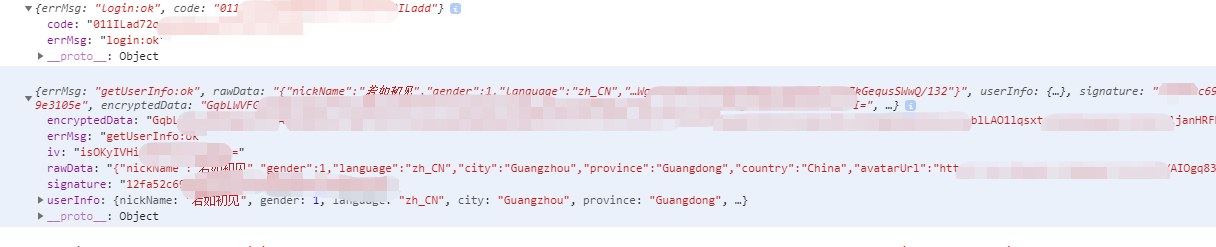
在 uni.login 和 uni.getUserInfo 被调用后,你可以获取到以下值用于继续请求后端给你的接口:
常用的值大概有:code 、iv 、encryptedData 和 个人基本信息,这些可以传给后端交换得到openid。
如果需要知道用户当前是否已经授权,则可以使用如下代码:
uniapp的授权文档,可以判断不同的授权类型:https://uniapp.dcloud.io/api/other/authorize?id=authorize
            // #ifdef MP-WEIXIN
            uni.getSetting({
             success(res) {
                console.log("授权:",res);
               if (!res.authSetting['scope.userInfo']) {
                    //这里调用授权
                    console.log("当前未授权");
               } else {
                    //用户已经授权过了
                    console.log("当前已授权");
               }
             }
           })
           //#endif