实时读取目录文件到 HDFS 案例
1)案例需求:使用 Flume 监听整个目录的文件
2)需求分析:

3)实现步骤:
1.创建配置文件 flume-dir-hdfs.conf
创建一个文件
[atguigu@hadoop102 job]$ touch flume-dir-hdfs.conf
打开文件
[atguigu@hadoop102 job]$ vim flume-dir-hdfs.conf
添加如下内容
a3.sources = r3
a3.sinks = k3
a3.channels = c3
# Describe/configure the source
a3.sources.r3.type = spooldir
a3.sources.r3.spoolDir = /opt/module/flume/upload
a3.sources.r3.fileSuffix = .COMPLETED
a3.sources.r3.fileHeader = true
#忽略所有以.tmp 结尾的文件,不上传
a3.sources.r3.ignorePattern = ([^ ]*.tmp)
# Describe the sink
a3.sinks.k3.type = hdfs
a3.sinks.k3.hdfs.path =
hdfs://hadoop102:9000/flume/upload/%Y%m%d/%H
#上传文件的前缀
a3.sinks.k3.hdfs.filePrefix = upload- #是否按照时间滚动文件夹
a3.sinks.k3.hdfs.round = true
#多少时间单位创建一个新的文件夹
a3.sinks.k3.hdfs.roundValue = 1
#重新定义时间单位
a3.sinks.k3.hdfs.roundUnit = hour
#是否使用本地时间戳
a3.sinks.k3.hdfs.useLocalTimeStamp = true
#积攒多少个 Event 才 flush 到 HDFS 一次
a3.sinks.k3.hdfs.batchSize = 100
#设置文件类型,可支持压缩
a3.sinks.k3.hdfs.fileType = DataStream
#多久生成一个新的文件
a3.sinks.k3.hdfs.rollInterval = 600
#设置每个文件的滚动大小大概是 128M
a3.sinks.k3.hdfs.rollSize = 134217700
#文件的滚动与 Event 数量无关
a3.sinks.k3.hdfs.rollCount = 0
#最小冗余数
a3.sinks.k3.hdfs.minBlockReplicas = 1
# Use a channel which buffers events in memory
a3.channels.c3.type = memory
a3.channels.c3.capacity = 1000
a3.channels.c3.transactionCapacity = 100
# Bind the source and sink to the channel
a3.sources.r3.channels = c3
a3.sinks.k3.channel = c3

2. 启动监控文件夹命令
[atguigu@hadoop102 flume]$ bin/flume-ng agent --conf conf/ --name
a3 --conf-file job/flume-dir-hdfs.conf
说明: 在使用 Spooling Directory Source 时
1) 不要在监控目录中创建并持续修改文件
2) 上传完成的文件会以.COMPLETED 结尾
3) 被监控文件夹每 500 毫秒扫描一次文件变动
3. 向 upload 文件夹中添加文件
在/opt/module/flume 目录下创建 upload 文件夹
[atguigu@hadoop102 flume]$ mkdir upload
向 upload 文件夹中添加文件
[atguigu@hadoop102 upload]$ touch atguigu.txt
[atguigu@hadoop102 upload]$ touch atguigu.tmp
[atguigu@hadoop102 upload]$ touch atguigu.log
4. 查看 HDFS 上的数据
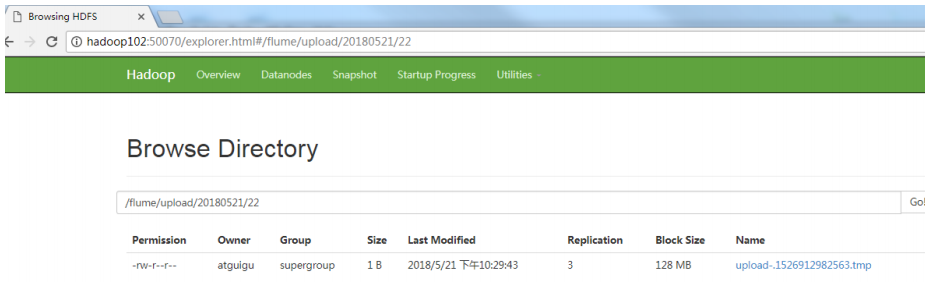
5. 等待 1s,再次查询 upload 文件夹
[atguigu@hadoop102 upload]$ ll
总用量 0 -rw-rw-r--. 1 atguigu atguigu 0 5 月 20 22:31 atguigu.log.COMPLETED
-rw-rw-r--. 1 atguigu atguigu 0 5 月 20 22:31 atguigu.tmp
-rw-rw-r--. 1 atguigu atguigu 0 5 月 20 22:31 atguigu.txt.COMPLETED