第一个小程序 router-link-路由的跳转


<template>
    <div id="app">

        <div>hello world!</div>
        <router-view></router-view>

    </div>
</template>

<script>
    export default {
        name: 'App'
    }
</script>
import Vue from 'vue'
import Router from 'vue-router'
// import Hello from "@/components/Hello";

Vue.use(Router)

export default new Router({
    routes: [
        {
            path: '/',
        },
        {
            path: '/hello',
            name: 'Hello',
            // component: Hello // 上下两种写法都ok,下面这种使用的是懒加载
            component: () =>
                import(/* webpackChunkName: "download" */ '@/components/Hello.vue')
        }
    ]
})
<template>
    <div>
        <h1>hello router!</h1>
    </div>
</template>

<script>
    export default {
        name: "Hello"
    }
</script>

<style scoped>

</style>
注:这里有个坑, vue-cli@3上面这个程序就报错
怎么回事呢,我用pycharm专业版的,安装了一个VUE
写这样的程序就报错了,至于为啥我也不知道,还有个报错,同样的代码放到2.13版本就一点问题也没有

路由懒加载
{
            path: '/hello',
            name: 'Hello',
            // component: Hello // 上下两种写法都ok,下面这种使用的是懒加载
            component: () =>
                import(/* webpackChunkName: "download" */ '@/components/Hello.vue')
        }
编程式导航,也可以理解为函数里面设置跳转
<template>
  <div id="app">
    <img src="./assets/logo.png">
<!--    <router-link to="/test">aaa</router-link>-->
    <button @click="toTest">跳转按钮</button>
    <router-view/>
  </div>
</template>

<script>
export default {
  name: 'App',
  methods:{
    toTest:function(){
      this.$router.push({path:"/test"})  // 就是这一句,注意是router,不是route
    }
  }
}
</script>

<style>
#app {
  font-family: 'Avenir', Helvetica, Arial, sans-serif;
  -webkit-font-smoothing: antialiased;
  -moz-osx-font-smoothing: grayscale;
  text-align: center;
  color: #2c3e50;
  margin-top: 60px;
}
</style>
动态路由 -- 我记住这个坑了
什么是动态路由?
举个例子吧:http://localhost:8080/#/test/23232 ,后面的数据是变动的,这个就是动态路由
对路由进行操作用router,获取参数用route
先说这里有一个坑, 只要在html里面写这个{{$route.params}}, 报错,为什么呢,因为temlpate里面只能有一个子元素
Component template should contain exactly one root element. If you are using v-if on multiple elements, use v-else-if to chain them instead.
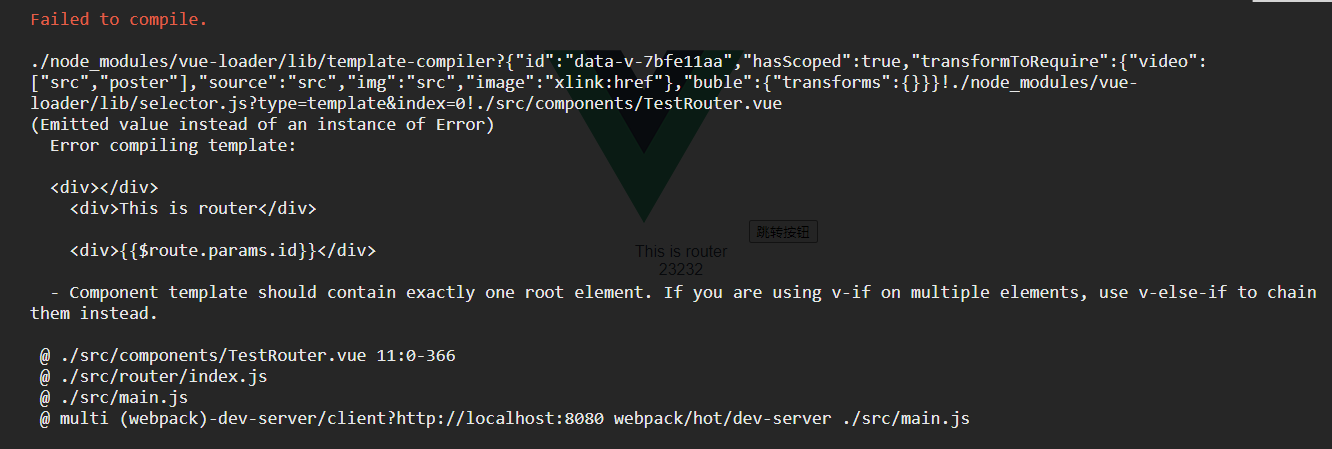
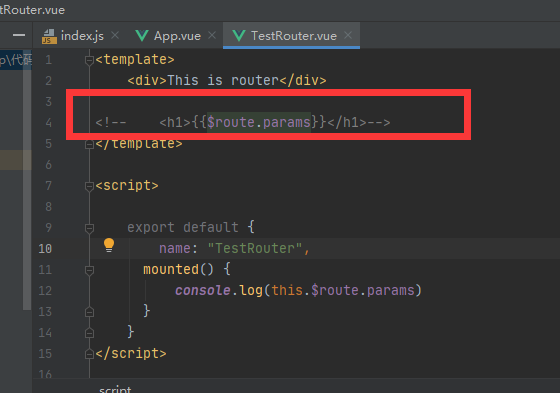
解决办法, 这样就搞定了

上代码
import Vue from 'vue'
import Router from 'vue-router'
// import HelloWorld from '@/components/HelloWorld'
import TestRouter from '@/components/TestRouter'

Vue.use(Router)

export default new Router({
  routes: [
    {
      path: '/'
      // name: 'HelloWorld',
      // component: HelloWorld
    },
    {
      path: '/test/:id',
      name: 'TestRouter',
      component: TestRouter
    }
  ]
})
<template>
  <div id="app">
    <img src="./assets/logo.png">

    <button @click="toTest">跳转按钮</button>
    <router-view/>
  </div>
</template>

<script>
export default {
  name: 'App',
  methods:{
    toTest:function(){
      this.$router.push({path:"/test/23232"}) // 这里链接也要加id,要不报错
    }
  }
}
</script>

<style>
#app {
  font-family: 'Avenir', Helvetica, Arial, sans-serif;
  -webkit-font-smoothing: antialiased;
  -moz-osx-font-smoothing: grayscale;
  text-align: center;
  color: #2c3e50;
  margin-top: 60px;
}
</style>
<template>
  <div></div>
    <div>This is router</div>

    <div>{{$route.params.id}}</div>
</template>

<script>

    export default {
        name: "TestRouter",
      mounted() {
          console.log(this.$route.params)
      }
    }
</script>

<style scoped>

</style>
嵌套路由
import Vue from 'vue'
import Router from 'vue-router'
// import HelloWorld from '@/components/HelloWorld'
import TestRouter from '@/components/TestRouter'

Vue.use(Router)

export default new Router({
  routes: [
    {
      path: '/'
      // name: 'HelloWorld',
      // component: HelloWorld
    },
    {
      path: '/test/:id',
      name: 'TestRouter',
      component: TestRouter,
      children:[{
        path: '/child',
        component: () =>
          import(/* webpackChunkName: "download" */ '@/components/Child.vue')

      }]
    }
  ]
})
<template>
  <div id="app">
    <img src="./assets/logo.png">

    <button @click="toTest">跳转按钮</button>
    <router-view/>
  </div>
</template>

<script>
export default {
  name: 'App',
  methods:{
    toTest:function(){
      this.$router.push({path:"/test/23232"}) // 这里链接也要加id,要不报错
    }
  }
}
</script>

<style>
#app {
  font-family: 'Avenir', Helvetica, Arial, sans-serif;
  -webkit-font-smoothing: antialiased;
  -moz-osx-font-smoothing: grayscale;
  text-align: center;
  color: #2c3e50;
  margin-top: 60px;
}
</style>
<template>
  <div>
    <div>This is router</div>
    <div>{{$route.params.id}}</div>
    <router-view></router-view>  // 嵌套路由需要加这句
  </div>
</template>

<script>

    export default {
        name: "TestRouter",
      mounted() {
          console.log(this.$route.params)
      }
    }
</script>

<style scoped>

</style>
<template>
    <div>
      <div>this child</div>
    </div>
</template>

<script>
    export default {
        name: "Child"
    }
</script>

<style scoped>

</style>
动态路由传参
import Vue from 'vue'
import Router from 'vue-router'
// import HelloWorld from '@/components/HelloWorld'
import TestRouter from '@/components/TestRouter'

Vue.use(Router)

export default new Router({
  routes: [
    {
      path: '/'
      // name: 'HelloWorld',
      // component: HelloWorld
    },
    {
      path: '/test/:id',
      name: 'TestRouter',
      component: TestRouter,
      children:[{
        path: '/child',
        component: () =>
          import(/* webpackChunkName: "download" */ '@/components/Child.vue')

      }]
    }
  ]
})
<template>
  <div id="app">
    <img src="./assets/logo.png">

    <button @click="toTest">跳转按钮</button>
    <router-view/>
  </div>
</template>

<script>
export default {
  name: 'App',
  methods:{
    toTest:function(){
      this.$router.push({name:"TestRouter", params:{id: 'asdfadf'}})

      //  注意下面这句,如果用path的话,如果path不符合规则,则报错
      // 通常动态路由传参,都用name的方式,也就是路由里面写的name,上面的方式
      // this.$router.push({path:"/test/1232", params:{id: 'asdfadf'}})
    }
  }
}
</script>

<style>
#app {
  font-family: 'Avenir', Helvetica, Arial, sans-serif;
  -webkit-font-smoothing: antialiased;
  -moz-osx-font-smoothing: grayscale;
  text-align: center;
  color: #2c3e50;
  margin-top: 60px;
}
</style>
<template>
  <div>
    <div>This is router</div>
    <div>{{$route.params.id}}</div>
<!--    <router-view></router-view>  // 嵌套路由需要加这句-->
  </div>
</template>

<script>

    export default {
      name: "TestRouter",
      mounted() {
          console.log(this.$route.params)
      }
    }
</script>

<style scoped>

</style>
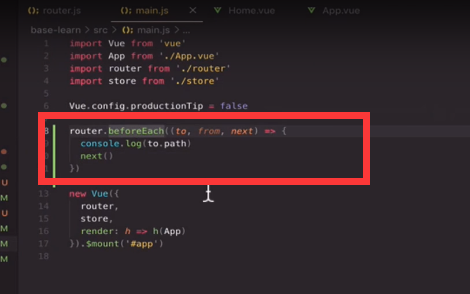
导航守卫 --main.js 类似钩子函数,必须有next(),否则夯住