日志文件记录了MySQL数据库的各种类型的活动,MySQL数据库中常见的日志文件有 查询日志,慢查询日志,错误日志,二进制日志,中继日志 ,事务日志。
修改配置或者想要使配置永久生效需将内容写入配置文件中:/etc/my.cnf.d/server.cnf
一、查询日志
查询日志在mysql中称为general log(通用日志),查询日志记录了数据库执行的命令,不管这些语句是否正确,都会被记录。由于数据库操作命令有可能非常多而且执行比较频繁,所以开启了查询日志以后,数据库可能需要不停的写入查询日志,这样会增大服务器的IO压力,增加很多系统开销,影响数据库的性能,所以默认情况下是关闭的,也不建议开启。
存储查询日志的方式:
方式1:将查询日志存放于指定的日志文件中;
方式2:将查询日志存放于mysql.general_log表中;
方式3:将查询日志同时存放于指定的日志文件与mysql库的general_log表中。
1、查看查询日志的相关参数
MariaDB [mysql]> show global variables like '%gen%log%';
+------------------+----------+
| Variable_name    | Value    |
+------------------+----------+
| general_log      | OFF      |
| general_log_file | ren7.log |
+------------------+----------+
2 rows in set (0.00 sec)

MariaDB [mysql]> show variables where variable_name like '%general_log%' or variable_name='log_output';
+------------------+----------+
| Variable_name    | Value    |
+------------------+----------+
| general_log      | OFF      |
| general_log_file | ren7.log |
| log_output       | FILE     |
+------------------+----------+
3 rows in set (0.00 sec)
2、查询日志变量详解
1 general_log:                指定是否开启查询日志(ON表示开启,OFF表示未开启,默认OFF)
2 general_log_file:           当log_output设置为“FILE”时,指定将查询日志保存成哪个文件、叫什么名,默认与主机名相同,一般位于/var/lib/mysql目录下
3 log_output:           指定将记录到的查询保存到什么位置(“NONE”、“FILE”、“TABLE”、“FILE,TABLE”)
4 file:                       保存成一个文件
5 table:                      保存成一张表
6 none:                       不记录
二、慢查询日志**
慢查询日志用来记录响应时间超过阈值的SQL语句,所以我们可以设置一个阈值,将运行时间超过该值的所有SQL语句都记录到慢查询日志文件中。该阈值可以通过参数 slow_launch_time来设置,默认为2秒。
1、查看慢查询日志的变量
MariaDB [mysql]> show global variables like '%slow%';
+---------------------------+--------------------------------------------------------------------------------------------------------------+
| Variable_name             | Value                                                                                                        |
+---------------------------+--------------------------------------------------------------------------------------------------------------+
| log_slow_admin_statements | ON                                                                                                           |
| log_slow_filter           | admin,filesort,filesort_on_disk,full_join,full_scan,query_cache,query_cache_miss,tmp_table,tmp_table_on_disk |
| log_slow_rate_limit       | 1                                                                                                            |
| log_slow_slave_statements | ON                                                                                                           |
| log_slow_verbosity        |                                                                                                              |
| slow_launch_time          | 2                                                                                                            |
| slow_query_log            | OFF                                                                                                          |
| slow_query_log_file       | ren7-slow.log                                                                                                |
+---------------------------+--------------------------------------------------------------------------------------------------------------+
8 rows in set (0.00 sec)
2、变量详解
1 slow_query_log = OFF|ON  (0|1)      #开启慢查询日志
2 slow_query_log_file = LOCALHOST-SLOW.log #慢查询日志的文件路径
3 long_query_time                 #慢查询时长;默认是10s
4 log_slow_rate_limit              #如果要记录的慢查询日志非常多的话,会按照速率来记录,默认1秒记录一个
5 log_slow_verbosity=full | query_plan    #记录的详细级别
6 log_output                    #指定将记录到的查询保存到什么位置
3、开启慢查询日志及测试
MariaDB [(none)]> set global slow_query_log=on;  #当前会话不生效,需重新连接数据库
Query OK, 0 rows affected (0.00 sec)
MariaDB [(none)]> select @@global.slow_query_log;
+-------------------------+
| @@global.slow_query_log |
+-------------------------+
|                       1 |
+-------------------------+
1 row in set (0.00 sec)
MariaDB [(none)]> select sleep(15);  #测试4次
+-----------+
| sleep(15) |
+-----------+
|         0 |
+-----------+
1 row in set (15.00 sec)
[root@ren7 mysql]# tailf /var/lib/mysql/ren7-slow.log  #查看慢查询日志的文件(默认保存类型是FILE)
 # Time: 190907 15:47:18
# User@Host: root[root] @ localhost []
# Thread_id: 10  Schema:   QC_hit: No
# Query_time: 15.008583  Lock_time: 0.000000  Rows_sent: 1  Rows_examined: 0
# Rows_affected: 0
SET timestamp=1567842438;
select sleep(15);
MariaDB [ren]> show global status like '%slow_queries%';  #查看一共记录了多少条慢查询语句
+---------------+-------+
| Variable_name | Value |
+---------------+-------+
| Slow_queries  | 4     |
+---------------+-------+
1 row in set (0.00 sec)
4、mysqldumpslow命令
mysqldumpslow是mysql自带的慢查询日志统计分析工具,可以对慢查询日志进行排序、查找、统计(只有我们将log_output的值设置为“FILE”或者“FILE,TABLE”时,mysqldumpslow才可以用)
(1)使用
[root@ren7 ~]# mysqldumpslow -s t /var/lib/mysql/ren7-slow.log

Reading mysql slow query log from /var/lib/mysql/ren7-slow.log
Count: 4  Time=15.01s (60s)  Lock=0.00s (0s)  Rows_sent=1.0 (4), Rows_examined=0.0 (0), Rows_affected=0.0 (0), root[root]@localhost
  select sleep(N)
(2)参数说明
[root@ren7 ~]# mysqldumpslow --help
Usage: mysqldumpslow [ OPTS... ] [ LOGS... ]

Parse and summarize the MySQL slow query log. Options are

  --verbose    verbose
  --debug      debug
  --help       write this text to standard output

  -v           verbose
  -d           debug
  -s ORDER     what to sort by (aa, ae, al, ar, at, a, c, e, l, r, t), 'at' is default
                aa: average rows affected
                ae: aggregated rows examined
                al: average lock time(平均锁定时间)
                ar: average rows sent(平均返回记录数)
                at: average query time(平均执行时间)
                 a: rows affected
                 c: count(执行计数)
                 e: rows examined
                 l: lock time(锁定时间)
                 r: rows sent(返回记录)
                 t: query time(执行时间)
  -r           reverse the sort order (largest last instead of first)
  -t NUM       just show the top n queries(指定只查看多少条统计信息)
  -a           don't abstract all numbers to N and strings to 'S'
  -n NUM       abstract numbers with at least n digits within names
  -g PATTERN   grep: only consider stmts that include this string(正则表达式)
  -h HOSTNAME  hostname of db server for *-slow.log filename (can be wildcard),
               default is '*', i.e. match all
  -i NAME      name of server instance (if using mysql.server startup script)
  -l           don't subtract lock time from total time
三、错误日志
主要记录:(很重要的信息日志文件)
(1)mysqld启动和关闭过程中输出的事件信息
(2)mysqld运行中产生的错误信息
(3)event scheduler 运行一个event时产生的日志信息
(4)在主从复制架构中的从服务器IO复制线程时产生的信息
1、查看参数
MariaDB [mysql]> show variables like '%log_error%';
+---------------+-------+
| Variable_name | Value |
+---------------+-------+
| log_error     |       |
+---------------+-------+
1 row in set (0.00 sec)

MariaDB [mysql]> show variables like '%log_warnings%';
+---------------+-------+
| Variable_name | Value |
+---------------+-------+
| log_warnings  | 2     |
+---------------+-------+
1 row in set (0.01 sec)
2、参数详解
1 log_error = /var/log/mysql_error.log  #指定错误日志的输出位置
2 log_warnings 为0, 表示不记录告警信息。
3 log_warnings 为1, 表示告警信息写入错误日志。
4 log_warnings 大于1, 表示各类告警信息,例如有关网络故障的信息和重新连接信息写入错误日志。(默认为2)
四、二进制日志***
在mysql中二进制日志为binlog,它记录了对数据库执行更改的所有操作,但是不包括 select 和 show 这类操作,因为这类操作对数据本身并没有修改,如果你还想记录select和show操作,那只能使用查询日志了,而不是二进制日志。(增删改的SQL语句)
二进制还包括了执行数据库更改操作的时间和执行时间等信息,它主要用于时间点恢复(备份恢复)以及主从复制结构
- 恢复(recovery) : 某些数据的恢复需要二进制日志,如当一个数据库全备文件恢复后,我们可以通过二进制的日志进行
point-in-time的恢复 - 复制(replication) : 通过复制和执行二进制日志使得一台远程的 MySQL 数据库(一般是slave 或者 standby) 与一台MySQL数据库(一般为master或者primary) 进行实时同步
- 审计(audit) :用户可以通过二进制日志中的信息来进行审计,判断是否有对数据库进行注入攻击
1、查看变量
MariaDB [mysql]> show global variables like '%bin%';
+-----------------------------------------+--------------------------------+
| Variable_name                           | Value                          |
+-----------------------------------------+--------------------------------+
| binlog_annotate_row_events              | ON                             |
| binlog_cache_size                       | 32768                          |
| binlog_checksum                         | CRC32                          |
| binlog_commit_wait_count                | 0                              |
| binlog_commit_wait_usec                 | 100000                         |
| binlog_direct_non_transactional_updates | OFF                            |
| binlog_format                           | MIXED                          |
| binlog_optimize_thread_scheduling       | ON                             |
| binlog_row_image                        | FULL                           |
| binlog_stmt_cache_size                  | 32768                          |
| encrypt_binlog                          | OFF                            |
| gtid_binlog_pos                         | 0-1-1                          |
| gtid_binlog_state                       | 0-1-1                          |
| innodb_locks_unsafe_for_binlog          | OFF                            |
| log_bin                                 | ON                             |
| log_bin_basename                        | /var/lib/mysql/mysql-bin       |
| log_bin_compress                        | OFF                            |
| log_bin_compress_min_len                | 256                            |
| log_bin_index                           | /var/lib/mysql/mysql-bin.index |
| log_bin_trust_function_creators         | OFF                            |
| max_binlog_cache_size                   | 18446744073709547520           |
| max_binlog_size                         | 1073741824                     |
| max_binlog_stmt_cache_size              | 18446744073709547520           |
| read_binlog_speed_limit                 | 0                              |
| sql_log_bin                             | ON                             |
| sync_binlog                             | 0                              |
| wsrep_forced_binlog_format              | NONE                           |
+-----------------------------------------+--------------------------------+
27 rows in set (0.00 sec)
2、变量详解
二进制日志文件的构成:
(1)日志文件:mysql-bin.xxxxxx,二进制格式
(2)索引文件:mysql-bin,index,索引文件(十进制文件)
log_bin = LOG_NAME:                        (只读变量)只能通过修改配置文件来指定是否启用二进制日志(全局的)
     #my.cnf配置文件中没有log_bin的配置,表示未开启二进制日志,如果存在log_bin的配置,则表示开启了二进制日志,同时,二进制日志文件的名称将会以log_bin对应的值为文件名前缀,文件默认位置在/var/lib/mysql/下,二进制日志文件的后缀名会进行自动编号,每次日志滚动后,后缀名编号自动加1.
log_bin_basename = /var/lib/mysql/mysql-bin: 指定二进制日志的文件的基名
log_bin_index = /var/lib/mysql/mysql-bin.index:指定二进制日志文件的索引文件
binlog_format = STATEMENT|ROW|MIXED:        指定基于哪种方式进行记录
          STATEMENT:            基于“语句”记录
          ROW:                基于“行”记录
          MIXED:              让系统自行判定该基于哪种方式记录
sync_binlog = 1|0:                           设定是否启动二进制日志同步功能
             -->每次提交事务,会将缓存中的内存刷新到二进制日志文件中。
             -->默认每个sql语句是一个事务,而且默认事务会自动提交,所以,默认的性能很差
        -->此值为0时,表示当事务提交后,不会立即将内存中的binlog刷新到磁盘中;安全性最差,性能最高
        -->此值为1时,表示每一次事务提交后,都会立即将内存中的二进制文件同步到磁盘中;安全性最高,性能最差
        -->还能设置为N,当设置为3时,表示每3次事务提交后,将binlog从内存刷写到磁盘一次,值设置的越大,有可能丢失的日志数据越多,但性能会越好
max_binlog_size = SIZE:                     指定二进制日志文件的上限,超过上限会滚动,以字节为单位(默认为1G,为1073741824B)
max_binlog_cache_size = SIZE:               指定二进制日志缓存空间大小,空间被填满,会自动滚动
sql_log_off = on|off:                       是否将一般的查询操作记录到二进制日志中
sql_log_bin = ON |OFF:                      指定是否启用二进制日志(会话级别)
log_bin_trust_function_creators = on|off:   指定是否允许创建可能导致不安全的函数
3、查看二进制日志文件列表及事件
SHOW {BINARY | MASTER} LOGS
SHOW BINLOG EVENTS [IN 'log_name']
show master status;
--修改配置文件
[root@ren7 ~]# vim /etc/my.cnf.d/server.cnf
#############################
[server]
log_bin = mysql-binlog
##############################
--重启服务
[root@ren7 ~]# systemctl restart mariadb
[root@ren7 ~]# mysql -uroot -proot -D ren;
--查看二进制日志文件列表
MariaDB [ren]> show master logs;
+---------------------+-----------+
| Log_name            | File_size |
+---------------------+-----------+
| mysql-binlog.000001 |       331 |
+---------------------+-----------+
1 row in set (0.00 sec)
MariaDB [ren]> show binary logs;
+---------------------+-----------+
| Log_name            | File_size |
+---------------------+-----------+
| mysql-binlog.000001 |       331 |
+---------------------+-----------+
1 row in set (0.00 sec)
--查看当前正在使用的二进制日志文件
MariaDB [ren]> show master status;
+---------------------+----------+--------------+------------------+
| File                | Position | Binlog_Do_DB | Binlog_Ignore_DB |
+---------------------+----------+--------------+------------------+
| mysql-binlog.000001 |      331 |              |                  |
+---------------------+----------+--------------+------------------+
1 row in set (0.00 sec)
--修改数据库的文件
MariaDB [ren]> drop table test4;
Query OK, 0 rows affected (0.00 sec)

MariaDB [ren]> delete from test where name='李连杰';
Query OK, 1 row affected (0.00 sec)

MariaDB [ren]> insert into test set name='漩涡鸣人';
Query OK, 1 row affected (0.01 sec)
--再次查看二进制日志文件
MariaDB [ren]> show master status;
+---------------------+----------+--------------+------------------+
| File                | Position | Binlog_Do_DB | Binlog_Ignore_DB |
+---------------------+----------+--------------+------------------+
| mysql-binlog.000001 |      840 |              |                  |
+---------------------+----------+--------------+------------------+
1 row in set (0.00 sec)
--查看二进制日志文件中的事件(查看binlog内容)
MariaDB [ren]> show binlog events;
MariaDB [ren]> show binlog events in 'mysql-binlog.000001';
+---------------------+-----+-------------------+-----------+-------------+---------------------------------------------------------+
| Log_name            | Pos | Event_type        | Server_id | End_log_pos | Info                                                    |
+---------------------+-----+-------------------+-----------+-------------+---------------------------------------------------------+
| mysql-binlog.000001 |   4 | Format_desc       |         1 |         256 | Server ver: 10.2.26-MariaDB-log, Binlog ver: 4          |
| mysql-binlog.000001 | 256 | Gtid_list         |         1 |         285 | []                                                      |
| mysql-binlog.000001 | 285 | Binlog_checkpoint |         1 |         331 | mysql-binlog.000001                                     |
| mysql-binlog.000001 | 331 | Gtid              |         1 |         373 | GTID 0-1-1                                              |
| mysql-binlog.000001 | 373 | Query             |         1 |         483 | use `ren`; DROP TABLE `test4` /* generated by server */ |
| mysql-binlog.000001 | 483 | Gtid              |         1 |         525 | BEGIN GTID 0-1-2                                        |
| mysql-binlog.000001 | 525 | Query             |         1 |         630 | use `ren`; delete from test where name='李连杰'         |
| mysql-binlog.000001 | 630 | Xid               |         1 |         661 | COMMIT /* xid=22 */                                     |
| mysql-binlog.000001 | 661 | Gtid              |         1 |         703 | BEGIN GTID 0-1-3                                        |
| mysql-binlog.000001 | 703 | Query             |         1 |         809 | use `ren`; insert into test set name='漩涡鸣人'         |
| mysql-binlog.000001 | 809 | Xid               |         1 |         840 | COMMIT /* xid=23 */                                     |
+---------------------+-----+-------------------+-----------+-------------+---------------------------------------------------------+
11 rows in set (0.00 sec)

MariaDB [ren]> show binlog events in 'mysql-binlog.000001' from 256;
+---------------------+-----+-------------------+-----------+-------------+---------------------------------------------------------+
| Log_name            | Pos | Event_type        | Server_id | End_log_pos | Info                                                    |
+---------------------+-----+-------------------+-----------+-------------+---------------------------------------------------------+
| mysql-binlog.000001 | 256 | Gtid_list         |         1 |         285 | []                                                      |
| mysql-binlog.000001 | 285 | Binlog_checkpoint |         1 |         331 | mysql-binlog.000001                                     |
| mysql-binlog.000001 | 331 | Gtid              |         1 |         373 | GTID 0-1-1                                              |
| mysql-binlog.000001 | 373 | Query             |         1 |         483 | use `ren`; DROP TABLE `test4` /* generated by server */ |
| mysql-binlog.000001 | 483 | Gtid              |         1 |         525 | BEGIN GTID 0-1-2                                        |
| mysql-binlog.000001 | 525 | Query             |         1 |         630 | use `ren`; delete from test where name='李连杰'         |
| mysql-binlog.000001 | 630 | Xid               |         1 |         661 | COMMIT /* xid=22 */                                     |
| mysql-binlog.000001 | 661 | Gtid              |         1 |         703 | BEGIN GTID 0-1-3                                        |
| mysql-binlog.000001 | 703 | Query             |         1 |         809 | use `ren`; insert into test set name='漩涡鸣人'         |
| mysql-binlog.000001 | 809 | Xid               |         1 |         840 | COMMIT /* xid=23 */                                     |
+---------------------+-----+-------------------+-----------+-------------+---------------------------------------------------------+
10 rows in set (0.00 sec)

MariaDB [ren]> show binlog events in 'mysql-binlog.000001' limit 1,2;
+---------------------+-----+-------------------+-----------+-------------+---------------------+
| Log_name            | Pos | Event_type        | Server_id | End_log_pos | Info                |
+---------------------+-----+-------------------+-----------+-------------+---------------------+
| mysql-binlog.000001 | 256 | Gtid_list         |         1 |         285 | []                  |
| mysql-binlog.000001 | 285 | Binlog_checkpoint |         1 |         331 | mysql-binlog.000001 |
+---------------------+-----+-------------------+-----------+-------------+---------------------+
2 rows in set (0.00 sec)
4、二进制日志滚动
(1)flush logs;
(2)文件超出指定大小;
(3)重启数据库(service mariadb restart / systemctl restart mariadb)
5、查看二进制日志文件(mysqlbinlog命令)
除了前面提到的可以通过show binlog events命令在mysql中查看日志内容,还可以通过mysqlbinlog命令在文件系统下查看对应的二进制日志文件。
[root@ren7 mysql]# pwd
/var/lib/mysql
[root@ren7 mysql]# mysqlbinlog mysql-binlog.000001
/*!50530 SET @@SESSION.PSEUDO_SLAVE_MODE=1*/;
/*!40019 SET @@session.max_insert_delayed_threads=0*/;
/*!50003 SET @OLD_COMPLETION_TYPE=@@COMPLETION_TYPE,COMPLETION_TYPE=0*/;
DELIMITER /*!*/;
# at 4
#190907 17:15:09 server id 1  end_log_pos 256 CRC32 0x16b33f7c     Start: binlog v 4, server v 10.2.26-MariaDB-log created 190907 17:15:09 at startup
# Warning: this binlog is either in use or was not closed properly.
ROLLBACK/*!*/;
BINLOG '
HXVzXQ8BAAAA/AAAAAABAAABAAQAMTAuMi4yNi1NYXJpYURCLWxvZwAAAAAAAAAAAAAAAAAAAAAA
AAAAAAAAAAAAAAAAAAAddXNdEzgNAAgAEgAEBAQEEgAA5AAEGggAAAAICAgCAAAACgoKAAAAAAAA
AAAAAAAAAAAAAAAAAAAAAAAAAAAAAAAAAAAAAAAAAAAAAAAAAAAAAAAAAAAAAAAAAAAAAAAAAAAA
AAAAAAAAAAAAAAAAAAAAAAAAAAAAAAAAAAAAAAAAAAAAAAAAAAAAAAAAAAAAAAAAAAAAAAAAAAAA
AAAAAAAAAAAEEwQADQgICAoKCgF8P7MW
'/*!*/;
# at 256
#190907 17:15:09 server id 1  end_log_pos 285 CRC32 0x6a3abc7d     Gtid list []
# at 285
#190907 17:15:09 server id 1  end_log_pos 331 CRC32 0x01d5789f     Binlog checkpoint mysql-binlog.000001
# at 331
#190907 17:27:38 server id 1  end_log_pos 373 CRC32 0x17565195     GTID 0-1-1 ddl
/*!100101 SET @@session.skip_parallel_replication=0*//*!*/;
/*!100001 SET @@session.gtid_domain_id=0*//*!*/;
/*!100001 SET @@session.server_id=1*//*!*/;
/*!100001 SET @@session.gtid_seq_no=1*//*!*/;
# at 373
#190907 17:27:38 server id 1  end_log_pos 483 CRC32 0xc4f951a5     Query    thread_id=9    exec_time=0    error_code=0
use `ren`/*!*/;
SET TIMESTAMP=1567848458/*!*/;
SET @@session.pseudo_thread_id=9/*!*/;
SET @@session.foreign_key_checks=1, @@session.sql_auto_is_null=0, @@session.unique_checks=1, @@session.autocommit=1, @@session.check_constraint_checks=1/*!*/;
SET @@session.sql_mode=1411383296/*!*/;
SET @@session.auto_increment_increment=1, @@session.auto_increment_offset=1/*!*/;
/*!C utf8 *//*!*/;
SET @@session.character_set_client=33,@@session.collation_connection=33,@@session.collation_server=8/*!*/;
SET @@session.lc_time_names=0/*!*/;
SET @@session.collation_database=DEFAULT/*!*/;
DROP TABLE `test4` /* generated by server */
/*!*/;
# at 483
#190907 17:28:11 server id 1  end_log_pos 525 CRC32 0x331814aa     GTID 0-1-2 trans
/*!100001 SET @@session.gtid_seq_no=2*//*!*/;
BEGIN
/*!*/;
# at 525
#190907 17:28:11 server id 1  end_log_pos 630 CRC32 0x2a7828ea     Query    thread_id=9    exec_time=0    error_code=0
SET TIMESTAMP=1567848491/*!*/;
delete from test where name='李连杰'
/*!*/;
# at 630
#190907 17:28:11 server id 1  end_log_pos 661 CRC32 0x13fd72a8     Xid = 22
COMMIT/*!*/;
# at 661
#190907 17:30:06 server id 1  end_log_pos 703 CRC32 0x4fd1715e     GTID 0-1-3 trans
/*!100001 SET @@session.gtid_seq_no=3*//*!*/;
BEGIN
/*!*/;
# at 703
#190907 17:30:06 server id 1  end_log_pos 809 CRC32 0xd387e70f     Query    thread_id=9    exec_time=0    error_code=0
SET TIMESTAMP=1567848606/*!*/;
insert into test set name='漩涡鸣人'
/*!*/;
# at 809
#190907 17:30:06 server id 1  end_log_pos 840 CRC32 0x62252207     Xid = 23
COMMIT/*!*/;
DELIMITER ;
# End of log file
ROLLBACK /* added by mysqlbinlog */;
/*!50003 SET COMPLETION_TYPE=@OLD_COMPLETION_TYPE*/;
/*!50530 SET @@SESSION.PSEUDO_SLAVE_MODE=0*/;
二进制日志格式:
    #190613 14:17:32 server id 1  end_log_pos 666 CRC32 0xeb1cde6b  Query   thread_id=9     exec_time=
    0       error_code=0
    use `testdb`/*!*/;
    事件发生的日期和时间:190613 14:17:32
    事件发生的服务器标识:server id 1
    事件的结束位置:end_log_pos 666
    事件的类型:Query
    事件发生时所在服务器执行此事件的线程ID:thread_id=9
    语句的时间戳与将其写入二进制文件中的时间差:exec_time=0
    错误代码:error_code=0
    事件内容:
    GTID:Global Transaction ID;
        专属属性:GTID
mysqlbinlog:客户端命令工具
    mysqlbinlog [options] log_file ...
    --start-datetime=
    --stop-datetime=
    --start-position=
    --stop-position=
五、中继日志
复制架构中,备服务器用于保存主服务器的二进制日志中读取到的事件;用于实现mysql的主从复制。
1、查看中继日志变量
MariaDB [ren]> show global variables like "%relay%";
+-----------------------+----------------+
| Variable_name         | Value          |
+-----------------------+----------------+
| max_relay_log_size    | 1073741824     |
| relay_log             |                |
| relay_log_basename    |                |
| relay_log_index       |                |
| relay_log_info_file   | relay-log.info |
| relay_log_purge       | ON             |
| relay_log_recovery    | OFF            |
| relay_log_space_limit | 0              |
| sync_relay_log        | 10000          |
| sync_relay_log_info   | 10000          |
+-----------------------+----------------+
10 rows in set (0.00 sec)
2、变量详解
1 relay_log fileName:       指定中继日志的文件名。【文件名为空,表示禁用了中继日志】
2 relay_log_index:          索引表
3 relay_log_info_file:      记录中继日志文件的相关信息
4 relay_log_purge:          指定是否自动删除无用的中继日志文件
5 relay_log_recovery:       是否可以对中继日志做自动恢复相关的配置
6 relay_log_space_limit:    指定中继日志可以占用的空间大小(0表示不限制)
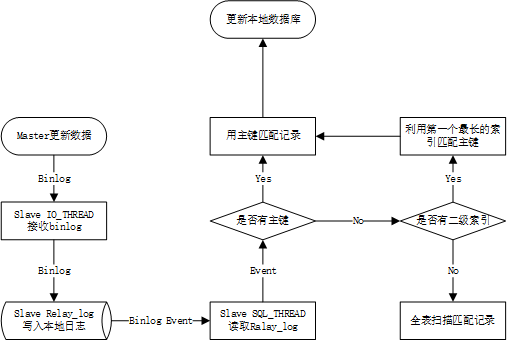
3、SQL线程应用中继日志流程
六、事务日志
事务日志:transaction log(ib_logfile0,ib_logfile1)
1、查看参数
MariaDB [ren]> show global variables like '%innodb%log%';
+-------------------------------------------+------------+
| Variable_name                             | Value      |
+-------------------------------------------+------------+
| innodb_encrypt_log                        | OFF        |
| innodb_flush_log_at_timeout               | 1          |
| innodb_flush_log_at_trx_commit            | 1          |
| innodb_locks_unsafe_for_binlog            | OFF        |
| innodb_log_arch_dir                       |            |
| innodb_log_arch_expire_sec                | 0          |
| innodb_log_archive                        | OFF        |
| innodb_log_block_size                     | 0          |
| innodb_log_buffer_size                    | 16777216   |
| innodb_log_checksum_algorithm             | DEPRECATED |
| innodb_log_checksums                      | ON         |
| innodb_log_compressed_pages               | ON         |
| innodb_log_file_size                      | 50331648   |
| innodb_log_files_in_group                 | 2          |
| innodb_log_group_home_dir                 | ./         |
| innodb_log_optimize_ddl                   | ON         |
| innodb_log_write_ahead_size               | 8192       |
| innodb_max_undo_log_size                  | 10485760   |
| innodb_mirrored_log_groups                | 0          |
| innodb_online_alter_log_max_size          | 134217728  |
| innodb_scrub_log                          | OFF        |
| innodb_scrub_log_speed                    | 256        |
| innodb_track_redo_log_now                 | OFF        |
| innodb_undo_log_truncate                  | OFF        |
| innodb_undo_logs                          | 128        |
| innodb_use_global_flush_log_at_trx_commit | OFF        |
+-------------------------------------------+------------+
26 rows in set (0.00 sec)
2、部分参数详解
innodb_buffer_pool_size                    一般设置成为物理内存的3/4,或者4/5
innodb_log_files_in_group = 2              事务日志文件的个数,默认为2个事务日志文件
innodb_log_file_size = 50331648(48m)      事务日志文件的单个大小48m
innodb_log_group_home_dir = ./             事务日志文件的所在路径,默认就在mariadb的数据目录/var/lib/mysql
事务型存储引擎自行管理和使用(Innodb,myisam引擎是不支持事务,外键,行级锁)
    redo log : 重做日志
    undo log :撤销日志
buffer_pool:缓冲池(一般而言,装完数据库第一个要调的参数)