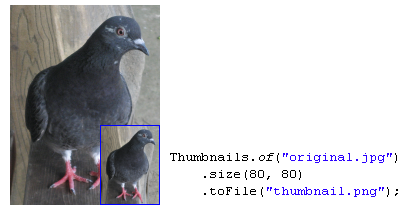
Create a thumbnail from an image file
Thumbnails.of(new File("original.jpg"))
        .size(160, 160)
        .toFile(new File("thumbnail.jpg"));
In this example, the image from original.jpg is resized, and then saved to thumbnail.jpg.
Alternatively, Thumbnailator will accept file names as a String. Using File objects to specify image files is not required:
Thumbnails.of("original.jpg")
        .size(160, 160)
        .toFile("thumbnail.jpg");
This form can be useful when writing quick prototype code, or when Thumbnailator is being used from scripting languages.
Create a thumbnail with rotation and a watermark
Thumbnails.of(new File("original.jpg"))
        .size(160, 160)
        .rotate(90)
        .watermark(Positions.BOTTOM_RIGHT, ImageIO.read(new File("watermark.png")), 0.5f)
        .outputQuality(0.8)
        .toFile(new File("image-with-watermark.jpg"));
In this example, the image from original.jpg is resized, then rotated to clockwise by 90 degrees, then a watermark is placed at the bottom right-hand corner which is half transparent, then is saved toimage-with-watermark.jpg with 80% compression quality settings.
Create a thumbnail and write to an OutputStream
OutputStream os = ...;

Thumbnails.of("large-picture.jpg")
        .size(200, 200)
        .outputFormat("png")
        .toOutputStream(os);
In this example, an image from the file large-picture.jpg is resized to a maximum dimension of 200 x 200 (maintaining the aspect ratio of the original image) and writes the that to the specifiedOutputStream as a PNG image.
Creating fixed-size thumbnails
BufferedImage originalImage = ImageIO.read(new File("original.png"));

BufferedImage thumbnail = Thumbnails.of(originalImage)
        .size(200, 200)
        .asBufferedImage();
The above code takes an image in originalImage and creates a 200 pixel by 200 pixel thumbnail using and stores the result in thumbnail.
Scaling an image by a given factor
BufferedImage originalImage = ImageIO.read(new File("original.png"));

BufferedImage thumbnail = Thumbnails.of(originalImage)
        .scale(0.25)
        .asBufferedImage();
The above code takes the image in originalImage and creates a thumbnail that is 25% of the original image, and uses the default scaling technique in order to make the thumbnail which is stored in thumbnail.
Rotating an image when creating a thumbnail
BufferedImage originalImage = ImageIO.read(new File("original.jpg"));

BufferedImage thumbnail = Thumbnails.of(originalImage)
        .size(200, 200)
        .rotate(90)
        .asBufferedImage();
The above code takes the original image and creates a thumbnail which is rotated clockwise by 90 degrees.
Creating a thumbnail with a watermark
BufferedImage originalImage = ImageIO.read(new File("original.jpg"));
BufferedImage watermarkImage = ImageIO.read(new File("watermark.png"));

BufferedImage thumbnail = Thumbnails.of(originalImage)
        .size(200, 200)
        .watermark(Positions.BOTTOM_RIGHT, watermarkImage, 0.5f)
        .asBufferedImage();
As shown, a watermark can be added to an thumbnail by calling the watermark method.
The positioning can be selected from the Positions enum.
The opaqueness (or conversely, transparency) of the thumbnail can be adjusted by changing the last argument, where 0.0f being the thumbnail is completely transparent, and 1.0f being the watermark is completely opaque.
Writing thumbnails to a specific directory
File destinationDir = new File("path/to/output");

Thumbnails.of("apple.jpg", "banana.jpg", "cherry.jpg")
        .size(200, 200)
        .toFiles(destinationDir, Rename.PREFIX_DOT_THUMBNAIL);
This example will take the source images, and write the thumbnails them as files to destinationDir(path/to/output directory) while renaming them with thumbnail. prepended to the file names.
Therefore, the thumbnails will be written as files in:
path/to/output/thumbnail.apple.jpgpath/to/output/thumbnail.banana.jpgpath/to/output/thumbnail.cherry.jpg
It's also possible to preserve the original filename while writing to a specified directory:
File destinationDir = new File("path/to/output");

Thumbnails.of("apple.jpg", "banana.jpg", "cherry.jpg")
        .size(200, 200)
        .toFiles(destinationDir, Rename.NO_CHANGE);
In the above code, the thumbnails will be written to:
path/to/output/apple.jpgpath/to/output/banana.jpgpath/to/output/cherry.jpg