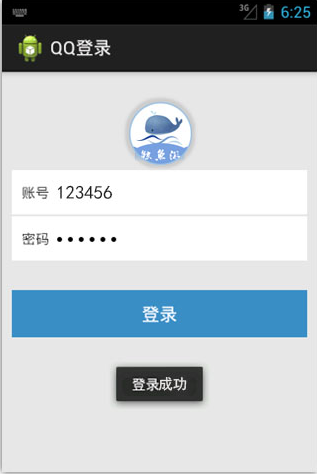
<RelativeLayout xmlns:android="http://schemas.android.com/apk/res/android"
    xmlns:tools="http://schemas.android.com/tools"
    android:layout_width="match_parent"
    android:layout_height="match_parent"
    android:background="#e7e7e7"
    android:paddingBottom="@dimen/activity_vertical_margin"
    android:paddingLeft="@dimen/activity_horizontal_margin"
    android:paddingRight="@dimen/activity_horizontal_margin"
    android:paddingTop="@dimen/activity_vertical_margin"
    tools:context="com.example.qq.MainActivity" >

    <LinearLayout
       android:layout_width="match_parent"
       android:layout_height="match_parent"
       android:orientation="vertical">

            <LinearLayout
             android:layout_width="match_parent"
             android:layout_height="match_parent"
             android:orientation="vertical"
             android:layout_weight="1">

                <LinearLayout
                    android:layout_width="match_parent"
                    android:layout_height="match_parent"
                    android:layout_weight="1"
                    android:orientation="vertical" >
                        <LinearLayout
                        android:layout_width="match_parent"
                        android:layout_height="match_parent"
                        android:layout_weight="1"
                        android:orientation="vertical" >
                    </LinearLayout>
                     <LinearLayout
                        android:layout_width="match_parent"
                        android:layout_height="match_parent"
                        android:layout_weight="1"
                        android:orientation="vertical" >
                          <ImageView
                            android:layout_width="match_parent"
                            android:layout_height="match_parent"
                            android:src="@drawable/tx"
                            android:layout_marginBottom="10dp"
                           />
                    </LinearLayout>
                </LinearLayout>

                     <LinearLayout
                     android:layout_width="match_parent"
                     android:layout_height="match_parent"
                     android:orientation="vertical"
                     android:layout_weight="1">
                                 <LinearLayout
                                 android:layout_width="match_parent"
                                 android:layout_height="match_parent"
                                 android:orientation="horizontal"
                                 android:background="#ffffff"
                                 android:layout_weight="1"
                                 android:layout_marginBottom="2dp">
                                 <TextView
                                     android:layout_width="0dp"
                                     android:layout_height="match_parent"
                                     android:layout_weight="1"
                                     android:background="#ffffff"
                                     android:text="账号"
                                     android:gravity="center_vertical"
                                     android:layout_marginLeft="10dp"
                                     />
                                  <EditText
                                     android:id="@+id/admin"
                                     android:layout_width="0dp"
                                     android:layout_height="match_parent"
                                     android:layout_weight="9"
                                     android:hint="QQ账号"
                                     android:background="#ffffff"
                                      />
                                  <TextView
                                        android:id="@+id/yadmin"
                                        android:layout_width="0dp"
                                        android:layout_height="0dp"
                                        android:text="123456"
                                                           />
                                  </LinearLayout>
                                  <LinearLayout
                                 android:layout_width="match_parent"
                                 android:layout_height="match_parent"
                                 android:background="#ffffff"
                                 android:layout_weight="1"
                                 android:layout_marginTop="2dp">
                                  <TextView
                                     android:layout_width="0dp"
                                     android:layout_height="match_parent"
                                     android:layout_weight="1"
                                     android:background="#ffffff"
                                     android:text="密码"
                                     android:gravity="center_vertical"
                                     android:layout_marginLeft="10dp"
                                     />

                                  <EditText
                                     android:id="@+id/password"
                                     android:layout_width="0dp"
                                     android:layout_height="match_parent"
                                     android:layout_weight="9"
                                     android:hint="密码"
                                     android:background="#ffffff"
                                     android:inputType="textPassword"
                                      />
                                 </LinearLayout>
                     </LinearLayout>
             </LinearLayout>


       <LinearLayout
       android:layout_width="match_parent"
       android:layout_height="match_parent"
       android:orientation="vertical"
       android:layout_weight="1">
                   <LinearLayout
                   android:layout_marginTop="40dp"
                   android:layout_width="match_parent"
                   android:layout_height="0dp"
                   android:layout_weight="1"
                   >
                     <Button
                     android:id="@+id/Login"
                     android:layout_width="match_parent"
                     android:layout_height="match_parent"
                     android:text="登录"
                     android:textColor="#ffffff"
                     android:background="#398ec6"
                     android:onClick="click"
                         />
                   </LinearLayout>
                   <LinearLayout
                   android:layout_width="match_parent"
                   android:layout_height="0dp"
                   android:layout_weight="3">
                   </LinearLayout>
       </LinearLayout>
       </LinearLayout>
</RelativeLayout>
package com.example.qq;

import android.app.Activity;
import android.os.Bundle;
import android.view.Menu;
import android.view.MenuItem;
import android.view.View;
import android.widget.Button;
import android.widget.EditText;
import android.widget.TextView;
import android.widget.Toast;

public class MainActivity extends Activity {

    @Override
    protected void onCreate(Bundle savedInstanceState) {
         super.onCreate(savedInstanceState);
         setContentView(R.layout.activity_main);
         Button  Login =(Button) findViewById(R.id.Login);


         Login.setOnClickListener(new View.OnClickListener() {
                TextView textView;
                @Override
                public void onClick(View view) {
                     EditText admin= (EditText) findViewById(R.id.admin);
                     EditText password= (EditText) findViewById(R.id.password);
                     String admin1=admin.getText().toString().trim();
                     String password1=password.getText().toString().trim();
                    // TODO Auto-generated method stub
                    if("123456".equals(admin1)&&"adc123".equals(password1)){
                    Toast.makeText(MainActivity.this,"登录成功",0).show();
                }else{
                    Toast.makeText(MainActivity.this,"登录失败",0).show();
                }
                }
            });
    }


    @Override
    public boolean onCreateOptionsMenu(Menu menu) {
        // Inflate the menu; this adds items to the action bar if it is present.
        getMenuInflater().inflate(R.menu.main, menu);
        return true;
    }

    @Override
    public boolean onOptionsItemSelected(MenuItem item) {
        // Handle action bar item clicks here. The action bar will
        // automatically handle clicks on the Home/Up button, so long
        // as you specify a parent activity in AndroidManifest.xml.
        int id = item.getItemId();
        if (id == R.id.action_settings) {
            return true;
        }
        return super.onOptionsItemSelected(item);
    }
}