当前的系统版本为rhel7.2,内核版本为“Linux 3.10.0-327.el7.x86_64”
[root@rhel7_2 ~]# hostnamectl
   Static hostname: rhel7_2.rusky.com
         Icon name: computer-vm
           Chassis: vm
        Machine ID: 1fbd678500124daea255a3b7a98e320c
           Boot ID: 02efde9e74ab44efbd0ff5145fe4e073
    Virtualization: kvm
  Operating System: Red Hat Enterprise Linux Server 7.2 (Maipo)
       CPE OS Name: cpe:/o:redhat:enterprise_linux:7.2:GA:server
            Kernel: Linux 3.10.0-327.el7.x86_64
      Architecture: x86-64
[root@rhel7 ~]# uname -rs
Linux 3.10.0-327.el7.x86_64
[root@rhel7 ~]#
RHEL7.4 版本的内核为 Linux 3.10.0-693.el7.x86_64
[root@rhel7_4 ~]# hostnamectl
   Static hostname: rhel7_4.rusky.com
         Icon name: computer-vm
           Chassis: vm
        Machine ID: c59cb0b9011f459297a11b7b6b3e457b
           Boot ID: e7712bc7e5ee40ee9d4819b77d02ba5e
    Virtualization: kvm
  Operating System: Red Hat Enterprise Linux Server 7.4 (Maipo)
       CPE OS Name: cpe:/o:redhat:enterprise_linux:7.4:GA:server
            Kernel: Linux 3.10.0-693.el7.x86_64
      Architecture: x86-64
[root@rhel7_4 ~]# uname -rs
Linux 3.10.0-693.el7.x86_64
[root@rhel7_4 ~]#
现在我们要将RHEL7.2的内核升级到跟RHEL7.4一致。
1、在 RHEL7.2 服务器上挂载 RHEL7.4 的系统镜像文件,并配置在本地YUM源:
[root@rhel7_2 ~]# mount /dev/cdrom /mnt/
[root@rhel7_2 ~]# cat /etc/yum.repos.d/rhel_local.repo
[mnt]
name=mnt
baseurl=file:///mnt
enable=1
gpgcheck=0
2、在RHEL2服务器上先执行yum clean all,再使用yum list kernel命令查看当前服务器上已安装的内核以及可更新的高版本内核。
[root@rhel7_2 ~]# yum list kernel
Loaded plugins: product-id, search-disabled-repos, subscription-manager
This system is not registered to Red Hat Subscription Management. You can use subscription-manager to register.
Installed Packages
kernel.x86_64                                                    3.10.0-327.el7                                                    @anaconda/7.2
Available Packages
kernel.x86_64                                                    3.10.0-693.el7                                                    mnt
3、安装新内核
安装完成之后,不会把原来的内核替换掉,系统中会有两个内核。可以直接reboot,系统默认从新版本的内核启动。
[root@rhel7_2 ~]# uname -rs
Linux 3.10.0-327.el7.x86_64
[root@rhel7_2 ~]# yum install kernel -y
[root@rhel7_2 ~]# cd /boot/
[root@rhel7_2 boot]# ll
total 104380
-rw-r--r--. 1 root root   126426 Oct 30  2015 config-3.10.0-327.el7.x86_64
-rw-r--r--. 1 root root   140894 Jul  7 08:01 config-3.10.0-693.el7.x86_64
drwx------. 6 root root      104 Nov 27 20:52 grub2
-rw-r--r--. 1 root root 43589700 Nov 27 16:45 initramfs-0-rescue-1fbd678500124daea255a3b7a98e320c.img
-rw-r--r--. 1 root root 19351528 Nov 27 16:46 initramfs-3.10.0-327.el7.x86_64.img
-rw-------. 1 root root 20127727 Nov 27 20:52 initramfs-3.10.0-693.el7.x86_64.img
-rw-r--r--. 1 root root   601691 Nov 27 16:44 initrd-plymouth.img
-rw-r--r--. 1 root root   252612 Oct 30  2015 symvers-3.10.0-327.el7.x86_64.gz
-rw-r--r--. 1 root root   293027 Jul  7 08:02 symvers-3.10.0-693.el7.x86_64.gz
-rw-------. 1 root root  2963044 Oct 30  2015 System.map-3.10.0-327.el7.x86_64
-rw-------. 1 root root  3228420 Jul  7 08:01 System.map-3.10.0-693.el7.x86_64
-rwxr-xr-x. 1 root root  5154912 Nov 27 16:46 vmlinuz-0-rescue-1fbd678500124daea255a3b7a98e320c
-rwxr-xr-x. 1 root root  5154912 Oct 30  2015 vmlinuz-3.10.0-327.el7.x86_64
-rwxr-xr-x. 1 root root  5875184 Jul  7 08:01 vmlinuz-3.10.0-693.el7.x86_64
[root@rhel7_2 ~]# uname -rs
Linux 3.10.0-327.el7.x86_64
安装完成之后,再查看内核,发现没有变化,还是跟之前的一样。
查看/boot/grub2/grub.cfg 配置文件,可以看到新内核3.10.0-693.el7.x86_64已经是排在最前边了,RHEL7 可以不用调整内核启动顺序,默认会从新内核启动。
### BEGIN /etc/grub.d/10_linux ###
menuentry 'Red Hat Enterprise Linux Server (3.10.0-693.el7.x86_64) 7.2 (Maipo)' --class red --class gnu-linux --class gnu --class os --unrestricted $menuentry_id_option 'gnulinux-3.10.0-327.el7.x86_64-advanced-e2de1cc9-e059-4306-a1a5-2389e3f83c70' {
        load_video
        set gfxpayload=keep
        insmod gzio
        insmod part_msdos
        insmod xfs
        set root='hd0,msdos1'
        if [ x$feature_platform_search_hint = xy ]; then
          search --no-floppy --fs-uuid --set=root --hint-bios=hd0,msdos1 --hint-efi=hd0,msdos1 --hint-baremetal=ahci0,msdos1 --hint='hd0,msdos1'  9862e642-ee59-4d6f-8256-2944de44f1ce
        else
          search --no-floppy --fs-uuid --set=root 9862e642-ee59-4d6f-8256-2944de44f1ce
        fi
        linux16 /vmlinuz-3.10.0-693.el7.x86_64 root=/dev/mapper/rhel-root ro rd.lvm.lv=rhel/root rd.lvm.lv=rhel/swap rhgb quiet LANG=en_US.UTF-8
        initrd16 /initramfs-3.10.0-693.el7.x86_64.img
}
menuentry 'Red Hat Enterprise Linux Server (3.10.0-327.el7.x86_64) 7.2 (Maipo)' --class red --class gnu-linux --class gnu --class os --unrestricted $menuentry_id_option 'gnulinux-3.10.0-327.el7.x86_64-advanced-e2de1cc9-e059-4306-a1a5-2389e3f83c70' {
        load_video
        set gfxpayload=keep
        insmod gzio
        insmod part_msdos
        insmod xfs
        set root='hd0,msdos1'
        if [ x$feature_platform_search_hint = xy ]; then
          search --no-floppy --fs-uuid --set=root --hint-bios=hd0,msdos1 --hint-efi=hd0,msdos1 --hint-baremetal=ahci0,msdos1 --hint='hd0,msdos1'  9862e642-ee59-4d6f-8256-2944de44f1ce
        else
          search --no-floppy --fs-uuid --set=root 9862e642-ee59-4d6f-8256-2944de44f1ce
        fi
        linux16 /vmlinuz-3.10.0-327.el7.x86_64 root=/dev/mapper/rhel-root ro rd.lvm.lv=rhel/root rd.lvm.lv=rhel/swap rhgb quiet LANG=en_US.UTF-8
        initrd16 /initramfs-3.10.0-327.el7.x86_64.img
}
menuentry 'Red Hat Enterprise Linux Server (0-rescue-1fbd678500124daea255a3b7a98e320c) 7.2 (Maipo)' --class red --class gnu-linux --class gnu --class os --unrestricted $menuentry_id_option 'gnulinux-0-rescue-1fbd678500124daea255a3b7a98e320c-advanced-e2de1cc9-e059-4306-a1a5-2389e3f83c70' {
        load_video
        insmod gzio
        insmod part_msdos
        insmod xfs
        set root='hd0,msdos1'
        if [ x$feature_platform_search_hint = xy ]; then
          search --no-floppy --fs-uuid --set=root --hint-bios=hd0,msdos1 --hint-efi=hd0,msdos1 --hint-baremetal=ahci0,msdos1 --hint='hd0,msdos1'  9862e642-ee59-4d6f-8256-2944de44f1ce
        else
          search --no-floppy --fs-uuid --set=root 9862e642-ee59-4d6f-8256-2944de44f1ce
        fi
        linux16 /vmlinuz-0-rescue-1fbd678500124daea255a3b7a98e320c root=/dev/mapper/rhel-root ro rd.lvm.lv=rhel/root rd.lvm.lv=rhel/swap rhgb quiet
        initrd16 /initramfs-0-rescue-1fbd678500124daea255a3b7a98e320c.img
}

### END /etc/grub.d/10_linux ###
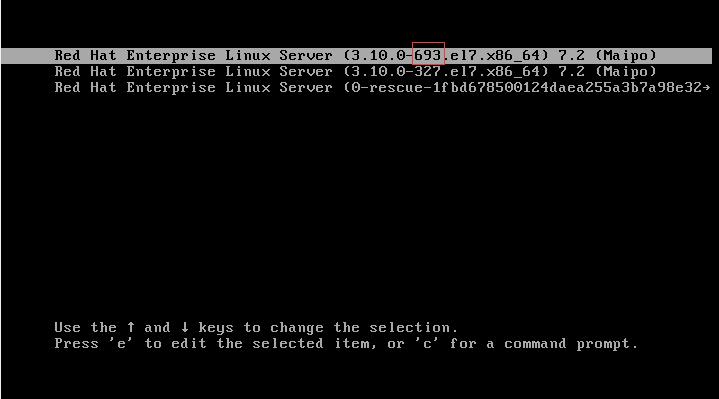
重新启动进入系统,查看内核版本已经是升级后的版本了。
[root@rhel7_2 ~]# uname -rs
Linux 3.10.0-693.el7.x86_64
正常情况下,是不需要修改内核启动顺序的,如果发现内核启动顺序不对,可以按下面的方式来修改:
[root@rhel7_2 ~]# grub2-editenv list  --查看系统默认内核版本
saved_entry=Red Hat Enterprise Linux Server (3.10.0-693.el7.x86_64) 7.2 (Maipo)
[root@rhel7_2 ~]# grep "menuentry " /boot/grub2/grub.cfg  --查看配置文件里的内核顺序;这个菜单条目对应上图中的三条选项。
menuentry 'Red Hat Enterprise Linux Server (3.10.0-693.el7.x86_64) 7.2 (Maipo)' --class red --class gnu-linux --class gnu --class os --unrestricted $menuentry_id_option 'gnulinux-3.10.0-327.el7.x86_64-advanced-e2de1cc9-e059-4306-a1a5-2389e3f83c70' {
menuentry 'Red Hat Enterprise Linux Server (3.10.0-327.el7.x86_64) 7.2 (Maipo)' --class red --class gnu-linux --class gnu --class os --unrestricted $menuentry_id_option 'gnulinux-3.10.0-327.el7.x86_64-advanced-e2de1cc9-e059-4306-a1a5-2389e3f83c70' {
menuentry 'Red Hat Enterprise Linux Server (0-rescue-1fbd678500124daea255a3b7a98e320c) 7.2 (Maipo)' --class red --class gnu-linux --class gnu --class os --unrestricted $menuentry_id_option 'gnulinux-0-rescue-1fbd678500124daea255a3b7a98e320c-advanced-e2de1cc9-e059-4306-a1a5-2389e3f83c70' {
[root@rhel7_2 ~]# grub2-set-default 'Red Hat Enterprise Linux Server (3.10.0-693.el7.x86_64) 7.2 (Maipo)'   --配置默认内核
[root@rhel7_2 ~]# grub2-mkconfig -o /boot/grub2/grub.cfg    --将修改的内容写入到grub.cfg配置文件。
Generating grub configuration file ...
Found linux image: /boot/vmlinuz-3.10.0-693.el7.x86_64
Found initrd image: /boot/initramfs-3.10.0-693.el7.x86_64.img
Found linux image: /boot/vmlinuz-3.10.0-327.el7.x86_64
Found initrd image: /boot/initramfs-3.10.0-327.el7.x86_64.img
Found linux image: /boot/vmlinuz-0-rescue-1fbd678500124daea255a3b7a98e320c
Found initrd image: /boot/initramfs-0-rescue-1fbd678500124daea255a3b7a98e320c.img
done
然后重启系统就可以了。
======================================
也可以不用配置Yum源。把内核文件(rpm包)下载到本地。然后rpm -ivh kernel.xxx.rpm安装之后重启系统就可以了。默认情况下,系统会自动使用新版本的内核进入系统。不需要修改内核启动顺序。