工作需要做了一个动态添加列表页面的小demo.用到了杂七杂八的javascript小知识.
而且并没有涉及到工作中的具体情境.有些通用,所以暂且罗列到这里.以后需要的时候可以直接拿来用.
看源码总是让人 无语.一知半解不知道说的什么.
下面是效果图.功能一看便知.
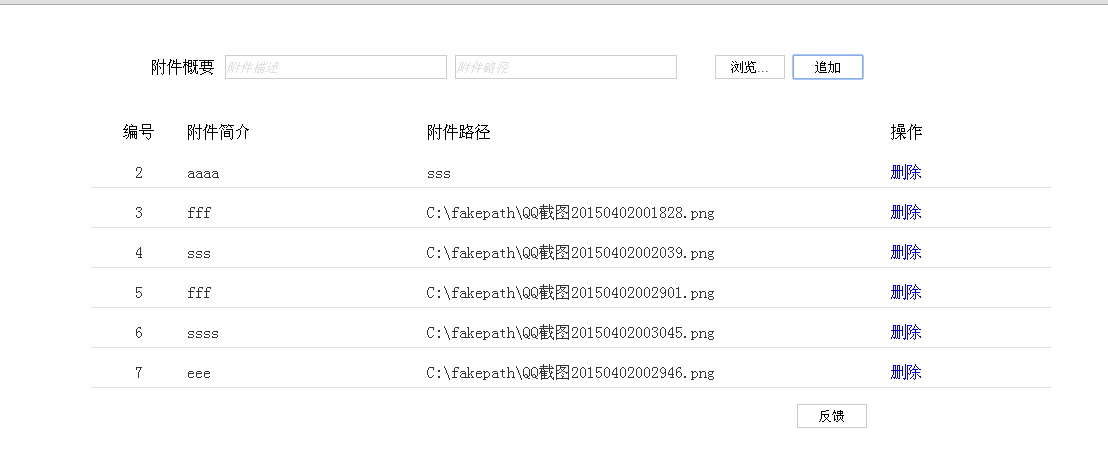
下面是源码
<!DOCTYPE html>
<html >
  <head>
    <meta charset="UTF-8">
    <title>附件添加</title>

    <script type="text/javascript" src="js/jquery-1.8.2.js"></script>

    <style type="text/css">
        input{ vertical-align:middle; margin:0; padding:0}
        .file-box{ position:relative;width:340px}
        .txt{ height:22px; border:1px solid #cdcdcd; width:220px;}
        .btn{ background-color:#FFF; border:1px solid #CDCDCD;height:24px; width:70px;}

        li{list-style-type:none;}
        .div1{
          float:left;
          width:10%;
          text-align: center;
          height:24px;
        }
        .div2{
          float:left;
          width:25%;
          height:24px;
        }
        .div3{
          float:left;
          width:45%;
          height:24px;
        }
        .div4{
          float:left;
          width:10%;
          text-align: center;
          height:24px;
        }
        .divHeader{
              margin-right: 10px;
             float: left;
             vertical-align: middle;
             line-height: 24px;

        }
        .mar{
         margin-left:0px;
        }
        .bor{
              height: 24px;
              border-bottom:1px solid rgb(223,223,223);
              margin-top: 15px;
              color:rgb(51,51,51);
        }
        .cur{
           cursor:auto;
        }
        .def{
            color: rgb(223,223,223);
            font-style: italic;
        }
    </style>
  </head>

  <body>

    <div id="page-wrapper" style="margin:auto;1000px;">

        <div style="margin-top: 50px; margin-left: 100px;">
            <div class="divHeader" ><span>附件概要</span></div>
            <div>
            <input  id="description" class='txt mar'  value=""/>
            <input id="path" class='txt mar' value=""/>
            <input id="fileInput" type="file" style="display:none" >
            <input type='button' class='btn mar' style="margin-left:30px;" onclick="$('input[id=fileInput]').click();" value='浏览...' />
            <input id="append" type='button'  class='btn mar'  value='追加' />
            </div>
            <pre id="fileDisplayArea"><pre>
        </div>

       <div style="">
           <ul>
           <li >

               <div class="div1" > <span>编号</span></div>
                <div class="div2" > <span>附件简介</span></div>
               <div class="div3" >  <span>附件路径</span></div>
                <div class="div4"> <span>操作</span></div>

           </li>
            <div style="clear:both;"></div>
           </ul>
           <ul id="data">
                  <li><div class="bor"><div class="div1" dd="22"> <span class="serial cur">1</span> </div><div class="div2"><span class="cur" title="ggg">ggg</span></div><div class="div3"><span class="cur" title="C:fakepath业务协同.html">C:fakepath业务协同.html</span> </div><div class="div4"><span><a onclick="deleteLi.call(this)" style="text-decoration: none;" href="javascript:void(0);">删除</a></span></div></div>  </li>
                  <div style="clear:both;"></div>
                  <li><div class="bor"><div class="div1" dd="22"> <span class="serial cur">2</span> </div><div class="div2"><span class="cur" title="aaaa">aaaa</span></div><div class="div3"><span class="cur" title="sss">sss</span> </div><div class="div4"><span><a onclick="deleteLi.call(this)" style="text-decoration: none;" href="javascript:void(0);">删除</a></span></div></div>  </li>
                  <div style="clear:both;"></div>
           </ul>

       </div>
    <div> <input style="float: right;margin-right: 184px;" id="apply" type='button'  class='btn mar'  value='反馈' />    </div>
  </script>
  <script type="text/javascript">

  $(function(){
    $("#description").val("附件描述");
    $("#description").addClass("def");
    $("#path").val("附件路径");
    $("#path").addClass("def");
  })


  //手动输入才会除法改变事件
// $("#path").on('input',function(e){
//   alert('Changed!')
// });
  function processInputPath(){

     if($("#path").val()=='附件路径')
      {
          $("#path").val("");
          $("#path").removeClass("def");
      }
     else if($("#path").val()=='')
      {
          $("#path").val("附件路径");
          $("#path").addClass("def");
      }
  }
   function processInputPathDes(){

     if($("#description").val()=='附件描述')
      {
          $("#description").val("");
          $("#description").removeClass("def");
      }
     else if($("#description").val()=='')
     {
          $("#description").val("附件描述");
          $("#description").addClass("def");
     }
  }
  $("#description").focus(function(){
      processInputPathDes();
  });

  $("#description").blur(function(){
    processInputPathDes();
  });

  $("#path").focus(function(){
     processInputPath();
  });

  $("#path").blur(function(){
   processInputPath();
  });
  //保存json的字面量json对象;
  var data=eval('[]');
  $('input[id=fileInput]').change(function() {
      $('#path').val($(this).val());
       $("#path").removeClass("def");
  });


   $("#append").click(function(){
     var descri=$("#description").val();
     var fileInput=$("#path").val();

     if(descri==undefined||descri==""||descri=="附件描述"){
        alert("请输入描述");
        return false;
     }
     if(fileInput==undefined||fileInput==""||fileInput=="附件路径"){
        alert("请选择文件");
        return false;
     }
     var serial=getMaxSerial();
     //封装描述,路径数据到json

     for(var i in data){
        if(fileInput==data[i]){
           alert("不能重复添加附件");
           return false;
        }
     }
     data.push(fileInput);
     createLi(serial,descri,fileInput);
   })

   function createLi(serial,descri,fileInput){
      //拼接添加li
     var  descriSub= descri;
     if(getLength(descri)>28){
        descriSub= getShowStr(descri,26);
     }

     var  fileInputSub= fileInput;
     if(getLength(fileInput)>50){
        fileInputSub= getShowStr(fileInput,48);
     }

     var str="<li ><div class='bor'><div class='div1' dd='22'> <span  class='serial cur'>"+serial+"</span> </div><div class='div2'><span class='cur' title='"+descri+"'>"+descriSub+"</span></div><div  class='div3'><span class='cur' title='"+fileInput+"'>"+fileInputSub+"</span> </div><div  class='div4'><span><a onclick='deleteLi.call(this)' style='text-decoration: none;' href='javascript:void(0);'>删除</a></span></div></div>  </li> <div style='clear:both;'></div>";

     $("#data").append($(str));
     $("#path").val("");
     $("#description").val("");
     processInputPath();
     processInputPathDes();

   }
   function deleteLi(){
    var title= $(this).parent().parent().siblings(".div3").children("span").attr("title");
    $(this).parent().parent().parent().parent().remove();

     for(var i in data){
      if(data[i]==title)
      {data.splice(i,1);}
     }
   }
   function getMaxSerial()
   {
       var serial= Number($(".serial:last").text());
       if(serial==undefined||serial==""||serial==null){
          serial=1;
       }
       else{
         serial=serial+1;
       }
       return serial
   }

   function getLength(str)
   {
        var realLength = 0;
        for (var i = 0; i < str.length; i++)
        {
            charCode = str.charCodeAt(i);
            if (charCode >= 0 && charCode <= 128)
            realLength += 1;
            else
            realLength += 2;
        }
        return realLength;
    }
    //根据长度获取index
    function getIndex(str,len)
    {
        var realLength = 0;
        var charLen=0;
        for (var i = 0; i < str.length; i++)
        {
            charCode = str.charCodeAt(i);
            if (charCode >= 0 && charCode <= 128)
            realLength += 1;
            else
            realLength += 2;

            if(realLength>=len-1){
             charLen=i;
             break;
            }
        }
        return charLen;
    }
    function getShowStr(str,len){

        return str.substring(0,getIndex(str,len))+"..";
    }

  </script>
</body>
</html>