开放数据协议(OData)是一个查询和更新数据的Web协议。OData是基于诸如HTTP和AtomPub的国际标准创建的,它提供了一个跨平台的数据通信的方案。OData应用了web技术如HTTP、Atom发布协议(AtomPub)和JSON等来提供对不同应用程序,服务和存储的信息访问。SharePoint 2010, SQL Server 2008 R2, PowerPivot, Windows Azure Table Storage, 和第三方的产品像 IBM’s WebSphere eXtreme Scale都使用OData。
首先,WCF Data Services是WCF服务,所以你可以使用所有现有的WCF知识。其次,WCF Data Services已经实现了OData拓扑,于是你可以致力于你的数据格式在你的程序中的表示,而不是AtomPub/JSON这些真正在网络上传递的数据格式。再有,WCF Data Services致力于数据传输,而不是数据存储。你的数据可以存放在任何位置:本地的数据库,云端的数据库,外部的web services,xml文件,等等。无论数据是怎么来的,你都可以用同样的方式来发布/使用它们。
使用Visual Studio 2010里头使用WCF Data Service,就是使用OData发布的Restful服务,下面的例子演示2010里头的WCF Data Service.
1、创建一个数据库,使用SQL Server Management Studio并运行 这个脚本.

创建了数据库,包含两个表Categories和Products,两个表里头分别插入了2条记录。
2、创建一个Web Application,然后创建一个Entity Data Model,如下图所示

3、创建一个Data Service暴露我们的模型:
using System;
using System.Collections.Generic;
using System.Data.Services;
using System.Data.Services.Common;
using System.Linq;
using System.ServiceModel.Web;
using System.Web;
namespace MyWebsite
{
public class ProductService : DataService<GettingStartedWithUpdateEntities>
{
// This method is called only once to initialize service-wide policies.
public static void InitializeService(DataServiceConfiguration config)
{
// TODO: set rules to indicate which entity sets and service operations are visible, updatable, etc.
// Examples:
config.SetEntitySetAccessRule("*", EntitySetRights.AllRead);
config.SetServiceOperationAccessRule("*", ServiceOperationRights.All);
config.DataServiceBehavior.MaxProtocolVersion = DataServiceProtocolVersion.V2;
}
}
}
4、验证ProductService服务,在浏览器中查看ProductService.svc,如下图所示:
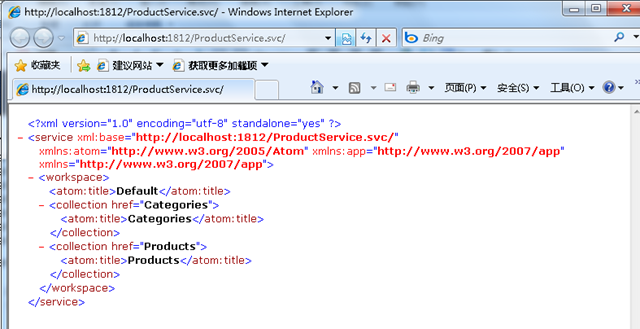
上图的内容就是AtomPub协议,首先,您向服务器的Atom链接发起带验证的GET请求(authenticated GET),以获得关于当前可用服的描述。服务器返回了一个(描述)Atom服务的XML文件,其中列出了一些列workspace,每个workspace包含对应的collection集合。一个workspace可能是一个博客,wiki命名空间或内容集等通过您用户名/密码可以访问的资源。
每个workspace可包含五种类型的集合:条目(entries),类别(categories),模板(templates),用户(users)和集成资源(generic resources)。
既然一个workspace是一个产品,那麽产品一般都包含一系列的条目,产品等等这样的集合。所有这些集合都通过和HTTP谓词所指代的同样的方式(GET,POSTD,ELETE,PUT)处理和作出响应。所有这些(集合)支持分页,因此,服务器可以将collections以一个易于处理的数据块方式返回。同时还支持按日期查询(集合),因此,您可以通过开始和结束日期过滤器来过滤collections。
为了获得一个collection,可以向网址(就是服务文档collection的’ href ‘列出的地址) 发起一个GET请求。服务文档为每个collection都指定了一个URI。如果你向一个URI 发出GET请求,你会得到一个包含Atom Collection的XML文件,其中列出了前X个该collection中的成员。如果collection中的成员多于X个,那么该文件还将包含指向下一批成员的URI,您可以使用它来获得下一批成员。您也可以在HTTP的头部通过Range来指定一日期范围,这样可以限制返回的collection只包含那些在开始和结束日期之间的条目。
我们已经拥有了一个暴露V2 版本的OData Protocol的服务ProductService.svc,下面我创建一个WPF应用程序来消费这个服务。
5、创建一个WPF应用程序,并添加ProductService.svc的服务引用。

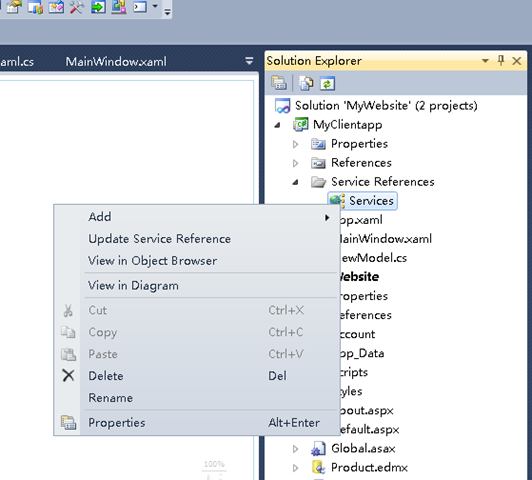
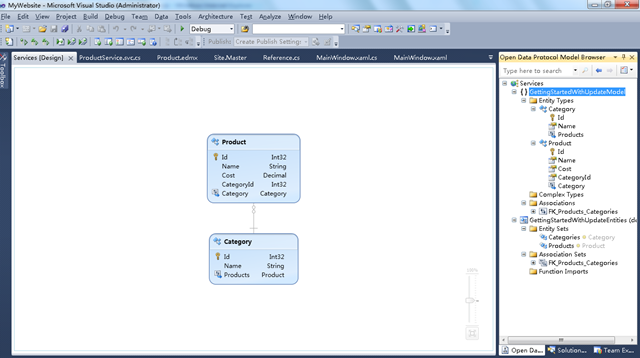
可以使用一个插件Open Data Protocol Visualizer查看服务返回的OData数据数据,这个工具的获取和安装可以参看VS2010的扩展。可以通过服务引用的“View in Diagram”进行查看。
下图是ProductService.svc的的OData Model Brower:
6、添加一个ViewModel,封装DataServiceContext,充当WPF表单和Data Service交互的中介。
public class ViewModel
{
private GettingStartedWithUpdateEntities _ctx;
private Category[] _categories;
private DataServiceCollection<Product> _products;
public ViewModel()
{
_ctx = new GettingStartedWithUpdateEntities(
new Uri("http://localhost:1812/ProductService.svc/%22));
Load();
}
public DataServiceCollection<Product> Products
{
get
{
return _products;
}
}
public Category[] Categories
{
get
{
return _categories;
}
}
public void SaveChanges()
{
_ctx.SaveChanges();
Load();
}
public void Load()
{
_categories = _ctx.Categories.ToArray();
_products = new DataServiceCollection<Product>(_ctx);
_products.Load(from p in _ctx.Products.Expand("Category")
select p);
}
}
7、制作WPF表单
<Window x:Class="MyClientapp.MainWindow"
xmlns="http://schemas.microsoft.com/winfx/2006/xaml/presentation%22
xmlns:x="http://schemas.microsoft.com/winfx/2006/xaml%22
Title="Products Catalog" Height="400" Width="425">
<Grid>
<StackPanel Orientation="Horizontal">
<Grid Margin="0,0,0,0" Name="grid1" Width="140" >
<ListBox ItemsSource="{Binding Path=Products}"
Name="Products"
IsSynchronizedWithCurrentItem="True">
<ListBox.ItemTemplate>
<DataTemplate>
<StackPanel Orientation="Horizontal">
<TextBlock Text="{Binding Path=Name}" FontWeight="Bold"/>
</StackPanel>
</DataTemplate>
</ListBox.ItemTemplate>
</ListBox>
</Grid>
<StackPanel Orientation="Vertical" Width="260">
<StackPanel Orientation="Horizontal">
<Label Name="lblName" Width="100">
<TextBlock Width="150">Name:</TextBlock>
</Label>
<TextBox Name="txtName"
Text="{Binding ElementName=Products, Path=SelectedItem.Name, Mode=TwoWay}"
Width="150"/>
</StackPanel>
<StackPanel Orientation="Horizontal">
<Label Name="lblCost" Width="100">
<TextBlock Width="150" >Cost:</TextBlock>
</Label>
<TextBox Name="txtCost"
Text="{Binding ElementName=Products, Path=SelectedItem.Cost, Mode=TwoWay}"
Width="150"/>
</StackPanel>
<StackPanel Orientation="Horizontal">
<Label Name="lblCategory" Width="100">
<TextBlock>Category:</TextBlock>
</Label>
<ComboBox Name="cmbCategory"
ItemsSource="{Binding Path=Categories}"
DisplayMemberPath="Name"
SelectedValuePath="."
SelectedValue="{Binding ElementName=Products, Path=SelectedItem.Category, Mode=TwoWay}"
Width="140" />
</StackPanel>
<Button Height="23"
HorizontalAlignment="Right"
Name="btnSaveChanges"
VerticalAlignment="Bottom"
Width="136"
Click="btnSaveChanges_Click">Save Changes</Button>
</StackPanel>
</StackPanel>
</Grid>
</Window>
编写如下codebehind代码:
namespace MyClientapp
{
/// <summary>
/// Interaction logic for MainWindow.xaml
/// </summary>
public partial class MainWindow : Window
{
ViewModel viewmodel = new ViewModel();
public MainWindow()
{
InitializeComponent();
this.cmbCategory.DataContext = viewmodel;
this.grid1.DataContext = viewmodel;
}
private void btnSaveChanges_Click(object sender, RoutedEventArgs e)
{
viewmodel.SaveChanges();
this.grid1.DataContext = viewmodel;
}
}
}
运行程序结果如下:

本文代码下载:https://files.cnblogs.com/shanyou/MyWebsite.zip
参考资源:
- Breaking Down ‘Data Silos’ – The Open Data Protocol (OData)
- Getting Started with the Data Services Update for .NET 3.5 SP1 – Part 1
- Getting Started with the Data Service Update for .NET 3.5 SP1 – Part 2
- Introducing the Microsoft Open Data Protocol Visualizer (CTP1)
- http://weblogs.asp.net/cazzu/archive/2010/06/08/wcf-data-service-pipeline.aspx
