首先讲一下,没有用到数据库,然后觉得重要的就是security的配置securityConfig.class,不太会说(好像也不太会用),上图吧,也是学习狂神过来的
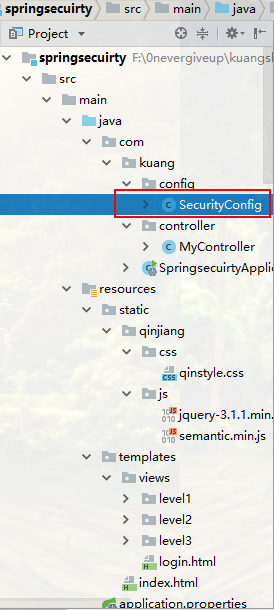
项目结构
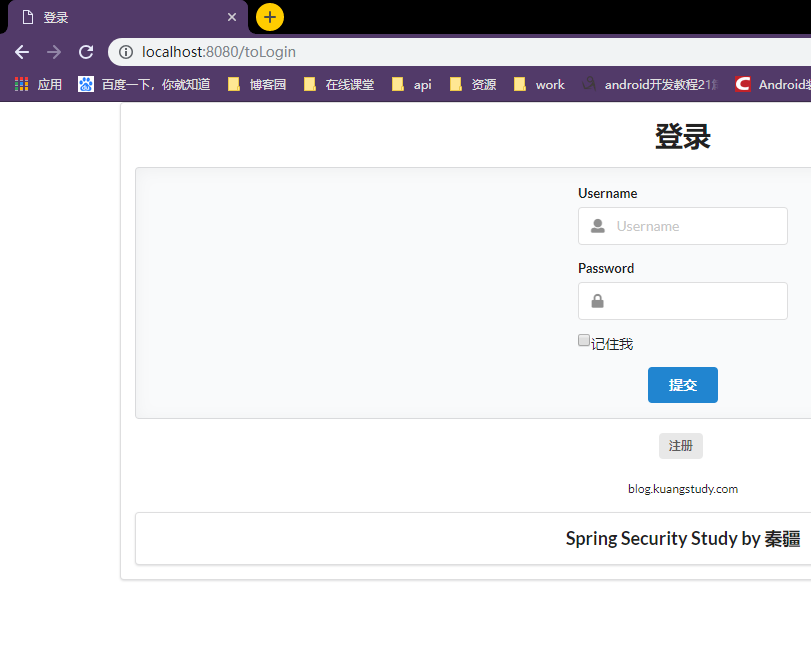
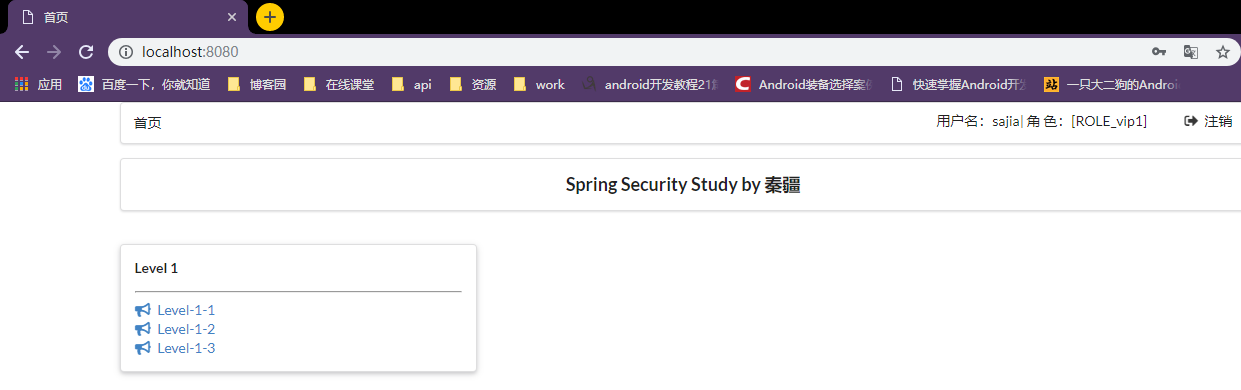
大致效果

pom.xml
<dependencies>
        <!-- thymeleaf整合security -->
        <dependency>
            <groupId>org.thymeleaf.extras</groupId>
            <artifactId>thymeleaf-extras-springsecurity5</artifactId>
            <version>3.0.4.RELEASE</version>
        </dependency>


        <!-- spring整合security -->
        <dependency>
            <groupId>org.springframework.boot</groupId>
            <artifactId>spring-boot-starter-security</artifactId>
            <version>2.1.4.RELEASE</version>
        </dependency>

        <!--thymeleaf模板-->
        <dependency>
            <groupId>org.thymeleaf</groupId>
            <artifactId>thymeleaf-spring5</artifactId>
        </dependency>
        <dependency>
            <groupId>org.thymeleaf.extras</groupId>
            <artifactId>thymeleaf-extras-java8time</artifactId>
        </dependency>

        <dependency>
            <groupId>org.springframework.boot</groupId>
            <artifactId>spring-boot-starter-web</artifactId>
        </dependency>

        <dependency>
            <groupId>org.springframework.boot</groupId>
            <artifactId>spring-boot-starter-test</artifactId>
            <scope>test</scope>
            <exclusions>
                <exclusion>
                    <groupId>org.junit.vintage</groupId>
                    <artifactId>junit-vintage-engine</artifactId>
                </exclusion>
            </exclusions>
        </dependency>
    </dependencies>

重点来了SecurityConfig.class
@EnableWebSecurity
public class SecurityConfig extends WebSecurityConfigurerAdapter {
    @Override   //授权
    protected void configure(HttpSecurity http) throws Exception {
        //首页所有人都可以访问,但是功能页只有对应权限的人才能访问
        //请求授权的规则
        http.authorizeRequests()
                .antMatchers("/").permitAll()
                .antMatchers("/level1/**").hasRole("vip1")
                .antMatchers("/level2/**").hasRole("vip2")
                .antMatchers("/level3/**").hasRole("vip3");

        /*
            没有授权会自动跳转到登录页面        http://localhost:8080/login
               定制登录页.loginPage("/toLogin")  http://localhost:8080/toLogin
               最后,走回   http://localhost:8080/login(因为要认证用户),页面的action动作为th:action="@{/login}"
               其对应      http.formLogin().loginPage("/toLogin").loginProcessingUrl("/login")
         */
        http.formLogin().loginPage("/toLogin").usernameParameter("name").passwordParameter("pwd").loginProcessingUrl("/login");

        //防攻击网站工具
        http.csrf().disable();   //关闭csrf功能,登出失败可能的原因

        //注销   bug:注销完,应该跳到首页
        http.logout().logoutSuccessUrl("/");

        //开启记住我的功能,勾上才生效
        http.rememberMe().rememberMeParameter("remember-me");
        //http.rememberMe();  //cookie 来的,关闭浏览器还存在,默认时间两周
    }

    @Override   //认证
    protected void configure(AuthenticationManagerBuilder auth) throws Exception {
        //在内存中认证(因为没有连接数据库啊)
        //密码编码  no PasswordEncoder mapped for the id "null"
        //在spring security5+  之后,新增了许多的加密方法
        auth.inMemoryAuthentication().passwordEncoder(new BCryptPasswordEncoder())
                .withUser("kuangshen").password(new BCryptPasswordEncoder().encode("123")).roles("vip2","vip3")
                .and()
                .withUser("root").password(new BCryptPasswordEncoder().encode("123")).roles("vip1","vip2","vip3")
                .and()
                .withUser("sajia").password(new BCryptPasswordEncoder().encode("123")).roles("vip1");
    }
}
MyController.class
@Controller
public class MyController {
    @RequestMapping({"/","/index"})
    public String index(){
        return "index";
    }
    @RequestMapping("/hello")
    public String hello(){
        return "hello springsecurity  !";
    }

    @RequestMapping("/toLogin")
    public String toLogin(){
        return "views/login";
    }

    //9个页面
    @RequestMapping("/level1/{id}")
    public String level1(@PathVariable("id") String id){
        return "views/level1/"+id;
    }

    @RequestMapping("/level2/{id}")
    public String level2(@PathVariable("id") String id){
        return "/views/level2/"+id;
    }
    @RequestMapping("/level3/{id}")
    public String level3(@PathVariable("id")String id){
        return "/views/level3/"+id;
    }
}
application.properties
#关闭模板引擎的缓存
spring.thymeleaf.cache=false
首页index.html
<!DOCTYPE html>
<html lang="en" xmlns:th="http://www.thymeleaf.org"
      xmlns:sec="http://www.thymeleaf.org/thymeleaf-extras-springsecurity5">
<head>
    <meta charset="UTF-8">
    <meta name="viewport" content="width=device-width, initial-scale=1, maximum-scale=1">
    <title>首页</title>
    <!--semantic-ui-->
    <link href="https://cdn.bootcss.com/semantic-ui/2.4.1/semantic.min.css" rel="stylesheet">
    <link th:href="@{/qinjiang/css/qinstyle.css}" rel="stylesheet">
</head>
<body>

<!--主容器-->
<div class="ui container">

    <div class="ui segment" id="index-header-nav" th:fragment="nav-menu">
        <div class="ui secondary menu">
            <a class="item"  th:href="@{/index}">首页</a>

            <!--登录注销-->

            <div class="right menu">
                <!--未登录-->
                <div sec:authorize="!isAuthenticated()">
                    <a class="item" th:href="@{/toLogin}">
                        <i class="address card icon"></i> 登录
                    </a>
                </div>

                <!--登录了:显示注销,用户名-->
                <div sec:authorize="isAuthenticated()">
                    <a class="item">
                        用户名:<span sec:authentication="name"></span>  |
                        角  色:<span sec:authentication="principal.authorities"></span>
                    </a>
                </div>
                <div sec:authorize="isAuthenticated()">
                    <a class="item" th:href="@{/logout}">
                        <i class="sign-out icon"></i> 注销
                    </a>
                </div>


            </div>
        </div>
    </div>

    <div class="ui segment" style="text-align: center">
        <h3>Spring Security Study by 秦疆</h3>
    </div>

    <div>
        <br>
        <div class="ui three column stackable grid">
            <!--菜单的动态效果显示,根据用户的角色-->
            <div class="column" sec:authorize="hasRole('vip1')">
                <div class="ui raised segment">
                    <div class="ui">
                        <div class="content">
                            <h5 class="content">Level 1</h5>
                            <hr>
                            <div><a th:href="@{/level1/1}"><i class="bullhorn icon"></i> Level-1-1</a></div>
                            <div><a th:href="@{/level1/2}"><i class="bullhorn icon"></i> Level-1-2</a></div>
                            <div><a th:href="@{/level1/3}"><i class="bullhorn icon"></i> Level-1-3</a></div>
                        </div>
                    </div>
                </div>
            </div>

            <div class="column" sec:authorize="hasRole('vip2')">
                <div class="ui raised segment">
                    <div class="ui">
                        <div class="content">
                            <h5 class="content">Level 2</h5>
                            <hr>
                            <div><a th:href="@{/level2/1}"><i class="bullhorn icon"></i> Level-2-1</a></div>
                            <div><a th:href="@{/level2/2}"><i class="bullhorn icon"></i> Level-2-2</a></div>
                            <div><a th:href="@{/level2/3}"><i class="bullhorn icon"></i> Level-2-3</a></div>
                        </div>
                    </div>
                </div>
            </div>

            <div class="column" sec:authorize="hasRole('vip3')">
                <div class="ui raised segment">
                    <div class="ui">
                        <div class="content">
                            <h5 class="content">Level 3</h5>
                            <hr>
                            <div><a th:href="@{/level3/1}"><i class="bullhorn icon"></i> Level-3-1</a></div>
                            <div><a th:href="@{/level3/2}"><i class="bullhorn icon"></i> Level-3-2</a></div>
                            <div><a th:href="@{/level3/3}"><i class="bullhorn icon"></i> Level-3-3</a></div>
                        </div>
                    </div>
                </div>
            </div>

        </div>
    </div>

</div>


<script th:src="@{/qinjiang/js/jquery-3.1.1.min.js}"></script>
<script th:src="@{/qinjiang/js/semantic.min.js}"></script>

</body>
</html>
login.html
<!DOCTYPE html>
<html lang="en" xmlns:th="http://www.thymeleaf.org">
<head>
    <meta charset="UTF-8">
    <meta name="viewport" content="width=device-width, initial-scale=1, maximum-scale=1">
    <title>登录</title>
    <!--semantic-ui-->
    <link href="https://cdn.bootcss.com/semantic-ui/2.4.1/semantic.min.css" rel="stylesheet">
</head>
<body>

<!--主容器-->
<div class="ui container">

    <div class="ui segment">

        <div style="text-align: center">
            <h1 class="header">登录</h1>
        </div>

        <div class="ui placeholder segment">
            <div class="ui column very relaxed stackable grid">
                <div class="column">
                    <div class="ui form">
                        <form th:action="@{/login}" method="post">
                            <div class="field">
                                <label>Username</label>
                                <div class="ui left icon input">
                                    <input type="text" placeholder="Username" name="name">
                                    <i class="user icon"></i>
                                </div>
                            </div>
                            <div class="field">
                                <label>Password</label>
                                <div class="ui left icon input">
                                    <input type="password" name="pwd">
                                    <i class="lock icon"></i>
                                </div>
                            </div>
                            <!--记住我-->
                            <div class="field">
                                <input type="checkbox" id="remember-me" name="remember-me"/>记住我
                            </div>
                            <input type="submit" class="ui blue submit button"/>
                        </form>
                    </div>
                </div>
            </div>
        </div>

        <div style="text-align: center">
            <div class="ui label">
                </i>注册
            </div>
            <br><br>
            <small>blog.kuangstudy.com</small>
        </div>
        <div class="ui segment" style="text-align: center">
            <h3>Spring Security Study by 秦疆</h3>
        </div>
    </div>


</div>

<script th:src="@{/qinjiang/js/jquery-3.1.1.min.js}"></script>
<script th:src="@{/qinjiang/js/semantic.min.js}"></script>

</body>
</html>
剩下就是头疼的静态资源了
1.html(剩下八个都一样的,改下<h3>Level-1-1</h3>这个就好了)

<!DOCTYPE html>
<html lang="en" xmlns:th="http://www.thymeleaf.org">
<head>
    <meta charset="UTF-8">
    <meta name="viewport" content="width=device-width, initial-scale=1, maximum-scale=1">
    <title>首页</title>
    <!--semantic-ui-->
    <link href="https://cdn.bootcss.com/semantic-ui/2.4.1/semantic.min.css" rel="stylesheet">
    <link th:href="@{/qinjiang/css/qinstyle.css}" rel="stylesheet">
</head>
<body>

<!--主容器-->
<div class="ui container">

    <div th:replace="~{index::nav-menu}"></div>

    <div class="ui segment" style="text-align: center">
        <h3>Level-1-1</h3>
    </div>

</div>


<script th:src="@{/qinjiang/js/jquery-3.1.1.min.js}"></script>
<script th:src="@{/qinjiang/js/semantic.min.js}"></script>

</body>
</html>
qinstyle.css
body{
    min- 1150px;
    overflow: auto;
}
#index-header-nav{
    font-size: 0px;
}
#blog-lable>a{
    margin: 1px;
}
剩下就是加油,多学多看多动手,加油