一、安装
二、汉化
①.下载语言包文件:http://localize.drupal.org/translate/languages/zh-hans
②.将 .po 文件放置到 drupal7/profiles/standard/translations 目录下
③.点击顶部的菜单“Modules”,进入模块管理页面(admin/modules),找到“Locale”模块,将其开启。
④.接着点击“Configuration” > “Languages”,进入语言管理界面(admin/settings/language)。
⑤.点击 Add Language 连接,选择 Chinese, Simplified(简体中文),接着点击“Configuration” > “Translate interface”,
再点击“Import”,在“Language file”下选择本地已下载的drupal7中文包,接着点击“Import”按钮,即可开始导入中文包。
⑥.到 admin/settings/language 目录下,将简体中文设为“Default”即可。
三、配置
①.设置默认时区
配置-》地区和语言 -》 区域设置(默认国家-中国 、一周的第一天-星期一 、默认时区 -重庆 、用户可以设置他们自己的时区勾去掉)
②.设置默认的日期格式
配置-》地区和语言 -》日期和时间
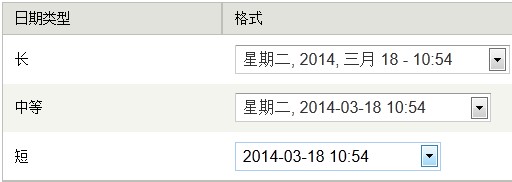
③.设置文件系统
配置-》媒体-》文件系统(公共文件系统路径 sites/default/files 临时目录 sites/default/files/tmp)
四、配置编辑器
ckeditor+ckfinder 安装
①。下载ckeditor:https://drupal.org/project/ckeditor
CKeditor源码:http://ckeditor.com/download (full版本)
下载CKFinder:http://ckfinder.com/download (下载php版本)
②。然后
(1)将ckeditor文件夹放置在/sites/all/modules/下,
(2)将CKeditor文件夹放置在/sites/all/modules/ckeditor/ckeditor文件夹下,
(3)将CKfinder文件夹放置在/sites/all/modules/ckeditor/文件夹下。
③。安装模块
④。配置模块
配置ckeditor
文本格式-》full html-》配置 关闭所有的过滤规则:
配置ckfinder
编辑ckfinder文件夹下的config.php
注释掉这个函数(这个函数会检查用户认证,在其他程序设计中更改为其他认证方式以返回true,但不能直接改成true,否则会有安全问题,drupal中会 有/sites/all/modules/ckeditor/includes/filemanager.config.php负责检查。)


function CheckAuthentication()
{
    // WARNING : DO NOT simply return "true". By doing so, you are allowing
    // "anyone" to upload and list the files in your server. You must implement
    // some kind of session validation here. Even something very simple as...

    // return isset($_SESSION['IsAuthorized']) && $_SESSION['IsAuthorized'];

    // ... where $_SESSION['IsAuthorized'] is set to "true" as soon as the
    // user logs in your system. To be able to use session variables don't
    // forget to add session_start() at the top of this file.

    return false;
}
在这句下面
在$baseDir = resolveUrl($baseUrl);
添加:
require_once '../../../../includes/filemanager.config.php';
打开网站的/sites/default/setting.php文件:
设置$base_url和$cookie_domain为你网站的URL地址:
$base_url = 'http://localhost/文件夹';  // NO trailing slash!
$cookie_domain = 'localhost/文件夹';
设置ckfinder的权限:
ckfinder access 注册用户 打勾
设置ckfinder为ckeditor的默认上传工具(打开 管理 - 配置 - ckeditor编辑器 打开"full"设置界面 编辑 打开“文件浏览器设置” 设置ckfinder为默认的文件浏览器 保存)
注意:添加图片时,别忘了选 “full html”