.save() 和 .restore()
- 除了会保存之前的样式,还会保存之前的坐标轴
pen.translate(x, y);
将画布的 坐标轴原点(0, 0) 从画布的左上角,移动到 (x, y)
- 必须再绘制之前,移动坐标轴
- 改变 画布坐标轴 之前的绘制,不受影响。
pen.scale(x, y);
x 设置水平方向上缩放倍数
y 设置垂直方向上缩放倍数
- 参照画布 绘制坐标轴原点(0, 0)
pen.rotate(radian);
radian 弧度 = deg*Math.PI/180
- 参照画布 的绘制坐标轴原点 (0, 0) radian 增大 顺时针旋转 坐标轴
- 本次旋转,会参照此刻坐标轴的角度,累加旋转,
旋转 案例

-
<!DOCTYPE html>
<html>
    <head>
        <meta charset="UTF-8" />
        <title>旋转</title>

        <style type="text/css">
            body {
                width: 100%;
                color: #000;
                background: #96b377;
                font: 14px Helvetica, Arial, sans-serif;
            }

            #wrap {
            /*
                display: flex;
                flex-direction: column;
                justify-content: center;
                align-items: center;
            */
            }
        </style>
    </head>

    <body>


        <div id="wrap">
            <canvas id="my_canvas" width="600" height="600">
                您的浏览器不支持 canvas,建议更新或者更换浏览器。
            </canvas>
        </div>


        <!-- javascript 代码 -->
        <script type="text/javascript">
            // 1. 获取画板
            var myCanvas = document.getElementById("my_canvas");

            // 给画布一个颜色
            myCanvas.style.backgroundColor = "#eee";

            // 2. 获取画笔
            var pen = myCanvas.getContext("2d");

            // 3. 一定要在绘制之前 设置好
            pen.fillStyle = 'olive';    // 填充的颜色
            pen.strokeStyle = "blue";    //  笔的颜色
            pen.lineWidth = 4;    // 笔宽
            pen.lineCap = "round";    // 圆形结束
            pen.lineJoin = "round";    // 圆角

            var radian = 0;

            var chgScale = 1;
            var val = -0.1;
            window.setInterval(function(){
                chgScale += val;
                if(chgScale < 0 ){
                    val = 0.1;
                    chgScale = 0+0.1;
                }
                if(chgScale > 2){
                    val = -0.1;
                    chgScale = 2-0.1;
                }

                pen.restore();
                // 4.开始绘制
                pen.clearRect(0, 0, myCanvas.width, myCanvas.height);
                pen.beginPath();
                pen.save();
                pen.translate(200, 200);
                pen.scale(chgScale, chgScale);
                pen.rotate(radian*Math.PI/180);
                pen.arc(0, 0, 100, 0, 2*Math.PI);
                pen.rect(0, 0, 100, 100);
                pen.stroke();
                radian += 4.5;
            }, 1000);

        </script>
    </body>
</html>
钟表 案例
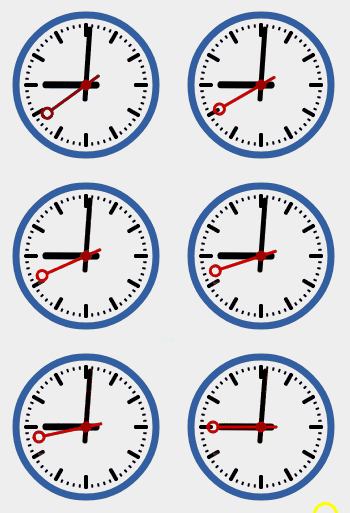
-
<!DOCTYPE html>
<html>
    <head>
        <meta charset="UTF-8" />
        <title>DIY Clock</title>

        <style type="text/css">
            body {
                width: 100%;
                color: #000;
                background: #96b377;
                font: 14px Helvetica, Arial, sans-serif;
            }

            #wrap {
                padding-left: 160px;
                padding-top: 160px;
                /*
                display: flex;
                flex-direction: column;
                justify-content: center;
                align-items: center;
                */
            }
        </style>
    </head>

    <body>

        <div id="wrap">
            <canvas id="my_canvas" width="600" height="600">
                您的浏览器不支持 canvas,建议更新或者更换浏览器。
            </canvas>
        </div>


        <!-- javascript 代码 -->
        <script type="text/javascript">
            // 1. 获取画板
            var myCanvas = document.getElementById("my_canvas");

            // 给画布一个颜色
            myCanvas.style.backgroundColor = "#eee";

            // 2. 获取画笔
            var pen = myCanvas.getContext("2d");

            // 3. 一定要在绘制之前 设置好
            pen.fillStyle = '#D40000';    // 填充的颜色
            pen.strokeStyle = "#000";    //  笔的颜色
            pen.lineWidth = 4;    // 笔宽
            pen.lineCap = "round";    // 圆形结束
            pen.lineJoin = "round";    // 圆角

            window.setInterval(diyClock, 1000);

            // 封装 diy 时钟
            function diyClock(){
                pen.clearRect(0, 0, myCanvas.width, myCanvas.height);

                pen.save();
                    pen.translate(300, 300);
                    //将整个画布逆时针旋转90度
                    pen.rotate(-90*Math.PI/180);

                    pen.scale(0.5, 0.5);

                    // 表盘    圆盘颜色:#325FA2    圆盘宽度:14    圆盘半径:140
                    pen.save();
                        pen.strokeStyle = "#325FA2";
                        pen.lineWidth = 14;
                        pen.beginPath();
                        pen.arc(0, 0, 140, 0, 2*Math.PI);
                        pen.stroke();
                    pen.restore();

                    // 分刻    宽度为4    长度为3    外层空心圆盘与分刻之间的距离也为20
                    pen.save();
                        var i = 0;
                        for(i=0; i<60; i++){
                            if(i%5 != 0){
                                pen.beginPath();
                                pen.moveTo(0, -120);
                                pen.lineTo(0,-117);
                                pen.stroke();
                            };
                            pen.rotate(6*Math.PI/180);
                        };
                    pen.restore();

                    // 时刻    宽度为8    长度为20    外层空心圆盘与时刻之间的距离也为20
                    pen.save();
                        pen.lineWidth = 8;
                        for(i=0; i<12; i++){
                            pen.beginPath();
                            pen.moveTo(0, -120);
                            pen.lineTo(0, -100);
                            pen.stroke();
                            pen.rotate(30*Math.PI/180);
                        };
                    pen.restore();

                    var curTime = new Date();
                    var seconds = curTime.getSeconds();
                    var minutes = curTime.getMinutes()+seconds/60;
                    var hours = curTime.getHours()+minutes/60;

                    // 时针    宽度为14     圆心外溢出80 收20
                    pen.save();
                        pen.rotate(30*hours*Math.PI/180);
                        pen.lineWidth = 14;
                        pen.beginPath();
                        pen.moveTo(-20,0);
                        pen.lineTo(80,0);
                        pen.stroke();
                    pen.restore();

                    // 分针    宽度为10    圆心外溢出112 收28
                    pen.save();
                        pen.rotate(6*minutes*Math.PI/180);
                        pen.lineWidth = 10;
                        pen.beginPath();
                        pen.moveTo(-28,0);
                        pen.lineTo(112,0);
                        pen.stroke();
                    pen.restore();

                    // 秒针    颜色:#D40000    宽度为6    圆心外溢出83 收30
                    pen.save();
                        pen.rotate(6*seconds*Math.PI/180);
                        pen.strokeStyle = "#D40000";
                        pen.fillStyle = "#D40000";
                        pen.lineWidth = 6;

                        pen.beginPath();
                        pen.moveTo(-30, 0);
                        pen.lineTo(83, 0);
                        pen.stroke();

                        // 秒针头   96码开外半径为10的空心圆    宽度为6
                        pen.beginPath();
                        pen.arc(96, 0, 10, 0, 2*Math.PI);
                        pen.stroke();

                        // 表芯半径为10的实心圆
                        pen.beginPath();
                        pen.arc(0, 0, 10, 0, 2*Math.PI);
                        pen.fill();
                    pen.restore();
                pen.restore();
            };
        </script>
    </body>
</html>