响应数据和结果视图
返回值分类
1.返回值是String
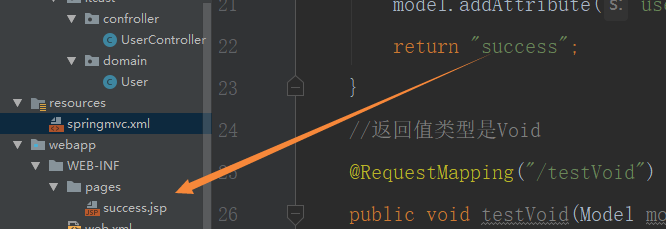
返回值类型是字符串的,会根据返回的字符串去寻找相对应的jsp页面
@Controller
@RequestMapping("/user")
public class UserController {
    //返回值类型是String
    @RequestMapping("/testString")
    public String testString(Model model){
        System.out.println("testString方法执行了");
        //模拟从数据库中查询出User对象
        User user = new User();
        user.setAge(20);
        user.setPassword("123");
        user.setUsername("任我行");
        //使用model把对象存起来
        model.addAttribute("user",user);
        return "success";
    }
2.返回值是Void
默认请求路径是什么就会去寻找请求路径的jsp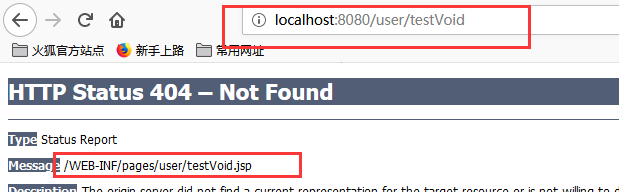
编写请求转发和重定向的程序和直接响应
@Controller
@RequestMapping("/user")
public class UserController {
    //返回值类型是String
    @RequestMapping("/testString")
    public String testString(Model model){
        System.out.println("testString方法执行了");
        //模拟从数据库中查询出User对象
        User user = new User();
        user.setAge(20);
        user.setPassword("123");
        user.setUsername("任我行");
        //使用model把对象存起来
        model.addAttribute("user",user);
        return "success";
    }
    //返回值类型是Void
    //请求转发是一次请求:不用编写项目的名称

    @RequestMapping("/testVoid")
    public void testVoid(HttpServletRequest request, HttpServletResponse response) throws ServletException, IOException {
        System.out.println("testVoid方法执行了");
        //编写请求转发的程序
       // request.getRequestDispatcher("/WEB-INF/pages/success.jsp").forward(request,response);//转发
        //response.sendRedirect(request.getContextPath()+"/index.jsp");//重定向
       //设置中文乱码
        response.setCharacterEncoding("UTF-8");
        response.setContentType("text/html;charset=UTF-8");
        response.getWriter().print("hello,大笨蛋");
        return;
    }
}
返回值是ModelAndView对象(存JavaBean对象和跳转页面)
    //返回值类型是ModelAndView
    @RequestMapping("/testModelAndView")
    public ModelAndView testModelAndView(){
        ModelAndView mv = new ModelAndView();
        System.out.println("testModelAndView执行了");
        //模拟从数据库中查询出User对象
        User user = new User();
        user.setAge(20);
        user.setPassword("123");
        user.setUsername("令狐冲");
        //调用mv的方法
        //user对象存储到mv对象中,同时也会把user对象存入到requst对象
        mv.addObject("user",user);
        //想跳转的页面
        mv.setViewName("success");
        return mv;
    }
转发或重定向
  //返回值类型是ModelAndView
    @RequestMapping("/testForwardOrRedirect")
    public String testForwardOrRedirect(){
        System.out.println("testForwardOrRedirect执行了");
//        return "forward:/WEB-INF/pages/success.jsp";

        //不用加项目名称,框架已经加好
        return "redirect:/index.jsp";
    }
响应json数据值过滤静态资源
<%--
  Created by IntelliJ IDEA.
  User: Yuan
  Date: 2019/7/22
  Time: 14:39
  To change this template use File | Settings | File Templates.
--%>
<%@ page contentType="text/html;charset=UTF-8" language="java" %>

<html>
<head>
    <title>Title</title>

    <script src="js/jquery.min.js"></script>

    <script>
        //页面加载,绑定单击事件
        $(function(){
           $("#btn").click(function(){
               alert("hello btn");
           })
        });
    </script>
</head>
<body>

    <br>
    <button id="btn">发送ajax请求</button>

</body>
</html>
上面的单击事件无法响应,原因是DispatcherServlet把静态资源给拦截了
解决方案
告诉前端控制器,哪些静态资源不拦截

响应jso数据值发送ajax的请求
<%--
  Created by IntelliJ IDEA.
  User: Yuan
  Date: 2019/7/22
  Time: 14:39
  To change this template use File | Settings | File Templates.
--%>
<%@ page contentType="text/html;charset=UTF-8" language="java" %>

<html>
<head>
    <title>Title</title>

    <script src="js/jquery.min.js"></script>

    <script>
        //页面加载,绑定单击事件
        $(function(){
           $("#btn").click(function(){
               $.ajax({
                   //编写json格式,设置属性和值
                   //url:请求服务器的路径
                   url:"user/testAjax",
                   //contentType:发送内容给服务器是的编码类型
                   contentType:"application/json;charset=UTF-8",
                   //data:发送到服务器的数据
                   data:'{"username":"hehe","password":"123","age":"20"}',
                   //dataType预期服务器返回的类型
                   dataType:"json",
                   //tpye,请求方式
                   type:"post",
                   //success:请求成功后的回调函数
                   success:function(data){
                            //data服务器端响应的json的数据,进行解析


                   }
               });
           });
        });
    </script>
</head>
<body>
    <br>
    <button id="btn">发送ajax请求</button>
</body>
</html>
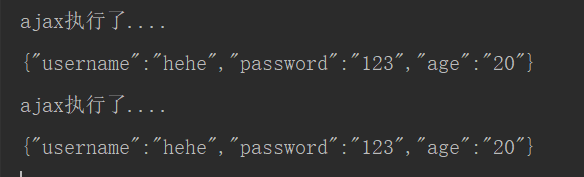
 @RequestMapping("/testAjax")
    public void testAjax(@RequestBody String body){
        System.out.println("ajax执行了....");
        System.out.println(body);
    }
文件上传之上传原理分析
文件上传的必要前提
1.form表单的enctype取值必须是:multipart/form-data
2.method属性取值必须是Post
3.提供一个文件选择域