ASP.NET Core 3 启动过程(一)
最近又忙于各种扯淡,今天来一个需求,明天又来一个需求,后天需求又变了,这可能是很多人遇到的情况。正在紧张的忙碌着,突然一个信息把所有计划打乱了,“这个项目很重要,要订100套,手里面的活停了,赶紧做这个”,其实所谓的100套也不过是用户想让先改他的需求的借口。这可能就是很多像我一样苦逼的程序员面对的工作,其实就是这样,这就是小公司特别是老板说了算的小公司现状。本想着打算把WPF单机项目的框架设计完之后,就回头继续处理ASP.NET Core的坑,结果WPF那边有人离职了(只剩我一个了),项目又着急(没有不急的项目),只能打道回府,停下系统这边的所有开发工作转而继续WPF的开发。即便如此,学习的脚步还是不能停下,停下就意味着没有了价值。
牢骚说完,我们还要继续努力工作,这是起码的职业素养。今天呢,我们就来看一看ASP.NET Core的启动过程。
创建项目,这里我们采用.NetCore3.1,创建空项目,项目如下:
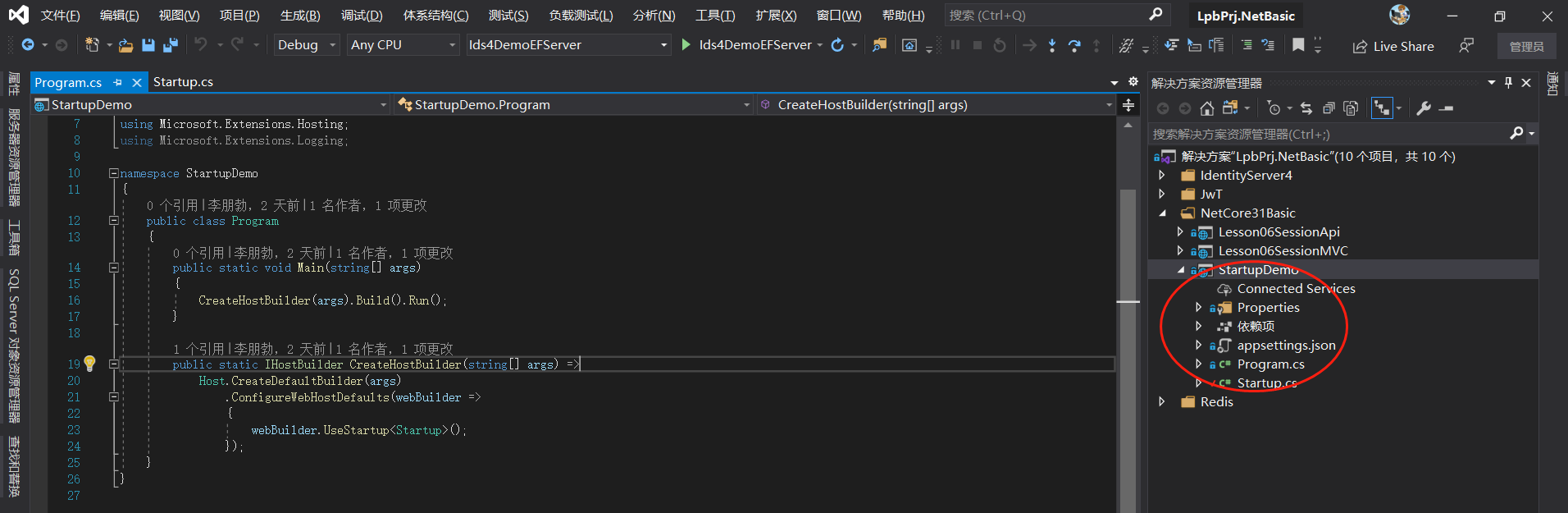
我们通过项目的属性不难看出,ASP.NET Core 3.1本质是一个控制台应用程序。程序的入口是Program-Main函数,这个函数内部是通过链式语法执行了一系列动作。那么我们就需要研究一下这个过程,分析一下ASP.NET Core 3.1是如何启动的。通过上面代码,我们看出整个过程分为这么几步来执行:
- 创建了一个缺省的Builder,
Host.CreateDefaultBuilder(args) - 配置WebHost 的缺省信息,
.ConfigureWebHostDefaults(webBuilder =>{webBuilder.UseStartup<Startup>();}); - 对这个创建的WebHost进行了两个操作,
Build()一下,然后Run()
这就结束了,看似很简单,其实一脸闷逼。这个过程到底做了哪些工作,我们还需要通过源码进行深入的解析。
Github源码地址:https://github.com/dotnet/aspnetcore/tree/release/3.1
针对上面的步骤,我们看一下源码
1、创建缺省的Builder,Host.CreateDefaultBuilder(args)
public static IHostBuilder CreateDefaultBuilder(string[] args)
        {
            //实例化一个HostBuilder
    		var builder = new HostBuilder();
			//设置当前运行目录为根目录
            builder.UseContentRoot(Directory.GetCurrentDirectory());
    		//对Host进行配置
            builder.ConfigureHostConfiguration(config =>
            {
                config.AddEnvironmentVariables(prefix: "DOTNET_");
                if (args != null)
                {
                    config.AddCommandLine(args);
                }
            });
			//对应用程序进行配置
            builder.ConfigureAppConfiguration((hostingContext, config) =>
            {
                var env = hostingContext.HostingEnvironment;

                config.AddJsonFile("appsettings.json", optional: true, reloadOnChange: true)
                      .AddJsonFile($"appsettings.{env.EnvironmentName}.json", optional: true, reloadOnChange: true);

                if (env.IsDevelopment() && !string.IsNullOrEmpty(env.ApplicationName))
                {
                    var appAssembly = Assembly.Load(new AssemblyName(env.ApplicationName));
                    if (appAssembly != null)
                    {
                        config.AddUserSecrets(appAssembly, optional: true);
                    }
                }

                config.AddEnvironmentVariables();

                if (args != null)
                {
                    config.AddCommandLine(args);
                }
            })
            //配置日志
            .ConfigureLogging((hostingContext, logging) =>
            {
                var isWindows = RuntimeInformation.IsOSPlatform(OSPlatform.Windows);

                // IMPORTANT: This needs to be added *before* configuration is loaded, this lets
                // the defaults be overridden by the configuration.
                if (isWindows)
                {
                    // Default the EventLogLoggerProvider to warning or above
                    logging.AddFilter<EventLogLoggerProvider>(level => level >= LogLevel.Warning);
                }

                logging.AddConfiguration(hostingContext.Configuration.GetSection("Logging"));
                logging.AddConsole();
                logging.AddDebug();
                logging.AddEventSourceLogger();

                if (isWindows)
                {
                    // Add the EventLogLoggerProvider on windows machines
                    logging.AddEventLog();
                }
            })
            //使用缺省的服务提供者
            .UseDefaultServiceProvider((context, options) =>
            {
                var isDevelopment = context.HostingEnvironment.IsDevelopment();
                options.ValidateScopes = isDevelopment;
                options.ValidateOnBuild = isDevelopment;
            });
			//返回实例化的HostBuilder
            return builder;
        }
2、创建缺省的WebHostBuilder,ConfigureWebHostDefaults内部调用ConfigureWebHost方法,创建了一个WebHostBuilder,这是关键之处,这里我们就形成了基于HostBuilder和WebHostBuilder的承载系统。在ConfigureWebHost内部,创建一个与HostBuilder有关联的WebHostBuilder,然后调用传入的委托,配置了WebHost并且设置了WebHostBuilder,这个设置就是代码UseStartup<Startup>()。最后配置WebHostBuilder作为HostBuilder的一个服务HostedService。
public static IHostBuilder ConfigureWebHostDefaults(this IHostBuilder builder, Action<IWebHostBuilder> configure)
{
    return builder.ConfigureWebHost(webHostBuilder =>
    {
        WebHost.ConfigureWebDefaults(webHostBuilder);

        configure(webHostBuilder);
    });
}

public static class GenericHostWebHostBuilderExtensions
{
    public static IHostBuilder ConfigureWebHost(this IHostBuilder builder, Action<IWebHostBuilder> configure)
    {
        var webhostBuilder = new GenericWebHostBuilder(builder);
        configure(webhostBuilder);
        builder.ConfigureServices((context, services) => services.AddHostedService<GenericWebHostService>());
        return builder;
    }
}


public IHostBuilder ConfigureServices(Action<HostBuilderContext, IServiceCollection> configureDelegate)
{
    _configureServicesActions.Add(configureDelegate ?? throw new ArgumentNullException(nameof(configureDelegate)));
    return this;
}
这里面还有一个方法WebHost.ConfigureWebDefaults(webHostBuilder);对GenericWebHostBuilder进行了配置。内部代码:
internal static void ConfigureWebDefaults(IWebHostBuilder builder)
{
    builder.ConfigureAppConfiguration((ctx, cb) =>
    {
        if (ctx.HostingEnvironment.IsDevelopment())
        {
            StaticWebAssetsLoader.UseStaticWebAssets(ctx.HostingEnvironment, ctx.Configuration);
        }
    });
    builder.UseKestrel((builderContext, options) =>
    {
        options.Configure(builderContext.Configuration.GetSection("Kestrel"));
    })
    .ConfigureServices((hostingContext, services) =>
    {
        // Fallback
        services.PostConfigure<HostFilteringOptions>(options =>
        {
            if (options.AllowedHosts == null || options.AllowedHosts.Count == 0)
            {
                // "AllowedHosts": "localhost;127.0.0.1;[::1]"
                var hosts = hostingContext.Configuration["AllowedHosts"]?.Split(new[] { ';' }, StringSplitOptions.RemoveEmptyEntries);
                // Fall back to "*" to disable.
                options.AllowedHosts = (hosts?.Length > 0 ? hosts : new[] { "*" });
            }
        });
        // Change notification
        services.AddSingleton<IOptionsChangeTokenSource<HostFilteringOptions>>(
                    new ConfigurationChangeTokenSource<HostFilteringOptions>(hostingContext.Configuration));

        services.AddTransient<IStartupFilter, HostFilteringStartupFilter>();

        if (string.Equals("true", hostingContext.Configuration["ForwardedHeaders_Enabled"], StringComparison.OrdinalIgnoreCase))
        {
            services.Configure<ForwardedHeadersOptions>(options =>
            {
                options.ForwardedHeaders = ForwardedHeaders.XForwardedFor | ForwardedHeaders.XForwardedProto;
                // Only loopback proxies are allowed by default. Clear that restriction because forwarders are
                // being enabled by explicit configuration.
                options.KnownNetworks.Clear();
                options.KnownProxies.Clear();
            });

            services.AddTransient<IStartupFilter, ForwardedHeadersStartupFilter>();
        }

        services.AddRouting();
    })
    .UseIIS()
    .UseIISIntegration();
}
3、调用Build方法和Run方法
/// <summary>
/// Run the given actions to initialize the host. This can only be called once.
/// </summary>
/// <returns>An initialized <see cref="IHost"/></returns>
public IHost Build()
{
    if (_hostBuilt)
    {
        throw new InvalidOperationException("Build can only be called once.");
    }
    _hostBuilt = true;

    BuildHostConfiguration();
    CreateHostingEnvironment();
    CreateHostBuilderContext();
    BuildAppConfiguration();
    CreateServiceProvider();

    return _appServices.GetRequiredService<IHost>();
}

/// <summary>
/// Runs an application and block the calling thread until host shutdown.
/// </summary>
/// <param name="host">The <see cref="IHost"/> to run.</param>
public static void Run(this IHost host)
{
    host.RunAsync().GetAwaiter().GetResult();
}
这里面主要的工作就是创建了一个承载系统,完成应用程序的启动和生命周期的管理。开启服务之后,然后就可以处理请求了。
那么什么是承载系统,承载系统到底做什么,下次我们继续。