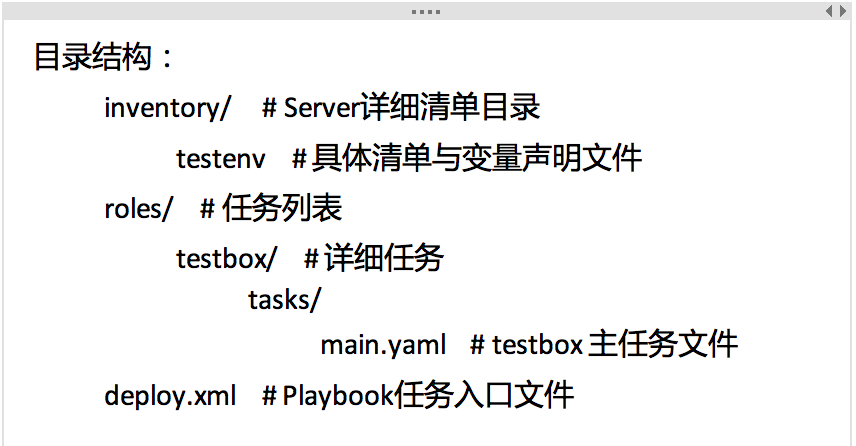
1、目录结构
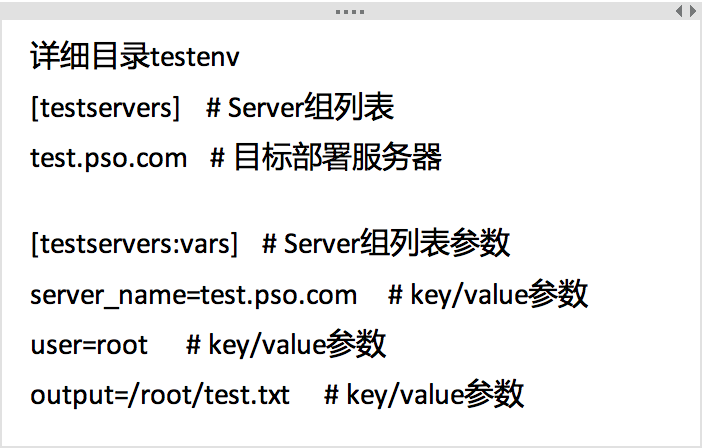
2、详细目录
3、主任务文件main.yaml
主任务文件main.yaml
  - name: print server name and user to remote testbox        # 任务名称
    shell: "echo 'Currently {{  user }} is logging {{ server_name }}' > {{ output }}
  # shell模块执行命令,变量是iventory/testenv中的 testservers:vars 部分的key/value
4、任务入口文件deploy.yaml

5、SSH免密码秘钥认证

6、部署到目标服务器
(.py3-a2.5-env) [deploy@ansible test_playbooks]$ ansible-playbook -i inventory/testenv ./deploy.yaml

PLAY [testservers] *********************************************************************

TASK [Gathering Facts] *****************************************************************
ok: [test.pso.com]

TASK [testbox : Print Server name and user to remote testbox] **************************
changed: [test.pso.com]

PLAY RECAP *****************************************************************************
test.pso.com               : ok=2    changed=1    unreachable=0    failed=0