1.什么是逆向工程
mybatis需要程序员自己编写sql语句,mybatis官方提供逆向工程可以针对单表自动生成mybatis执行所需要的代码(mapper.java、mapper.xml、po...)
企业实际开发中,常用的逆向工程方式:
由数据库的表生成java代码。
2.下载逆向工程
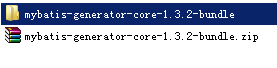
3.使用方法(要求会用)
为了防止后期数据库表修改、扩展,需求修改等原因,更新自动生成的po,mapper覆盖有误。我们新建专门逆向生成的项目generatorSqlmapCustom,再按需求将自动生成的po,mapper等拷贝到项目中去。
3.1运行逆向工程
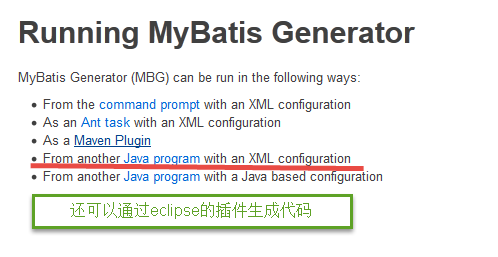
建议使用java程序方式,不依赖开发工具。
3.2mapper生成配置文件
在gengeratorConfig.xml中配置mapper生成的详细信息,注意改下几点:
(1)添加要生成的数据库表;
(2)po文件所在包路径;
(3)mapper文件所在包路径。
配置文件如下:

<?xml version="1.0" encoding="UTF-8"?>
<!DOCTYPE generatorConfiguration
  PUBLIC "-//mybatis.org//DTD MyBatis Generator Configuration 1.0//EN"
  "http://mybatis.org/dtd/mybatis-generator-config_1_0.dtd">

<generatorConfiguration>
    <context id="testTables" targetRuntime="MyBatis3">
        <commentGenerator>
            <!-- 是否去除自动生成的注释 true:是 : false:否 -->
            <property name="suppressAllComments" value="true" />
        </commentGenerator>
        <!--数据库连接的信息:驱动类、连接地址、用户名、密码 -->
        <jdbcConnection driverClass="com.mysql.jdbc.Driver"
            connectionURL="jdbc:mysql://localhost:3306/mybatisdemo" userId="root"
            password="">
        </jdbcConnection>
        <!-- <jdbcConnection driverClass="oracle.jdbc.OracleDriver"
            connectionURL="jdbc:oracle:thin:@127.0.0.1:1521:yycg"
            userId="yycg"
            password="yycg">
        </jdbcConnection> -->

        <!-- 默认false,把JDBC DECIMAL 和 NUMERIC 类型解析为 Integer,为 true时把JDBC DECIMAL 和
            NUMERIC 类型解析为java.math.BigDecimal -->
        <javaTypeResolver>
            <property name="forceBigDecimals" value="false" />
        </javaTypeResolver>

        <!-- targetProject:生成PO类的位置 -->
        <javaModelGenerator targetPackage="joanna.yan.po"
            targetProject=".src">
            <!-- enableSubPackages:是否让schema作为包的后缀 -->
            <property name="enableSubPackages" value="false" />
            <!-- 从数据库返回的值被清理前后的空格 -->
            <property name="trimStrings" value="true" />
        </javaModelGenerator>
        <!-- targetProject:mapper映射文件生成的位置 -->
        <sqlMapGenerator targetPackage="joanna.yan.mapper"
            targetProject=".src">
            <!-- enableSubPackages:是否让schema作为包的后缀 -->
            <property name="enableSubPackages" value="false" />
        </sqlMapGenerator>
        <!-- targetPackage:mapper接口生成的位置 -->
        <javaClientGenerator type="XMLMAPPER"
            targetPackage="joanna.yan.mapper"
            targetProject=".src">
            <!-- enableSubPackages:是否让schema作为包的后缀 -->
            <p    roperty name="enableSubPackages" value="false" />
        </javaClientGenerator>
        <!-- 指定数据库表 -->
        <table tableName="items"></table>
        <table tableName="orders"></table>
        <table tableName="orderdetail"></table>
        <table tableName="user"></table>
        <!-- <table schema="" tableName="sys_user"></table>
        <table schema="" tableName="sys_role"></table>
        <table schema="" tableName="sys_permission"></table>
        <table schema="" tableName="sys_user_role"></table>
        <table schema="" tableName="sys_role_permission"></table> -->

        <!-- 有些表的字段需要指定java类型
         <table schema="" tableName="">
            <columnOverride column="" javaType="" />
        </table> -->
    </context>
</generatorConfiguration>
3.3使用Java类生成mapper文件
public class GeneratorSqlmap {

    public void generator() throws Exception{
        List<String> warnings = new ArrayList<String>();
        boolean overwrite = true;
        //指定 逆向工程配置文件
        File configFile = new File("generatorConfig.xml");
        ConfigurationParser cp = new ConfigurationParser(warnings);
        Configuration config = cp.parseConfiguration(configFile);
        DefaultShellCallback callback = new DefaultShellCallback(overwrite);
        MyBatisGenerator myBatisGenerator = new MyBatisGenerator(config,
                callback, warnings);
        myBatisGenerator.generate(null);

    }
    public static void main(String[] args) throws Exception {
        try {
            GeneratorSqlmap generatorSqlmap = new GeneratorSqlmap();
            generatorSqlmap.generator();
        } catch (Exception e) {
            e.printStackTrace();
        }
    }

}
生成后的代码:
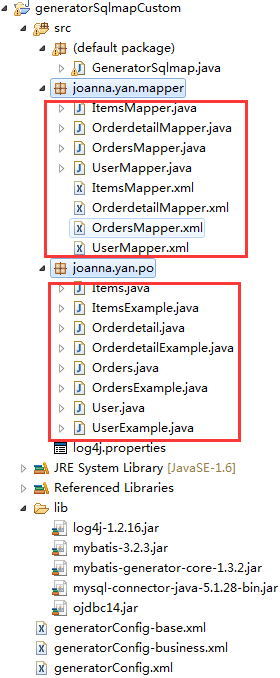
3.4拷贝生成的mapper文件到工程中指定的目录中
3.4.1mapper.xml
Mapper.xml文件拷贝至mapper目录内
3.4.2mapper.java
Mapper.xml文件拷贝至mapper目录内
注意:mapper.xml文件和mapper.java文件在一个目录内且文件名相同。
3.4.3mapper接口测试
public class ItemsMapperTest {
    private ApplicationContext applicationContext;
    private ItemsMapper itemsMapper;

    @Before
    public void setUp(){
        applicationContext=new ClassPathXmlApplicationContext("classpath:spring/applicationContext.xml");
        itemsMapper=(ItemsMapper) applicationContext.getBean("itemsMapper");
    }

    @Test
    public void testInsert() {
        Items item=new Items();
        item.setName("手机");
        item.setPrice(999f);
     item.setCreatetime(new Date());
        itemsMapper.insert(item);
    }

    //自定义条件查询
    @Test
    public void testSelectByExample() {
        ItemsExample itemsExample=new ItemsExample();
        //通过criteria构造查询条件
        ItemsExample.Criteria criteria=itemsExample.createCriteria();
        criteria.andNameEqualTo("笔记本3");
        //可能返回多条记录
        List<Items> list=itemsMapper.selectByExample(itemsExample);
        System.out.println(list);
    }

    //根据主键查询
    @Test
    public void testSelectByPrimaryKey() {
        Items items=itemsMapper.selectByPrimaryKey(1);
        System.out.println(items);
    }

    @Test
    public void testUpdateByPrimaryKey() {
        //对所有字段进行更新,需要先查询出来再更新
        Items items=itemsMapper.selectByPrimaryKey(1);
        items.setName("水杯");
        itemsMapper.updateByPrimaryKey(items);
        //如果传入字段不为空才更新,在批量更新中使用此方法,不需要先查询再更新
        itemsMapper.updateByPrimaryKeySelective(items);
    }

}
4.逆向工程注意事项
4.1Mapper文件内容不覆盖而是追加
XXXMapper.xml文件已经存在时,如果进行重新生成则mapper.xml文件内容不被覆盖而是进行内容追加,结果导致mybatis解析失败。
解决方法:删除原来已经生成的mapper.xml文件再进行生成。
MyBatis自动生成的po和mapper.java文件不是内容追加而是直接覆盖没有此问题。
4.2 Table schema问题
下边是针对Oracle数据库表生成代码的schema问题:
schema即数据库模式,oracle中一个用户对应一个schema,可以理解为用户就是schema。当Oracle数据库存在多个Schema可以访问相同的表名时,使用mybatis生成该表的mapper.xml将会出现mapper内容重复的问题,结果导致mybatis解析错误。
解决方法:在table中填写schema,如下:
<table schema="XXXX" tableName=" " >
XXXX即为一个schema的名称,生成后将mapper.xml的schema前缀批量去掉,如果不去掉,当Oracle用户变更了sql语句将查询失败。
快捷操作方式:mapper.xml文件中批量替换:“from XXXX.”为空。
Oracle查询对象的schema可从dba_objects中查询,如下:
select * from dba_objects