1.下载Nlog、Nlog.Web.AspNetCore包

2.添加NLog.config xml文件
资料https://github.com/NLog/NLog/wiki/Database-target#dbprovider-examples
<?xml version="1.0" encoding="utf-8" ?>
<nlog xmlns="http://www.nlog-project.org/schemas/NLog.xsd"
      xmlns:xsi="http://www.w3.org/2001/XMLSchema-instance"
      autoReload="true"
      internalLogLevel="Warn"
      internalLogFile="C:gitdamienbodAspNetCoreNlogLogsinternal-nlog.txt">     //配置错误可以在这里找到提示信息
  <targets>
    <target name="AllDatabase" xsi:type="Database" dbProvider="Microsoft.Data.SqlClient.SqlConnection, Microsoft.Data.SqlClient" connectionString="Data Source = .;Initial Catalog = test; User ID = sa;Password =wys;"
            commandText="insert into dbo.Log (Application, Logged, Level, Message,Logger, CallSite, Exception
      ) values (@Application, @Logged, @Level, @Message,@Logger, @Callsite, @Exception);">  //dbProvider是必须的
      <!--
  Remarks:
    The appsetting layouts require the NLog.Extended assembly.
    The aspnet-* layouts require the NLog.Web assembly.
    The Application value is determined by an AppName appSetting in Web.config.
    The "NLogDb" connection string determines the database that NLog write to.
    The create dbo.Log script in the comment below must be manually executed.

  Script for creating the dbo.Log table.

  SET ANSI_NULLS ON
  SET QUOTED_IDENTIFIER ON
  CREATE TABLE [dbo].[Log] (
      [Id] [int] IDENTITY(1,1) NOT NULL,
      [Application] [nvarchar](50) NOT NULL,
      [Logged] [datetime] NOT NULL,
      [Level] [nvarchar](50) NOT NULL,
      [Message] [nvarchar](max) NOT NULL,
      [Logger] [nvarchar](250) NULL,
      [Callsite] [nvarchar](max) NULL,
      [Exception] [nvarchar](max) NULL,
    CONSTRAINT [PK_dbo.Log] PRIMARY KEY CLUSTERED ([Id] ASC)
      WITH (PAD_INDEX  = OFF, STATISTICS_NORECOMPUTE  = OFF, IGNORE_DUP_KEY = OFF, ALLOW_ROW_LOCKS  = ON, ALLOW_PAGE_LOCKS  = ON) ON [PRIMARY]
  ) ON [PRIMARY]
-->
      <parameter name="@application" layout="AspNetCoreNlog" />
      <parameter name="@logged" layout="${date}" />
      <parameter name="@level" layout="${level}" />
      <parameter name="@message" layout="${message}" />

      <parameter name="@logger" layout="${logger}" />
      <parameter name="@callSite" layout="${callsite:filename=true}" />
      <parameter name="@exception" layout="${exception:tostring}" />
    </target>
  </targets>
  <rules>
    <!--All logs, including from Microsoft-->
    <logger name="*" minlevel="info" writeTo="AllDatabase" />
  </rules>
</nlog>
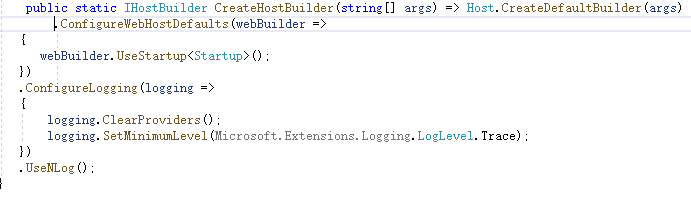
找到Program.cs
改成这样