安装步骤,就不多做解释了,一步一步向下执行就可以了,
我遇到的问题,会描述一下,我没遇到的,自行找一下就好。
1.先执行下面的语句
yum install -y automake autoconf libtool gcc gcc-c++
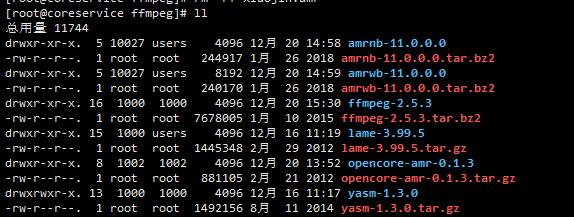
2.先自己创建一个目录(上图是我自己的目录),然后cd 到自己的目录下,在执行下面的命令(复制粘贴即可)
wget http://www.tortall.net/projects/yasm/releases/yasm-1.3.0.tar.gz


tar -xzvf yasm-1.3.0.tar.gz


cd yasm-1.3.0


./configure


make


make install

编译完成后,退回到上一个目录

cd ..
wget http://jaist.dl.sourceforge.net/project/lame/lame/3.99/lame-3.99.5.tar.gz


tar -xzvf lame-3.99.5.tar.gz

cd lame-3.99.5

./configure

make

make install

cd ..
wget http://downloads.sourceforge.net/project/opencore-amr/opencore-amr/opencore-amr-0.1.3.tar.gz


tar -xzvf opencore-amr-0.1.3.tar.gz


cd opencore-amr-0.1.3


./configure

make

make install

cd ..
wget http://www.penguin.cz/~utx/ftp/amr/amrnb-11.0.0.0.tar.bz2


预防解压和编译时可能会报错, 安装一下 bzip2 unzip patch

yum -y install bzip2

yum install -y unzip

yum -y install patch

tar -xjvf amrnb-11.0.0.0.tar.bz2

cd amrnb-11.0.0.0

./configure

make

make install

cd ..
wget http://www.penguin.cz/~utx/ftp/amr/amrwb-11.0.0.0.tar.bz2


tar -xjvf amrwb-11.0.0.0.tar.bz2


cd amrwb-11.0.0.0

./configure

make

make install

cd ..
wget http://ffmpeg.org/releases/ffmpeg-2.5.3.tar.bz2


tar -xjvf ffmpeg-2.5.3.tar.bz2


cd ffmpeg-2.5.3


这个比较长一点

./configure --enable-libmp3lame --enable-libopencore-amrnb --enable-libopencore-amrwb --enable-version3 --enable-shared

make

make install

cd ..

最后验证一下

ffmpeg -version

验证完毕 最后要绑定路径,按上面的方法安装完成后,是在 /usr/local/lib 目录下 需要修改一下配置文件
执行下面的语句

vim /etc/ld.so.conf
编辑在最下面加上 /usr/local/lib  (看下面的图片)

然后 执行

ldconfig

执行转换命令,首先创建一个目录 mkdir 然后把一个amr格式的文件转换一下

ffmpeg -i 2.amr 1.mp3
代码部分 我用的是.NET CORE
//首先是把下载到linux 然后转换成MP3 其实现在前端是可以直接播放 amr格式,但是我们公司的版本低无法支持。
//我是从企业微信下载的媒体,是有media_id的,然后get 请求就可以获取到
//GetMediaTokenUrl() = https://qyapi.weixin.qq.com/cgi-bin/media/get?access_token=你的token&media_id=你的值(url 可以按自己的替换)
// strPath=@"/usr/local/dev/static/media/NAME.amr"
//ProcessStartInfo和Process 引用 System.Diagnostics 没有的百度一下吧。
public static bool GetQYWXTFile(string media_id, string strPath)
        {
            string strUrl = GetMediaTokenUrl() + media_id;
            //创建请求
            WebRequest request = WebRequest.Create(strUrl);
            //请求设置
            request.Credentials = CredentialCache.DefaultCredentials;
            //创建应答接收
            WebResponse response = request.GetResponse();

            Stream streamResponse = response.GetResponseStream();

            using (Stream fileStream = new FileStream(strPath, FileMode.Create))
            {
                byte[] read = new byte[1024];
                int realRed = streamResponse.Read(read,0,read.Length);
                while (realRed>0)
                {
                    fileStream.Write(read, 0, realRed);
                    realRed = streamResponse.Read(read,0,read.Length);
                }

                fileStream.Close();
            }

            streamResponse.Close();
            //关闭响应
            response.Close();


            var newFile = strPath.Replace(Path.GetExtension(strPath), ".mp3");
            var processStartInfo = new ProcessStartInfo("ffmpeg", $" -i {strPath} {newFile}");
            using (var process = Process.Start(processStartInfo))
            {
                process?.Close();
            }

            return true;
        }