0x00 前言
Windows 中提供了 2 个分析事件日志的 PowerShell cmdlet:一个是Get-WinEvent,超级强大,但使用起来比较麻烦;另一个是Get-EventLog,使得起来相当简单,可以实时筛选,接下来,我们利用PowerShell 来自动筛选 Windows 事件日志。
0x01 Get-WinEvent
A、XML编写
假设有这样一个需求:windows server2008 R2环境,需要统计一下近7天用户登录次数。
我们可以直接利用事件查看器里面筛选日志,如下图:
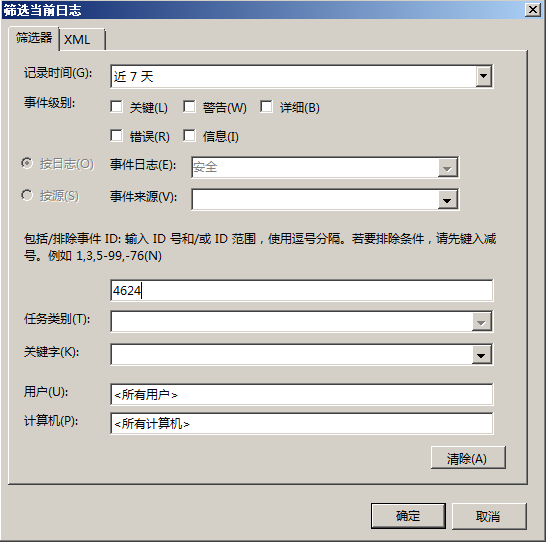
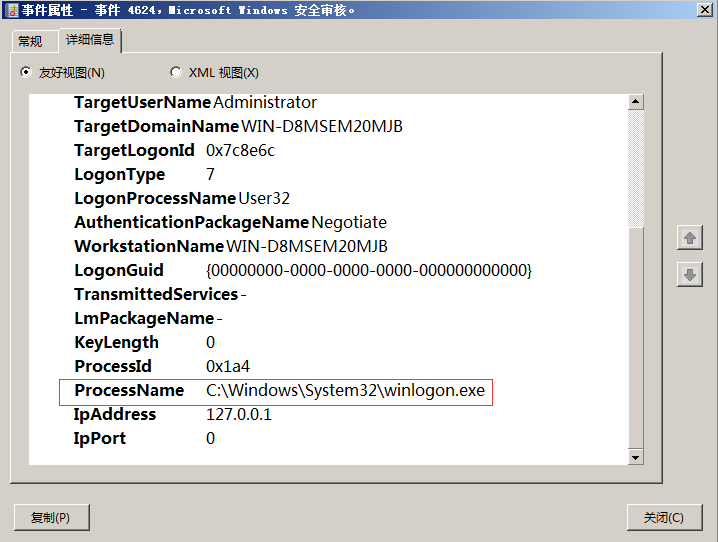
通过查看登录日志,发现在真正的登录时间,是这条日志,去其他不同的是,此条日志记录的进程名是winlogon.exe 要实现比较精确的筛选,需要从这里入手,
进一步筛选 点击“事件属性”里面的“详细信息”中,可以看见一条信息,后面会用到:
在“筛选当前日志”中,选择“XML”,勾选“手动编辑查询”,并确认,在手动编辑中加入以下设置 *[EventData[Data[@Name='ProcessName'] and (Data='c:windowssystem32winlogon.exe')]] and 如图(里面的PrcessName和winlogon.exe就是前面在“事件属性”里面的“详细信息”中看到的):
*[EventData[Data[@Name='ProcessName'] and (Data='c:windowssystem32winlogon.exe')]] and
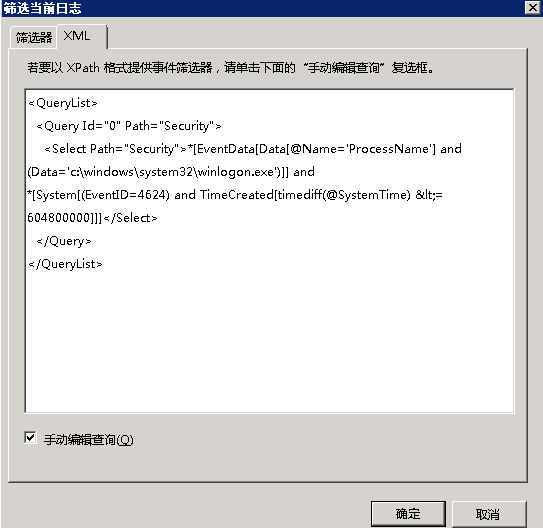
点击确认,可以精确的筛选用户登录事件。
windows server 2012的登录筛选 在windows server2012中,可能会有一些小变化,但是也没关系,按照之前的解决思路即可。下面可做参考:
*[EventData[Data[@Name='ProcessName'] and (Data='c:windowssystem32winlogon.exe')]] and
*[EventData[Data[@Name='LogonType'] and (Data='10')]] and
B、Get-WinEvent使用
Get-WinEvent -FilterHashtable @{Logname='system';Id='6006','6005'}

0x02 Get-EventLog
Get-EventLog Security -InstanceId 4624,4625

$xml='<QueryList>
  <Query Id="0" Path="Security">
    <Select Path="Security">*[System[(EventID=4624)]]</Select>
  </Query>
</QueryList>'
$events = Get-WinEvent -FilterXml $xml
$i=0
#Write-Host '登录时间','登录类型','登录账号','登录IP地址'
while ($i -lt $events.length) {
    $time=$events[$i].TimeCreated
    $type=[regex]::matches($events[$i].Message, '登录类型:(.+)') | %{$_.Groups[1].Value.Trim()}
    $user=([regex]::matches($events[$i].Message, '帐户名:(.+)') | %{$_.Groups[1].Value.Trim()})[1]
    $IP=[regex]::matches($events[$i].Message, '源网络地址:(.+)') | %{$_.Groups[1].Value.Trim()}
    Write-Host $time,$user,$type,$IP
    $i++
}
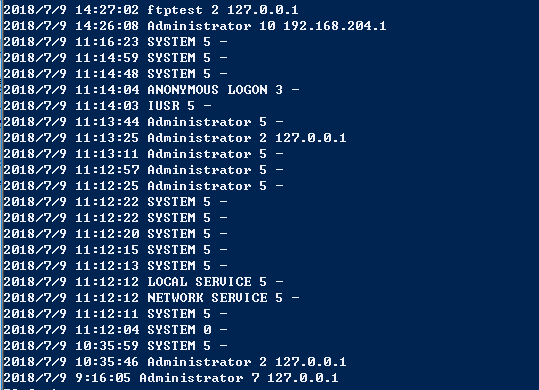
脚本运行:
查看用户登录事件、登录用户名、登录类型、登录IP地址
最后
欢迎关注个人微信公众号:Bypass--,每周原创一篇技术干货。

参考链接:
Get-EventLog 使用
https://www.cnblogs.com/brooks-dotnet/archive/2010/08/24/1807615.html
https://www.cnblogs.com/fuhj02/archive/2011/01/03/1924339.html
Get-EventLog使用
https://docs.microsoft.com/zh-cn/powershell/module/Microsoft.PowerShell.Management/Get-EventLog?view=powershell-5.1
精准的筛选windows用户登录事件
https://www.iyunv.com/thread-525384-1-1.html